
Best Customer Effort Score Survey Questions
Best Customer Effort Score Survey Questions
Customer Effort Score (CES) surveys help you understand how easy it is for customers to complete specific tasks. The key is asking simple, targeted questions immediately after important interactions, like resolving a support issue or completing a purchase. CES focuses on effort, not overall satisfaction, making it a practical tool for identifying friction points that impact loyalty.
Key Takeaways:
- Core Question: "How easy was it to complete your request today?"
- Alternative: "Our company made it easy for me to handle my issue" (rated on a 7-point Likert scale).
- When to Send: Within 5 minutes to 48 hours after key interactions (e.g., post-purchase, after support resolution).
- Follow-Up: Pair ratings with optional open-ended questions like "What made this interaction difficult?" to uncover specific pain points.
- Best Practices: Use the same channel as the interaction, limit surveys to two questions, and avoid over-surveying.
By focusing on customer effort, you can pinpoint areas for improvement, reduce churn, and build stronger customer relationships.
Core CES Survey Questions
The Standard CES Question
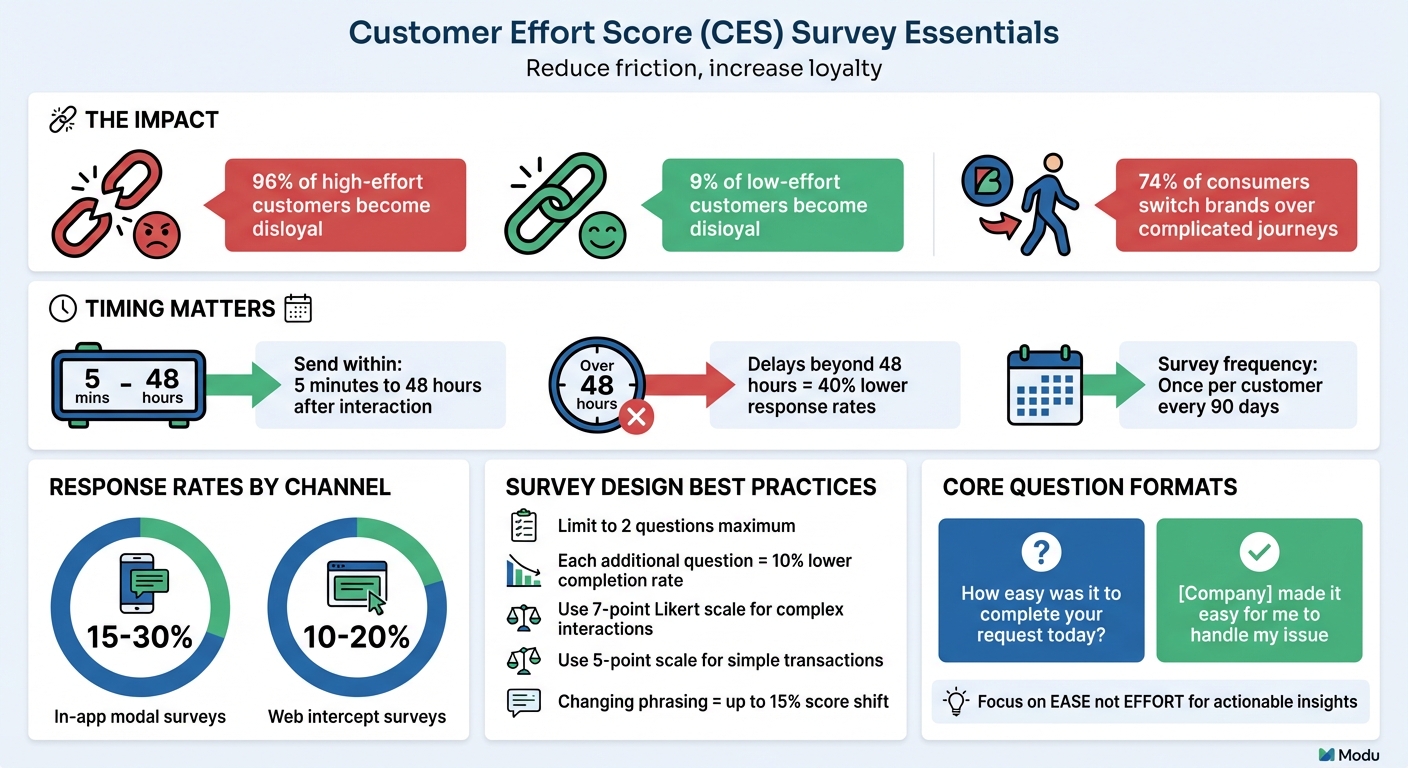
The most common CES question is: "How easy was it to complete your request today?" [4][2]. This question focuses on ease, making it straightforward to interpret consistently [6].
Another approach, called CES 2.0, uses an agreement statement: "[Company] made it easy for me to handle my issue" [6]. This version relies on a 7-point Likert scale, ranging from "Strongly Disagree" to "Strongly Agree", with higher scores indicating a better experience. The agreement format is especially useful for more complex scenarios, such as B2B interactions or post-support surveys, as it helps reduce response bias [6].
"The difference between 'How much effort did you expend?' and 'How easy was it?' isn't semantic; it's the difference between actionable intelligence and noise." - ActionXM [6]
When deciding which phrasing to use, consider the type of interaction. For quick, straightforward transactions, stick with the direct question. For multi-step or support-related interactions, opt for the agreement statement. Keep in mind that changing phrasing can shift scores by up to 15% [6], so consistency is key. Also, avoid asking, "How much effort did you put in?" as it can introduce negative bias. Focusing on "ease" instead provides clearer, more actionable insights [6].
When to Use the Core CES Question
Now that the core CES question formats are clear, here’s how to use them effectively. CES is designed to measure specific interactions, so it should be triggered immediately after those events rather than at regular intervals [9].
Send CES surveys right after key moments, such as:
- Post-purchase on confirmation pages
- After a support ticket is resolved
- Within 24 hours of onboarding completion
- Following self-service interactions [6][9]
Timing is critical. Surveys sent within five minutes to 48 hours after an interaction yield higher response rates - delays beyond this window can lead to up to 40% lower participation due to memory decay [6]. Also, use the same channel as the interaction for delivery. For instance, include a survey link in a chat window after a live chat session or an IVR prompt after a phone call.
To keep response rates high, limit the survey to two questions: the core CES rating and an optional open-ended follow-up. Adding extra questions can reduce completion rates by about 10% per question [6]. To avoid overloading customers, space out surveys - send them only once per customer every 90 days or use strategic sampling by targeting 10–20% of interactions [6].
CES Survey Questions for Different Use Cases
Website and App Interaction Questions
Understanding how users navigate your website or app is crucial. For example, ask: "How easy was it to find the needed information on our website?" This helps you assess if your content layout is effective. For tasks like account management, questions such as "How easy was it to create an account?" or "How straightforward was it to update your account information?" can highlight potential pain points.
When it comes to eCommerce, try "How easy was it to complete your purchase?" or a statement like "The checkout process was straightforward and simple" for users to agree or disagree with. For self-service options, ask "How easy was it to find answers in our help center?" or "The self-service portal met my needs without requiring assistance."
Keep in mind that survey response rates vary - modal surveys within apps tend to gather 15%–30% participation, while web intercept surveys average 10%–20% [6]. These insights can pave the way for more focused surveys that address specific customer challenges.
Customer Support Interaction Questions
Customer support is often where lasting impressions are made. Ask questions that focus on resolving issues and ease of access. A core question could be: "How easy was it to resolve your issue today?" To evaluate accessibility, try "How easy was it to reach our customer service team through your preferred contact method?" For processes like refunds or exchanges, use "How effortless was the process of getting a refund or exchange?"
Statements also work well, such as "[Company] made it easy for me to handle my issue" rated on a 7-point Likert scale. These interactions matter - a single poor experience is enough to push over half of customers to switch providers [11]. Timing is key: send these surveys immediately after the issue is resolved to capture fresh feedback.
Product and Service Usage Questions
When users first interact with your product, it's important to gauge their experience. Ask "How straightforward was it to use our product for the first time?" For feature adoption, try "How easy is it to use [Feature Name] to accomplish your goals?" Installation or setup questions like "How easy or difficult was the installation or setup process?" can uncover early-stage challenges.
For B2B or SaaS products, tailor questions to specific scenarios. For example: "How easy was it to integrate [Product] with your existing systems?" or "How simple was it to customize our product to your needs?" Timing is everything - launch these surveys directly in-app within five minutes of completing a specific action to get the most accurate feedback [9][6]. These targeted questions help refine every aspect of the user experience.
5 Questions To Ask Your Customers To Measure Their Effort Score
Adding Open-Ended Questions to CES Surveys
If you want a clearer picture of customer effort, combine your CES ratings with open-ended questions. While a CES score gives you a sense of how easy or difficult an experience was, it’s the qualitative feedback that uncovers the why. For instance, while 96% of customers who face high-effort interactions tend to become disloyal [6][1], open-ended responses help pinpoint the exact friction points driving that dissatisfaction.
These responses provide details that numbers alone can’t capture. When customers explain their struggles, they highlight specific issues - like confusing interfaces, slow processes, or unclear instructions - that your team can address to create a smoother experience [7][9]. This kind of insight fills the gaps left by numerical data.
Follow-Up Questions to Identify Customer Pain Points
Pairing CES ratings with thoughtful follow-up questions is a great way to uncover what’s really going on. For customers who give low scores (1–3), try asking: "What made this interaction difficult for you?" For neutral scores, you might ask: "What would have made this experience easier?" These kinds of questions help you zero in on trouble spots [6].
Other useful follow-ups include:
- "What was the hardest part of this process?"
- "What could we do to make this easier for you?"
- "What made you choose this score?"
It’s important to keep these follow-ups optional. Forcing customers to answer can lead to frustration and might even reduce survey completion rates by about 10% for every required question you add [6].
Using Modu's Text Module for Private Feedback
If you're looking for a tool to gather detailed, open-ended CES feedback, Modu's Text module is a solid choice. It allows customers to share private responses that only your team can see, encouraging honest and detailed input.
Setting Up CES Surveys with Modu
Modu simplifies the process of setting up CES surveys with its user-friendly, modular approach. Whether you want to deploy surveys directly on your website, share them via links, or use popup widgets, Modu makes it easy, even if you don’t have technical expertise. Its analytics dashboard does the heavy lifting by automatically calculating average scores and displaying response trends, giving you quick insights at a glance.
Using Modu's Rating Module for CES
The Rating Module is the foundation for collecting CES data. If you’re evaluating more complex interactions, like customer support or B2B onboarding, stick to a 7-point Likert scale - this is the standard for benchmarking in such scenarios [5][6]. For simpler, transactional interactions - think post-checkout or mobile app usage - a 5-point numeric scale is quicker and more practical [6].
The phrasing of your CES question matters. Focus on "ease" to get clearer, actionable feedback. For instance, you might ask: "[Your Company] made it easy for me to [resolve my issue/complete my purchase]." This reduces confusion and ensures the data you collect is meaningful [6].
If your survey targets mobile users, consider using an emoticon scale (ranging from sad to happy faces). These visual scales are easier to navigate on smaller screens and can boost completion rates [4][10]. Modu handles the CES score calculations for you, providing averages or percentages of "easy" responses [8][9][10].
Timing is everything. Surveys should go out within 5 minutes of the interaction you’re measuring - whether it’s after a support ticket closes, a purchase confirmation, or an onboarding step [6]. Delays beyond 48 hours can drop response rates by 40% [6]. Also, send the survey through the same channel where the interaction occurred (e.g., in-app for product use, email for support tickets) to maintain context [9][6].
Combining Rating and Text Modules for Better Insights
While the Rating Module captures the "what", adding the Text Module uncovers the "why." Start with the Rating Module to gather the quantitative score, then follow up with an optional Text Module for open-ended feedback [4][6]. Keeping the survey to just two questions increases the likelihood of completion [6][13].
Take advantage of conditional logic to tailor your Text Module prompts. For low scores (1–3), ask: "What made this interaction difficult for you?" For high scores (5–7), try: "What made this experience easy?" This approach helps you pinpoint pain points for detractors and identify best practices from promoters [3][6].
To keep the experience positive, make the Text Module optional. Forcing responses can frustrate customers and reduce the quality of feedback [6]. Since the Text Module responses are private - viewable only by your team - customers are more likely to provide honest, detailed input. Combining quantitative ratings with qualitative insights gives you a well-rounded understanding of customer effort, helping you address issues and build loyalty. Research shows that 96% of customers who encounter high-effort interactions become disloyal, compared to just 9% of those who experience low-effort interactions [6][12].
Conclusion
Crafting effective CES surveys starts with asking clear, focused questions that measure ease and identify points of friction. The key is to design questions that are straightforward, reference specific interactions, and avoid confusing, multi-part phrasing.
When you get these basics right, the insights can be game-changing. For example, research shows that 96% of customers who face high-effort interactions become disloyal, compared to just 9% of those who report low-effort experiences [6].
But having strong survey questions is only half the battle - execution matters just as much. Tools like Modu simplify the process with no-code Rating and Text Modules. These tools allow you to deploy surveys immediately after an interaction and automatically calculate scores. The Rating Module provides the quantitative "what", while the Text Module digs into the qualitative "why", offering a full picture without overwhelming respondents.
To maximize completion rates and actionable insights, stick to the industry-standard 7-point Likert scale for more complex interactions, send surveys right after tasks are completed, and limit the survey to two questions.
With 74% of today's consumers ready to switch brands over a complicated customer journey [8], reducing friction is non-negotiable. The right CES questions, paired with tools like Modu, turn customer feedback into a powerful competitive edge by addressing pain points and enhancing experiences that build loyalty.
FAQs
What’s a good CES score?
A good CES score generally means a low score, indicating that customers find their interactions simple and hassle-free. While exact benchmarks can differ, one thing is clear: high-effort experiences often lead to disloyalty. In fact, 96% of customers who encounter high effort report being disloyal. To boost both satisfaction and loyalty, the priority should be making things easier for your customers.
How do I calculate CES from my survey data?
To calculate Customer Effort Score (CES), you simply ask customers to rate how easy or difficult their interaction with your business was. This is usually done using a numerical scale - like 1 to 5.
Once you've collected the responses, calculate the average score. Here's the key takeaway:
- Lower scores mean customers found the experience easier and more seamless.
- Higher scores suggest they encountered more challenges or friction during their interaction.
This straightforward metric helps you gauge how much effort customers feel they need to put in, giving you a clear signal of where improvements might be needed.
When should I use CES vs CSAT or NPS?
Use the Customer Effort Score (CES) to understand how simple it is for customers to complete certain tasks, such as resolving problems or navigating onboarding processes. This metric highlights areas where customers may encounter challenges, allowing you to address and minimize those pain points.
Turn to CSAT when you want to measure satisfaction during specific interactions or touchpoints. For a broader view of loyalty and willingness to recommend your brand, rely on NPS. By combining these metrics, you gain a more comprehensive view of the overall customer experience.