
Top Customer Feedback Tools for SaaS Teams in 2026
Top Customer Feedback Tools for SaaS Teams in 2026
Understanding your customers’ feedback is essential for improving your SaaS product. Traditional methods like email surveys or phone interviews often miss the mark due to low response rates and delayed insights. Modern tools solve these issues by collecting feedback in real-time, leveraging AI to analyze trends, and integrating directly into your team's workflow.
Here’s a quick look at the best tools for SaaS teams in 2026:
- Modu: Centralized feedback boards with voting, AI clustering, and integrations like Slack and Jira. Starts at $0/month.
- UserVoice: Combines public voting portals with AI insights tied to revenue. Pricing starts at $1,333/month.
- Canny: Feedback boards, AI-powered insights, and CRM integrations. Free for small teams; Pro plan at $79/month.
- Typeform: Conversational forms with AI survey building and 300+ integrations. Starts at $25/month.
- Zonka Feedback: Real-time, multichannel surveys with churn prediction and sentiment analysis. Custom pricing.
- Hotjar: Behavioral analytics paired with feedback tools like heatmaps and session replays. Free plan available; paid plans from €48/month.
- Qualtrics: Enterprise-level omnichannel feedback with predictive analytics. Custom pricing.
Each tool offers unique features like public voting boards, in-app surveys, and AI-powered analysis to help you prioritize improvements and reduce churn. Choose a platform that fits your budget, integrates with your existing tools, and aligns with your team’s feedback strategy.
What are the Best Customer Feedback Tools in 2026 to Improve CX & Drive Growth?
1. Modu

Modu is a feedback management platform designed around modular boards where users can vote, rate, and suggest ideas. It brings everything - from feature requests to product roadmaps - into one centralized space, making it easier for SaaS teams to gather and act on customer input. Here’s a closer look at its key features.
Feedback collection methods
Modu provides six module types to handle different kinds of feedback. The Suggestions module acts as a public idea hub, where users can submit feature requests and vote on others’ ideas - great for building a roadmap based on user priorities. The Rating module uses 1-5 scales (numbers or emojis) to collect NPS-style feedback and satisfaction surveys. For private, open-ended responses like bug reports or internal surveys, the Text module ensures only admins can view submissions. Additionally, single and multiple-choice polls allow for quick preference checks, while roadmap and changelog modules keep users updated on what’s in progress, planned, or already launched.
You can embed these modules, share direct links, or trigger pop-ups based on user actions. Whether users are in-app, browsing your help center, or reading an email, Modu meets them where they are.
And it doesn’t stop there - Modu integrates seamlessly with your existing tools.
Integration capabilities
Modu works with Slack, Jira, Trello, Linear, ClickUp, and Google Sheets to streamline your workflow. For example, when a new suggestion or rating is submitted, Modu can send a Slack message, create a Jira issue, move a Trello card, or generate a task in Linear. With Google Sheets, live CSV exports via IMPORTDATA keep your data synced automatically - no manual exporting needed. This direct integration ensures feedback flows smoothly into your development pipeline, cutting down on time-consuming copy-paste tasks.
AI-powered analysis
The Growth plan ($59/month) includes AI clustering, which groups similar feedback into themes. Instead of combing through hundreds of individual suggestions, you get an overview of recurring trends, like requests for mobile apps, improved onboarding, or specific integrations. This feature saves time on manual categorization and helps you quickly identify what matters most to your users.
Customization options
Modu also offers advanced customization features to match your product’s branding and team requirements. Options like themes, custom domains, password protection, and SSO are available on higher-tier plans. You can style feedback boards to align with your brand, restrict access to certain user groups, or keep internal boards private. Plus, features like user profiles and team collaboration tools allow multiple team members to review feedback, leave internal notes, and coordinate responses - all without leaving the platform.
2. UserVoice
UserVoice brings together various feedback channels and uses AI-driven tools to help SaaS teams turn customer input into actionable insights. This streamlined system ensures no feedback is overlooked.
Feedback collection methods
UserVoice captures feedback through a mix of passive and proactive methods. Passive collection includes in-app widgets, online reviews, support logs, and social media. On the proactive side, it uses NPS, CSAT, and CES surveys, as well as interviews, focus groups, validation tests, and advisory boards.
Integration capabilities
The platform integrates seamlessly with tools like Salesforce, Jira, Slack, HubSpot, and Gainsight. For example, Salesforce integration ties feedback to revenue metrics, Jira syncs it with your product backlog, and Slack sends real-time alerts - cutting out the need for manual data transfers.
AI-powered analysis
UserVoice's Feedback Intelligence Suite leverages AI to identify recurring topics, monitor customer trends, and evaluate sentiment and urgency. It flags critical issues and distills key insights, enabling smarter product decisions. According to UserVoice, combining AI insights with traditional feedback methods results in a 30% higher success rate in product launches compared to relying on a single approach [7].
"The most powerful product decisions emerge at the intersection of AI analysis and authentic customer voices."
- UserVoice [7]
Customization options
UserVoice allows for tailored feedback experiences with features like public voting boards and branded in-app widgets that match your product's design. Automated status updates keep users informed when their feedback leads to new features. With ICE scoring and automatic data enrichment - linking user, account, and revenue details - you can prioritize requests based on their real business impact.
3. Canny
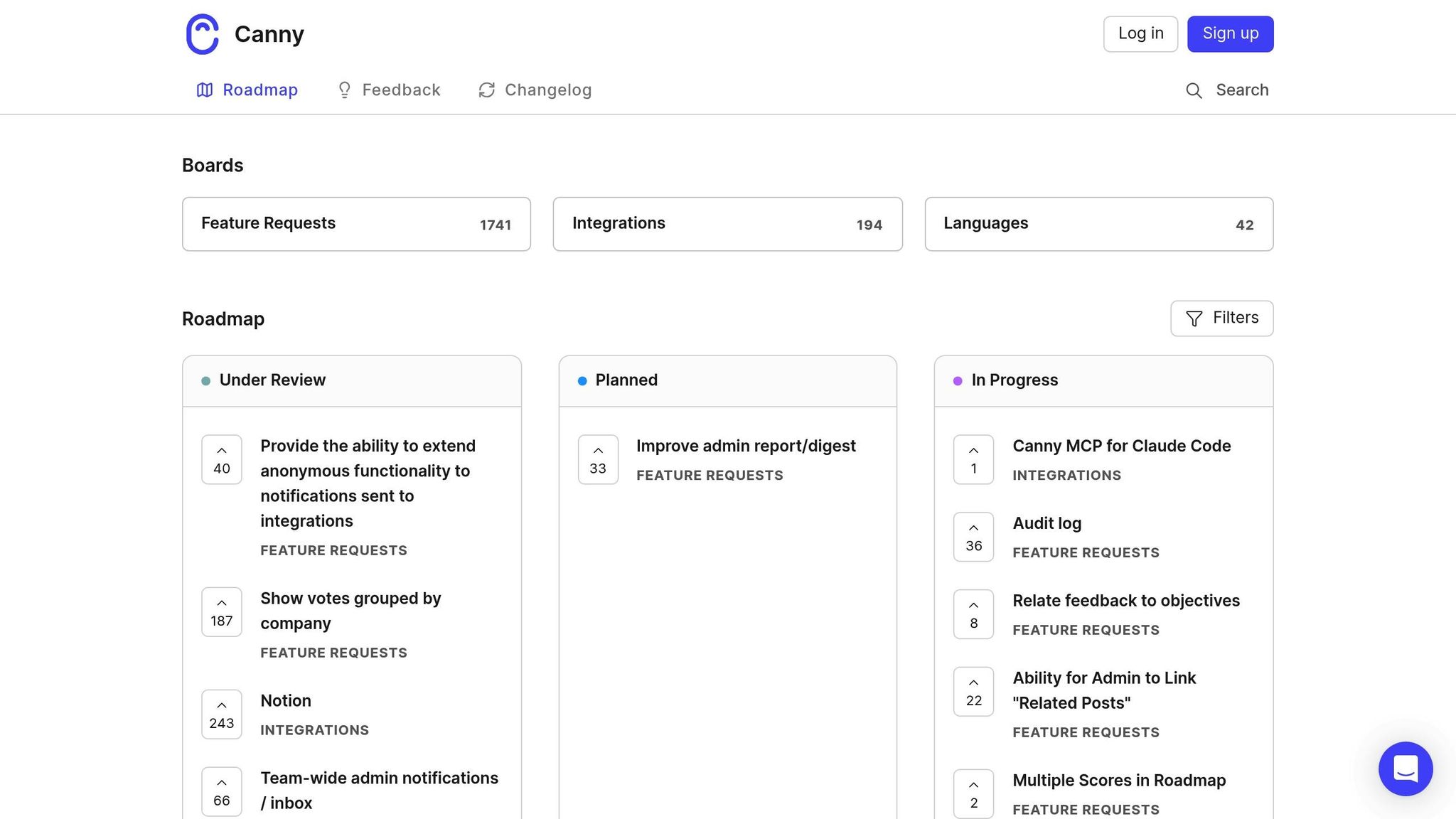
Canny's public portals and AI tools help SaaS teams gather, organize, and act on customer feedback efficiently, offering real-time insights tailored to their needs. With over 15 million feedback items processed for more than 50,000 companies[8], Canny has become a trusted platform for centralizing feature requests and closing the feedback loop.
Feedback Collection Methods
Canny provides several ways to collect customer input. Its feedback portals allow users to submit ideas, vote on requests, and discuss features on public or private boards. In-app widgets make it easy for customers to share feedback without leaving your product. The Autopilot AI Capture feature takes it a step further by pulling insights from support chats, reviews, and calls automatically. Additionally, teams can manually log feedback during sales or support interactions via integrations with tools like Intercom and Zendesk.
"Canny has reduced the number of inbounds in our support inbox by 20%, which significantly reduces support loads."
- Chelsea Darby, Customer Success[8]
Integration Capabilities
Canny seamlessly connects with over 50 tools, bringing feedback directly into platforms like Jira, GitHub, ClickUp, Linear, and Asana with automatic status syncing. Integrations with Salesforce and HubSpot tie feedback to revenue data, helping teams prioritize requests from high-value customers.
"Suddenly, everything from Canny to Intercom to Slack was linked. We were actually able to record what people wanted in one place, with basically no effort."
- Nick Barraclough, Partner Success Manager[8]
AI-Powered Analysis
Canny's Autopilot suite uses AI to streamline the feedback process. It detects and merges duplicate requests, condenses discussion threads, and even issues smart follow-up questions to gather more insights.
"Canny's Autopilot ensures feature requests never fall through the cracks. We've seen an 80% increase in requests logged since introducing Autopilot."
- Owen Doherty, COO[10]
One example: A B2B marketing SaaS company with 500 employees consolidated feedback from eight Slack channels into a single board, reducing their feature request volume by 35% and saving each product manager 12 hours per week[9].
Customization Options
Canny offers flexibility with prioritization formulas, custom post fields for extra metadata, and branded themes to match your product's design. It also supports revenue-aware prioritization by syncing CRM data, allowing teams to focus on requests from their most valuable customers.
Up next, see how Typeform simplifies user feedback collection even further.
4. Typeform
Typeform's conversational interface turns feedback collection into a natural, engaging dialogue. Unlike traditional survey tools, its one-question-at-a-time format keeps things simple and helps boost completion rates. With 95% of the Fortune 500 using it[11], Typeform has become a top choice for teams looking for customizable, branded forms without needing a design expert.
Feedback Collection Methods
Typeform offers several ways to capture customer feedback across different touchpoints. You can embed surveys on websites, send them via email, share them on chat platforms, or even use QR codes at events. Pre-made templates for NPS, CSAT, and CES make standard feedback campaigns quick and easy to set up.
Respondents can also provide video feedback, allowing them to record answers directly within the form - perfect for capturing emotions and context that text responses might miss. Features like logic jumps tailor questions based on previous answers, while URL parameters pre-fill information for a more personal touch. Plus, Partial Submit Points ensure you still collect valuable insights, even from incomplete responses.
"Good answers are built from good questions. Every single time."
- Elizabeth Stokoe, Conversational Analyst [13]
Here’s a quick tip: forms with a clear, welcoming introduction screen get 5% more responses than those that dive straight into questions. Another helpful feature? Randomizing multiple-choice options to avoid skewed data.
Integration Capabilities
Typeform integrates with over 300 business tools[11], making it easy to sync responses across your tech stack. For example, it works with CRMs like HubSpot, Salesforce, and Pipedrive to turn feedback into actionable entries. Real-time integrations with platforms like Slack, Microsoft Teams, Notion, and Airtable ensure your team can act on feedback without delay.
The Workflow Builder takes automation a step further. It can segment audiences and trigger personalized follow-ups based on responses. For instance, negative NPS feedback can be routed to support for immediate attention, while positive feedback might go to marketing for potential case studies.
AI-Powered Analysis
Typeform's AI tools analyze qualitative data to identify recurring themes and even suggest follow-up questions for deeper insights. This means you can uncover actionable takeaways without spending hours sifting through responses manually.
"The VOC is actionable 'gold' which has helped us determine where and how we can make our customer's journey... easier, more seamless, and meaningful."
- Christine Werner, Typeform [12]
Customization Options
Typeform allows you to fully tailor your forms to match your brand by adding logos, custom themes, colors, images, and videos. For $59/month (Plus plan), you can remove Typeform branding and use custom domains like feedback.yourbrand.com.
The Embed SDK makes it easy to integrate forms directly into your web apps, with options to hide headers and footers so the forms feel like a natural part of your product. If you’re short on time, Typeform AI can even design and structure forms for you based on simple text prompts. According to Typeform, 96% of customers report a better brand experience after switching to their platform, and their forms collect 3.5 times more data than traditional ones[14].
Next, we’ll look at how Zonka Feedback enables teams to capture real-time customer sentiment across multiple channels.
5. Zonka Feedback
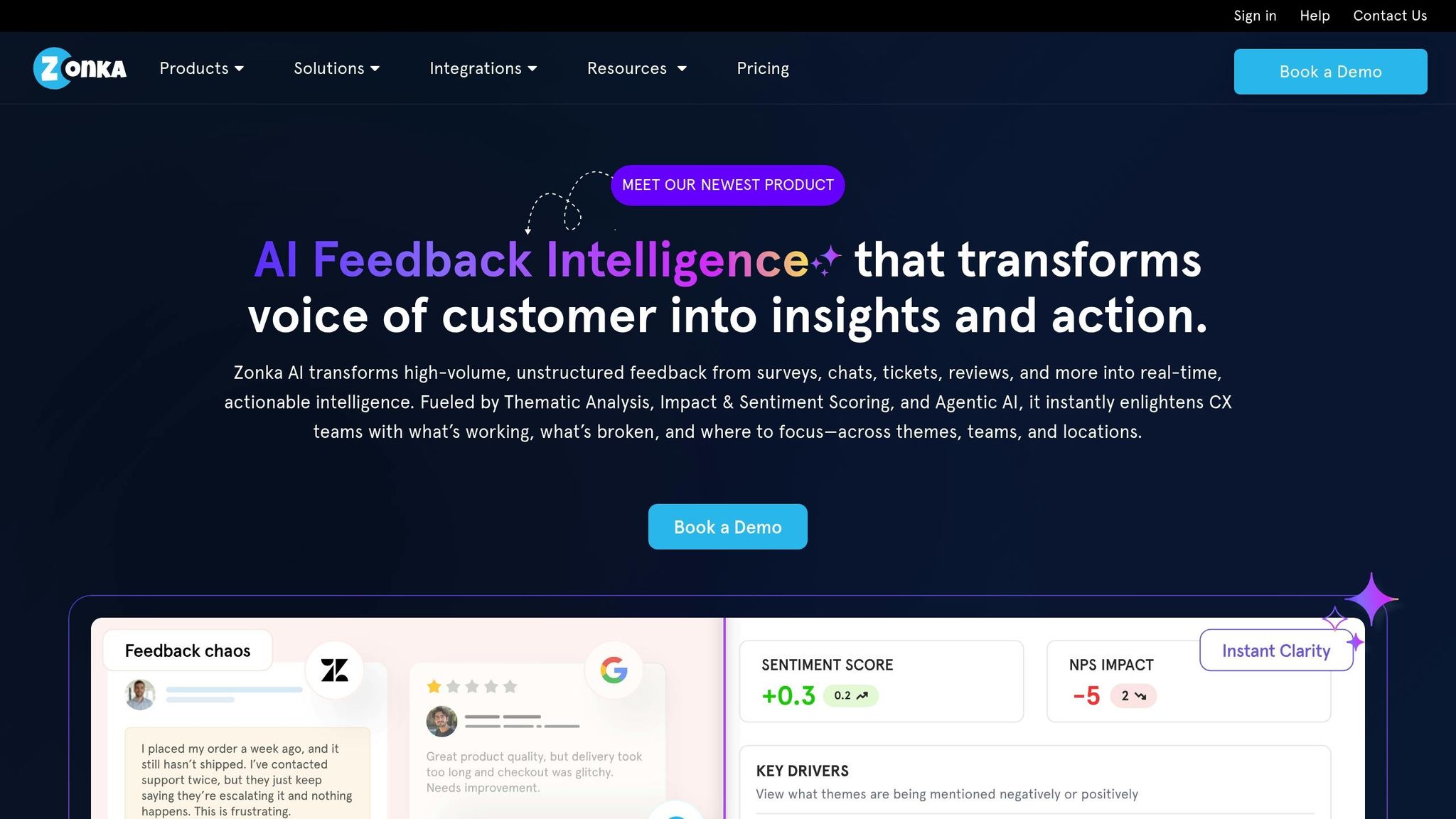
Zonka Feedback simplifies real-time, multichannel feedback collection for SaaS workflows. It gathers insights through various channels like in-app surveys, website widgets, email, SMS, WhatsApp, and even offline kiosks [1][15]. Using behavioral triggers, it launches surveys at critical moments - such as onboarding, feature activation, or friction points - ensuring feedback is timely and relevant [1][16].
Feedback Collection Methods
Zonka provides native SDKs for platforms like iOS, Android, React Native, and Flutter, making it easy to integrate surveys directly into apps [16][17]. In-app surveys often achieve response rates of 30% or more [3]. The platform includes over 100 pre-built survey templates and a no-code builder with advanced logic and branching capabilities. Event-based triggers let you send surveys immediately after key actions, while dynamic audience segmentation (based on factors like plan type or usage patterns) helps minimize survey fatigue and ensures the data you collect is meaningful [1][16].
Integration Capabilities
Zonka connects seamlessly with popular tools like Salesforce, HubSpot, Zendesk, Intercom, Jira, and Slack [1][15]. It also integrates with over 3,000 additional apps through Zapier. Closed-loop workflows streamline processes - like creating Jira tickets or sending Slack alerts for negative feedback - while survey responses can be synced to CRM systems for a comprehensive view of customer health.
"What I love - the integrations are almost endless! Helping the system to tie in seamlessly with our current toolset."
- Rafael H., Founder & CEO, Reteamly [17]
AI-Powered Analysis
Zonka’s AI tools handle tasks like thematic clustering, sentiment detection, and intent analysis automatically [1][15]. The "Ask AI" feature allows you to interact with your feedback data conversationally, while AI Impact Analysis pinpoints the issues most affecting key metrics like NPS and CSAT. Early users have reported an 80% faster turnaround from insights to action and a 5% reduction in churn [18]. For instance, SmartBuyGlasses boosted its NPS by 30% using Zonka Feedback to monitor customer sentiment in real time [1][15]. Pricing starts at $49/month, with a 14-day free trial available, and the platform boasts a G2 rating between 4.6 and 4.7 out of 5 [16].
Customization Options
Zonka offers extensive customization, including white-labeling options that allow you to tailor branding, logos, themes, and colors [15][16]. It meets ISO 27001:2022 standards and complies with GDPR and HIPAA, making it a secure choice for SaaS teams managing sensitive customer data. However, some users mention that the platform’s wide array of features can feel overwhelming initially, and advanced AI functionalities are typically available only on higher-tier plans [1][16].
Next, discover how Hotjar visualizes user behavior and feedback.
6. Hotjar
Hotjar, now part of Contentsquare, blends behavioral analytics with direct user feedback to help businesses understand how and why users interact with their websites. The platform gathers insights through tools like on-page widgets, customizable surveys (covering metrics like NPS, CSAT, and CES), session replays, heatmaps, and one-on-one user interviews. This combination of proactive feedback and behavioral tracking paints a clear picture of user experiences - whether it's identifying where users click or pinpointing sources of frustration.
Feedback Collection Methods
Hotjar provides over 40 free survey templates that can be deployed in various formats, including pop-ups, embedded forms, or external links. Users can even attach screenshots to their feedback, making it easier to spot visual issues or bugs. For example, Matalan, a fashion and homeware retailer, used Hotjar's feedback tools to test website changes and identify bugs based on customer input. This approach resulted in a 1.23% increase in checkout conversions and a 400% return on investment [23]. Similarly, Golf Digest Online utilizes session replays to uncover obstacles customers face when booking golf courses [21].
"We love Survey's feedback collection button because it gives us instant feedback from shoppers. It doesn't interrupt the checkout flow, and it allows us to fully understand our shopper's experience, in real-time." - Noelle Smith, Conversion Analyst at eShopWorld [23]
Integration Capabilities
Hotjar connects seamlessly with over 100 tools, including Slack, Microsoft Teams, Jira, Salesforce, HubSpot, and Intercom, ensuring teams stay updated with real-time alerts and customer data. The "Data Connect" feature allows data exports to warehouses like Snowflake, AWS, and Microsoft Azure. Additionally, Hotjar integrates with AI tools such as ChatGPT, Claude, Microsoft Copilot, and Dust via a Model Context Protocol (MCP)-powered connection. With over 402 million survey responses collected and trusted by more than 1.3 million websites and apps, Hotjar is a go-to for many organizations [55, 56].
AI‑Powered Analysis
Hotjar leverages AI to streamline data analysis. It can create goal-based surveys, summarize reports, and categorize feedback by sentiment [52, 56, 61]. The platform’s Interviews tool provides AI-powered transcriptions of user calls, while its Sense AI (CoPilot) feature acts as a chat-based assistant, delivering detailed data insights. One user shared that incorporating Hotjar insights into their workflow led to a 17% increase in successful A/B tests [19].
Customization Options
Hotjar offers advanced targeting features, allowing businesses to trigger surveys based on user behavior, location, or demographic data. For instance, surveys can appear after users click a specific element or reach a milestone in an onboarding process [22]. The free plan includes up to 20,000 user sessions per month, along with heatmaps, session replays, and up to three surveys. Paid plans unlock unlimited surveys and permanent storage for responses. Trusted by over 3,700 enterprise brands and serving teams in more than 180 countries, Hotjar remains a key tool for understanding user behavior [20].
Moving forward to Qualtrics…
7. Qualtrics
Qualtrics stands out as a feedback tool that turns customer input into practical insights. It gathers feedback through multiple channels, including email, SMS, social media, review sites, and direct messaging. Beyond surveys, it uses advanced digital analytics like session replays, heatmaps, and rage-click detection to uncover customer behavior patterns [64,66]. This mix of direct and indirect feedback helps SaaS teams grasp not only what customers are saying but also how they interact with products, offering a well-rounded approach to feedback collection.
Feedback Collection Methods
Qualtrics provides in-product and in-app feedback tools that integrate seamlessly into dashboards or mobile apps, using behavioral triggers to prompt responses [64,66]. For internal use, the Frontline Feedback tool enables employees to share and prioritize suggestions through features like upvotes and merging [65,71]. The platform also supports advanced survey features, including branching logic, file uploads, signature capture, and offline usability [27]. With over 2 billion conversations analyzed annually for more than 20,000 clients, Qualtrics efficiently handles vast amounts of feedback data [26].
Integration Capabilities
The platform connects directly with popular CRMs like Salesforce, HubSpot, and Microsoft Dynamics, making it easy to launch transactional surveys and link feedback to customer records. Additionally, its integration with over 8,000 apps via Zapier allows for automated workflows triggered by survey responses [66,68,72]. Real-time notifications through tools like Slack and Microsoft Teams, combined with automated ticketing and case management, streamline team responses. For instance, Sprint (now part of T-Mobile) used Qualtrics' digital insights to address checkout issues, reducing cart abandonment by 22% after resolving key friction points [25].
AI-Powered Analysis
Qualtrics uses AI to elevate feedback analysis. Its tools automatically detect themes, summarize insights, and analyze sentiment in open-ended responses [73,74,75,76]. The platform supports multilingual analysis in languages like English, French, Spanish, German, and Japanese, eliminating the need for manual translations [28]. Users have reported a 35–40% improvement in data quality and a 7% boost in survey response rates, with 90% of respondents engaging with AI-generated follow-up questions [76,77].
Customization Options
The platform allows teams to segment feedback based on the customer lifecycle, making it easier to identify specific challenges [24]. Real-time web intercepts enable feedback collection without interrupting browsing, while automated ticketing ensures detractors receive follow-ups within 24 hours, helping to resolve negative experiences promptly [64,66]. Reflecting its robust features, Qualtrics has earned a 4.4/5 rating on G2, backed by over 2,900 reviews [29].
Feature Comparison
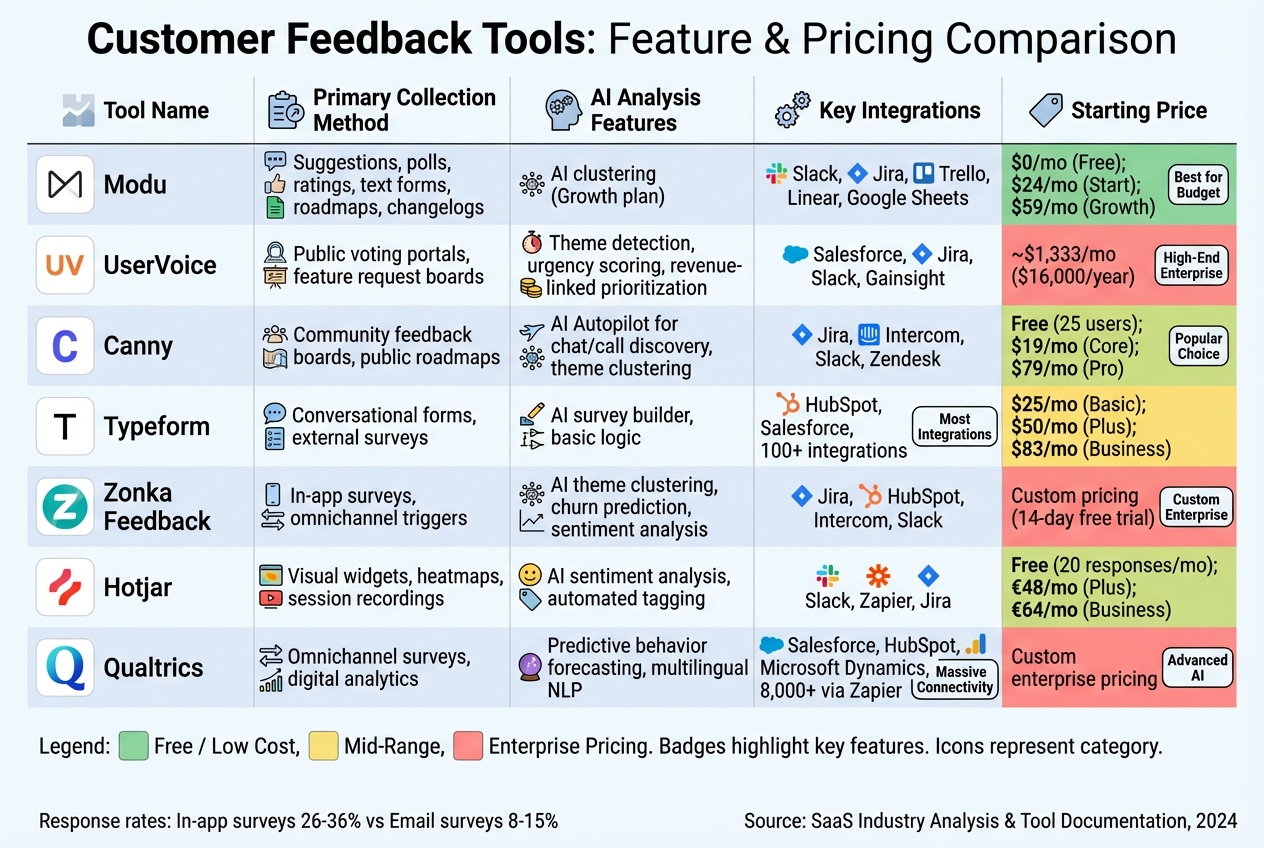
Finding the right tool for your SaaS team's workflow and budget can be tricky. The table below breaks down seven options, comparing collection methods, AI features, integrations, and pricing to help you decide.
| Tool | Primary Collection Method | AI Analysis | Key Integrations | Starting Price |
|---|---|---|---|---|
| Modu | Suggestions, polls, ratings, text forms, roadmaps, changelogs | AI clustering (Growth plan) | Slack, Jira, Trello, Linear, Google Sheets | $0/mo (Free); $24/mo (Start); $59/mo (Growth) |
| UserVoice | Public voting portals, feature request boards | Theme detection, urgency scoring, revenue-linked prioritization | Salesforce, Jira, Slack, Gainsight | $16,000/year (~$1,333/mo) |
| Canny | Community feedback boards, public roadmaps | AI Autopilot for chat/call discovery, theme clustering | Jira, Intercom, Slack, Zendesk | Free (25 users); $19/mo (Core); $79/mo (Pro) |
| Typeform | Conversational forms, external surveys | AI survey builder, basic logic | HubSpot, Salesforce, 100+ via integrations | $25/mo (Basic); $50/mo (Plus); $83/mo (Business) |
| Zonka Feedback | In-app surveys, omnichannel triggers | AI theme clustering, churn prediction, sentiment analysis | Jira, HubSpot, Intercom, Slack | Custom pricing (14-day free trial) |
| Hotjar | Visual widgets, heatmaps, session recordings | AI sentiment analysis, automated tagging | Slack, Zapier, Jira | Free (20 responses/mo); €48/mo (Plus); €64/mo (Business) |
| Qualtrics | Omnichannel surveys, digital analytics | Predictive behavior forecasting, multilingual NLP | Salesforce, HubSpot, Microsoft Dynamics, 8,000+ via Zapier | Custom enterprise pricing |
Collection Methods
Each tool offers distinct ways to gather feedback. Modu, Canny, and UserVoice shine with their public voting portals and roadmaps, fostering transparency. On the other hand, Zonka Feedback and Hotjar excel at in-app surveys and contextual triggers, which can boost response rates to 26–36% compared to the 8–15% typical for email surveys [30]. Meanwhile, Typeform focuses on standalone conversational forms, ideal for market research, while Qualtrics provides robust omnichannel tools for enterprise-level surveys and analytics [24].
AI Capabilities
AI features set these tools apart by automating complex tasks. UserVoice and Canny link feedback to revenue metrics, like Salesforce ACV/ARR, helping teams prioritize features that drive business impact [2]. Zonka Feedback and Hotjar leverage AI for theme clustering and churn prediction, reducing manual analysis time by 40–60% [6]. Qualtrics leads the pack in predictive analytics, analyzing 2 billion conversations annually and offering multilingual sentiment analysis in English, French, Spanish, German, and Japanese [26].
Pricing
Pricing varies widely, from free tiers to enterprise-level contracts. Modu provides a free plan, with its Growth plan available for $59/mo, while Canny offers a free tier for up to 25 users, scaling to $661/mo for 1,000 tracked users [5]. At the higher end, UserVoice starts at $16,000 per year, and Qualtrics offers custom pricing for enterprise needs [2]. These pricing structures can significantly impact scalability as your team grows.
Integrations
Seamless integrations are crucial for actionable feedback. UserVoice, Modu, and Zonka Feedback offer native two-way sync with tools like Jira and Linear, ensuring feedback doesn't get lost in silos [4]. Qualtrics connects with over 8,000 apps via Zapier, while Typeform integrates with 100+ tools, making it great for lead qualification and research [25]. Teams that use tools with strong integrations often see up to 3x higher feature adoption rates [5].
Conclusion
To wrap up, selecting the right feedback tool depends on your team’s workflow, growth stage, and budget. Modu stands out with its flexible free tier and affordable scaling options. For B2B companies tied to revenue, Canny and UserVoice are solid choices. If visual insights are a priority, Hotjar delivers, while Typeform shines in market research. For enterprise-level analytics, Qualtrics and Zonka Feedback are excellent contenders.
Start by clearly defining your primary use case - whether it’s feature management, in-product surveys, or omnichannel analytics. Ensure the tool integrates seamlessly with your existing stack (like Jira, Slack, or Salesforce) to prevent feedback from becoming isolated. Research shows that 78% of teams using structured feedback tools see a 3x increase in feature adoption rates, and these systems can improve customer retention by 25% [5].
Another key consideration is choosing platforms that help you close the feedback loop. Tools with changelog and roadmap features allow you to notify users when their suggestions are implemented. This builds trust and shows your customers that their input truly matters [4][5].
Before committing to a tool, test your shortlisted options with a small team. Set clear metrics - such as Net Revenue Retention (NRR), churn rate reduction, and time-to-value - to measure success objectively [31][32]. Launching a pilot program, tracking performance, and closing the feedback loop can make a measurable impact on growth.
FAQs
Which feedback tool fits my SaaS stage?
The best feedback tool for your business depends on where your SaaS company is in its journey and what you aim to achieve. For early-stage teams, straightforward tools that gather qualitative insights are ideal - they help you understand your users without overwhelming complexity. As your company scales, platforms with AI capabilities and advanced analytics become more important, offering deeper insights and actionable data. For mature businesses, the focus should shift to tools that seamlessly integrate feedback into your existing workflows and help boost customer retention. Start with basic solutions and let your feedback tools grow alongside your SaaS, ensuring they meet your evolving needs.
How do I tie feedback to revenue?
To link feedback directly to revenue, SaaS teams need well-organized systems for gathering and analyzing customer input. By using centralized tools, teams can pinpoint recurring requests and common pain points, making it easier to prioritize improvements and enhance customer satisfaction.
Incorporating this feedback into product roadmaps helps ensure new features match customer needs, leading to higher adoption rates and better retention. This approach creates a continuous cycle where customer input fuels product success, ultimately driving revenue growth.
What KPIs should I track in a pilot?
To gauge the success of a pilot, monitor customer satisfaction scores (CSAT), Net Promoter Score (NPS), and feedback response rates. These metrics provide a snapshot of engagement and satisfaction levels. Alongside the numbers, collect qualitative feedback to identify specific areas that need attention. Together, these insights can help assess how well the pilot is performing and inform decisions for future adjustments.