
How to Build a Public Product Roadmap in 5 Steps
How to Build a Public Product Roadmap in 5 Steps
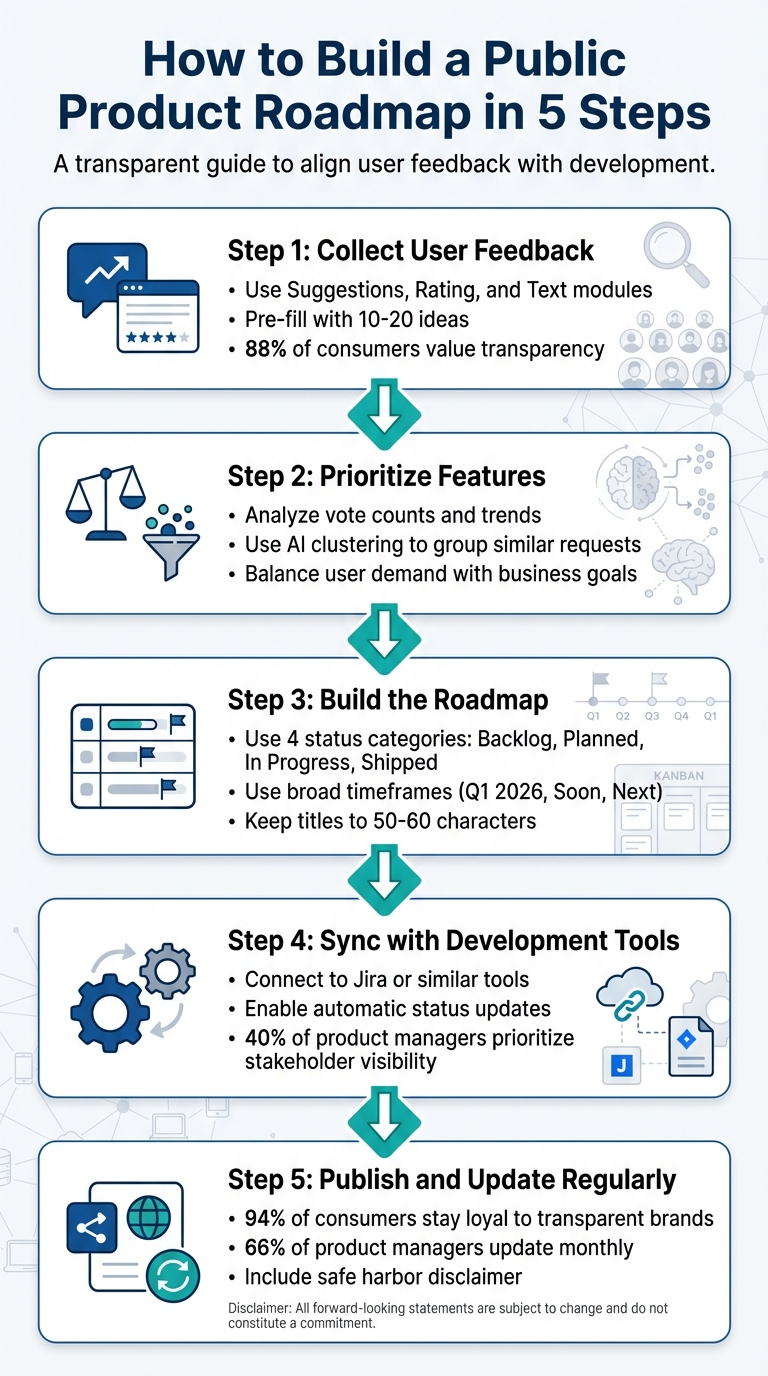
Creating a public product roadmap can strengthen trust with your users and align your product with their needs. Here's how you can do it in five steps:
- Collect User Feedback: Use tools like Modu to gather feature suggestions, ratings, and open-ended responses. Pre-fill your feedback board with common requests to encourage participation.
- Prioritize Features: Analyze user votes and feedback trends, but balance them with your business goals, development effort, and strategic value.
- Build the Roadmap: Use broad timeframes like "Now, Next, Later" to set expectations. Organize features into stages such as "Planned", "In Progress", and "Shipped."
- Sync with Development Tools: Integrate your roadmap with tools like Jira to ensure real-time updates and keep internal teams aligned.
- Publish and Update Regularly: Share your roadmap publicly, but include a disclaimer that plans can change. Keep it updated to maintain trust and engagement.
How to Build a Public Product Roadmap in 5 Simple Steps (+ Free Template)
Step 1: Gather User Feedback for Your Roadmap
Create a roadmap that aligns with real user needs. Research shows that 88% of consumers value authenticity and transparency when choosing brands to support [8]. The quickest way to show these qualities? Actively listen to your audience. Gathering feedback takes the guesswork out of the process and gives you the data you need to build features that users truly want.
Instead of relying on internal assumptions or the loudest opinions, you’ll have clear, measurable evidence of what matters most to your users. This method can also reduce support tickets by addressing common feature requests before they become issues. To get started, set up your feedback board using Modu's tools.
Set Up Modu's Feedback Tools
Begin by creating a feedback board in Modu that combines different modules for gathering input. Use the Suggestions module to allow users to submit feature ideas and vote on others’ suggestions. This creates a dynamic, user-driven list of priorities. Add a Rating module to gauge sentiment on existing features or proposed updates with a simple 1–5 scale. Finally, include a Text module for open-ended responses, giving users space to share detailed feedback that doesn’t fit into predefined categories.
Avoid launching an empty board - it can discourage participation. Instead, pre-fill it with 10–20 ideas sourced from support tickets, social media, or frequently requested features [1]. This shows users the board is active and encourages them to contribute.
Increase Participation with Embeds and Links
A feedback board won’t help if no one sees it [1]. Make it visible by embedding it in high-traffic areas of your website, like the footer, main navigation, or your product's settings page. Modu offers options like website embeds and popup widgets, which let users share feedback while they’re already engaged with your product.
You can also share direct links to the board in onboarding emails, support ticket responses, or community platforms like Discord or Slack. Some companies manage feedback from hundreds of thousands of users through centralized systems [7], proving that scaling is achievable when participation is easy. To close the loop, enable automatic notifications to inform users when a feature they voted for moves from "Planned" to "Shipped." This simple step can turn casual voters into dedicated advocates [1].
Step 2: Prioritize Features Using Feedback Data
Deciding what to build first starts with digging into your feedback. Look for patterns in voting, identify recurring themes, and weigh user demand against your company’s goals. This process helps turn scattered input into a ranked list of features that make sense for your users and your business.
Analyze Trends with Modu Analytics
Start by checking the vote counts on your feedback board. Modu’s Suggestions module automatically organizes feature requests by their vote totals, giving you a quick snapshot of what users care about most. Beyond votes, take a look at the Rating module to spot features with low satisfaction scores - these often point to areas needing improvement before adding new functionality.
One of Modu’s standout tools is its AI clustering, which groups similar requests from different sources. For example, in 2022, Mercury’s product team discovered that what initially seemed like a single support agent’s report was actually backed by 20 to 30 other users. This insight, made possible by their centralized voting system, helped them justify changes to their roadmap with data rather than anecdotes [9]. Once you’ve gathered these insights, the next step is aligning them with your internal priorities.
Align User Requests with Business Priorities
While popularity is important, it shouldn’t be the sole factor driving your roadmap. Compare user feedback to internal priorities by weighing it against factors like effort scores (how many developer hours a feature requires), strategic importance (how well it fits your long-term vision), and financial impact (whether it reduces churn or attracts high-value customers).
Take GiveButter as an example. In 2022, their "Auctions" feature received over 600 user votes. But instead of relying on popularity alone, the team, led by Director of Product Jesse Sandala, assigned effort scores and strategic importance values to the request. This balanced approach led to a successful launch, with engagement levels matching their data-driven predictions [9].
"We assigned the effort score and strategic importance to achieve a more balanced ranking for our roadmap." - Jesse Sandala, Director of Product, GiveButter [9]
Finally, use Modu’s analytics to explain your decisions. If a popular feature doesn’t align with your business goals or technical capacity, communicate this directly on your feedback board. Being transparent about trade-offs builds trust, even when you can’t fulfill every request.
Step 3: Create Your Roadmap with Modu's Roadmap Module
Once you've prioritized your features, the next step is to craft your roadmap. Modu's Roadmap module offers a clear, structured way to showcase what you're building, what's coming next, and what you've already completed. The goal? A simple, visual plan that users can quickly scan and understand. From here, it's all about defining each roadmap item with clarity.
Add Titles, Descriptions, and ETAs
Start by creating roadmap items with concise, descriptive titles - aim for 50–60 characters. Highlight the key terms upfront. For instance, instead of "Enhancement to the User Dashboard Experience", go with "Dashboard Speed Improvements." This way, users can immediately grasp the feature's purpose without needing to read detailed explanations.
Your description should act as an elevator pitch - a quick summary of the feature's value in about 150–160 characters. Focus on the problem it addresses rather than diving into technical details. For example, replace "Implementing GraphQL API endpoints for data retrieval" with "Faster data loading so you can view reports in under 2 seconds." To encourage interaction, include a call to action like "Learn more" or "Share your thoughts."
When it comes to timelines, steer clear of specific launch dates. Opt for broader labels like "Q1 2026", "Soon", or "Next." This approach keeps expectations manageable and allows your team to remain flexible. TinyMCE's Product Manager, Fredrik Danielsson, highlighted this strategy when they launched their public roadmap in mid-2022. By focusing on capabilities and use cases instead of rigid deadlines, they gathered over 300 user insights while maintaining realistic commitments [10].
"Inspire people by showing them capabilities and solutions that you've identified as potential use cases. You're excited about this stuff, so let it come through." - Fredrik Danielsson, Product Manager, TinyMCE [10]
Once you've defined your items, it's time to organize them based on their development stages.
Sort Features by Development Stage
Divide roadmap items into four status categories: Backlog (or Under Review) for ideas still in consideration, Planned for features you're committed to building, In Progress for those actively being developed, and Shipped for updates that are complete. This categorization makes it easy for users to see where each feature stands.
When moving a feature from Planned to In Progress, include mockups or design previews to help users envision what's coming. TinyMCE used this tactic effectively during the development of their Merge Tags plugin. Led by Head of Product Roman Khudonogov, the team shared mockups in the In Progress tab, sparking valuable feedback that influenced the final product [10]. Start with 10–20 items to show activity and keep the roadmap updated regularly [1].
Step 4: Connect Your Roadmap to Development Tools
Linking your roadmap to your development tools ensures that updates happen in real-time, keeping everything aligned. With Modu's integrations, you can create tickets or cards directly from your roadmap within your development platform. When developers mark those tasks as complete, the roadmap automatically updates the status to "Shipped." This seamless sync ensures your public roadmap reflects the real progress, not outdated plans. Considering that 40% of product managers see stakeholders as the primary audience for their roadmaps, having accurate, automated updates is key to building trust [12]. By syncing updates, you maintain transparency, showing users progress that matches internal work. Let’s dive into how to set up these automated updates for smooth communication.
Set Up Automatic Updates Through Integrations
Start by connecting Modu to your development tool using the API token from your platform. Once connected, map statuses - for instance, when a Jira issue moves to "Done", the corresponding roadmap item updates to "Shipped." Depending on your workflow, you can choose between manual or automatic syncing. If your team uses multiple tools, manual syncing gives you more control over where updates go. Use webhooks to enable instant status updates [11].
"The Roadmap & Jira integration works across the organization to collect feedback, track ideas, and align stakeholders around progress from Jira." - Roadmap.space [11]
Focus on syncing features and improvements that directly impact users. As Daniel Schwarz from LogRocket advises, "Generally, I would suggest that you stay away from integrations - specifically ones like Jira and GitHub that feed bugs/issues into your roadmap. You won't want to saturate your product roadmap with potentially hundreds of bug reports" [3]. Keep your public roadmap clean by filtering for "Stories" or "Features" instead of "Bugs."
Configure Team Notifications
Once syncing is set up, keep everyone in the loop with real-time notifications. For example, configure Slack alerts so that when a roadmap item’s status changes, teams like marketing, sales, and support are instantly notified. This eliminates the need for manual updates and ensures everyone is on the same page.
Enable two-way notifications to connect user feedback directly with your product and engineering teams. This approach ensures your go-to-market teams are always aware of what’s shipping, while the development team stays in tune with what users need.
Step 5: Publish and Update Your Public Roadmap
Once your roadmap is synced with development tools, it’s time to share it with your users. Publishing your roadmap does more than just inform - it builds trust and reduces common support questions. In fact, 94% of consumers are more likely to stay loyal to brands that are transparent [13]. By sharing your roadmap, you’re creating a stronger connection with your audience that goes beyond just delivering updates.
Share Your Roadmap with Access Controls
Modu allows you to control how you share your roadmap. You can make it fully public by adding the direct link to your app’s navigation, website footer, or even onboarding emails [1]. For community-focused platforms like Discord or Slack, pinning the link ensures easy access. If you need to limit visibility, use password protection or Single Sign-On (SSO) to share it selectively, keeping sensitive internal details secure [6][4].
Don’t forget to include a "safe harbor" statement on your roadmap page. This disclaimer helps manage expectations by clarifying that the roadmap is subject to change and doesn’t guarantee specific outcomes [6]. Keep your status categories simple - stick to 3-4 options like "Under Review", "Planned", "In Progress", and "Shipped" to avoid confusion [1][6]. Instead of locking yourself into specific launch dates, use broader time frames like "Q1 2025" or "Coming Soon" for flexibility [1].
The key to maintaining trust is keeping your roadmap active and up-to-date.
Keep Users Engaged with Regular Updates
An outdated roadmap can erode trust [1]. With over 66% of product managers updating their roadmaps at least once a month [14], you should aim to do the same. Set a weekly or bi-weekly schedule to review your roadmap, update statuses, archive completed items, and incorporate new feedback [1][15]. When a feature moves to "Shipped", Modu automatically notifies users who voted for it, transforming passive supporters into loyal advocates [1].
Consider enabling voting on roadmap items to gather insights on feature demand, but disabling public comments can save you from the burden of constant moderation [6][5]. Tom Redman, Head of Product at Buffer, highlights the value of transparency:
"If we don't have a compelling reason for something to be private, it'll be shared transparently" [13]
Your roadmap can also serve as a powerful sales tool. Showing potential customers that a requested feature is "Planned" can help reduce churn and even close deals [13][4]. Finally, add an "Updated on {date}" note to your roadmap page so users always know they’re viewing the latest information [2].
Conclusion
Creating a public product roadmap helps build trust by fostering transparency. By following five key steps - gathering user feedback, prioritizing features based on data, crafting your roadmap in Modu, integrating development tools, and sharing regular updates - you open a clear channel of communication with your users. This connection often leads to stronger loyalty and deeper engagement.
Take, for example, a launch in April 2023, where user preferences significantly shifted development priorities. This highlights how crucial it is to align your roadmap with what users actually want.
A well-maintained roadmap doesn’t just improve communication; it also reduces support inquiries, validates your strategic direction, and supports sales by showing potential customers that their desired features are already "Planned." As Front's leadership has pointed out, involving users in the process turns them into advocates for your product. The secret to making this work is consistency. Stick to a regular update schedule, use general timeframes instead of rigid deadlines, and always close the loop by letting users know when their requested features are delivered. Keeping your roadmap up to date reinforces trust and shows users that their feedback truly matters.
Think of your roadmap as a living document that grows alongside your product and your users. By sticking to these steps, you create a cycle of continuous improvement that ensures your product evolves with user needs. Keep it transparent, keep it current, and watch as your users transform into active champions of your product.
FAQs
What should I include (and exclude) in a public roadmap?
A public roadmap serves as a guide for outlining your product's vision, priorities, upcoming features, and key milestones that align with your broader goals. It’s also an opportunity to explain the reasoning behind certain updates, which can help build trust and demonstrate openness.
However, it’s important to strike the right balance. Avoid including sensitive or proprietary information, such as technical specifications, internal workflows, or strategic plans. Additionally, steer clear of overly specific deadlines - this helps manage expectations and reduces the risk of disappointment if timelines shift. The goal is to maintain transparency while safeguarding details that could impact your competitive position.
How do I handle popular feature requests that don’t fit our strategy?
Managing popular feature requests that clash with your strategy is a balancing act that hinges on clear communication and thoughtful prioritization. It's important to let your audience know that their feedback matters, even if certain suggestions don't align with your current objectives. Be upfront about this - explain why some ideas won't move forward right now.
You can still acknowledge these requests by evaluating them for potential inclusion in future plans. Another approach is to mark them as 'under consideration' on your roadmap. This shows you're taking the ideas seriously without making promises you can't keep. Open and honest communication like this helps preserve trust while keeping your team focused on strategic goals.
How often should I update a public roadmap to keep trust?
To keep trust intact, make it a habit to update your public roadmap on a regular basis. This shows progress, acknowledges shifting priorities, and ensures everyone - stakeholders and users alike - stays on the same page. Frequent updates also reinforce a sense of transparency and accountability.