
Feature Voting Checklist: 10 Must-Have Elements
Feature Voting Checklist: 10 Must-Have Elements
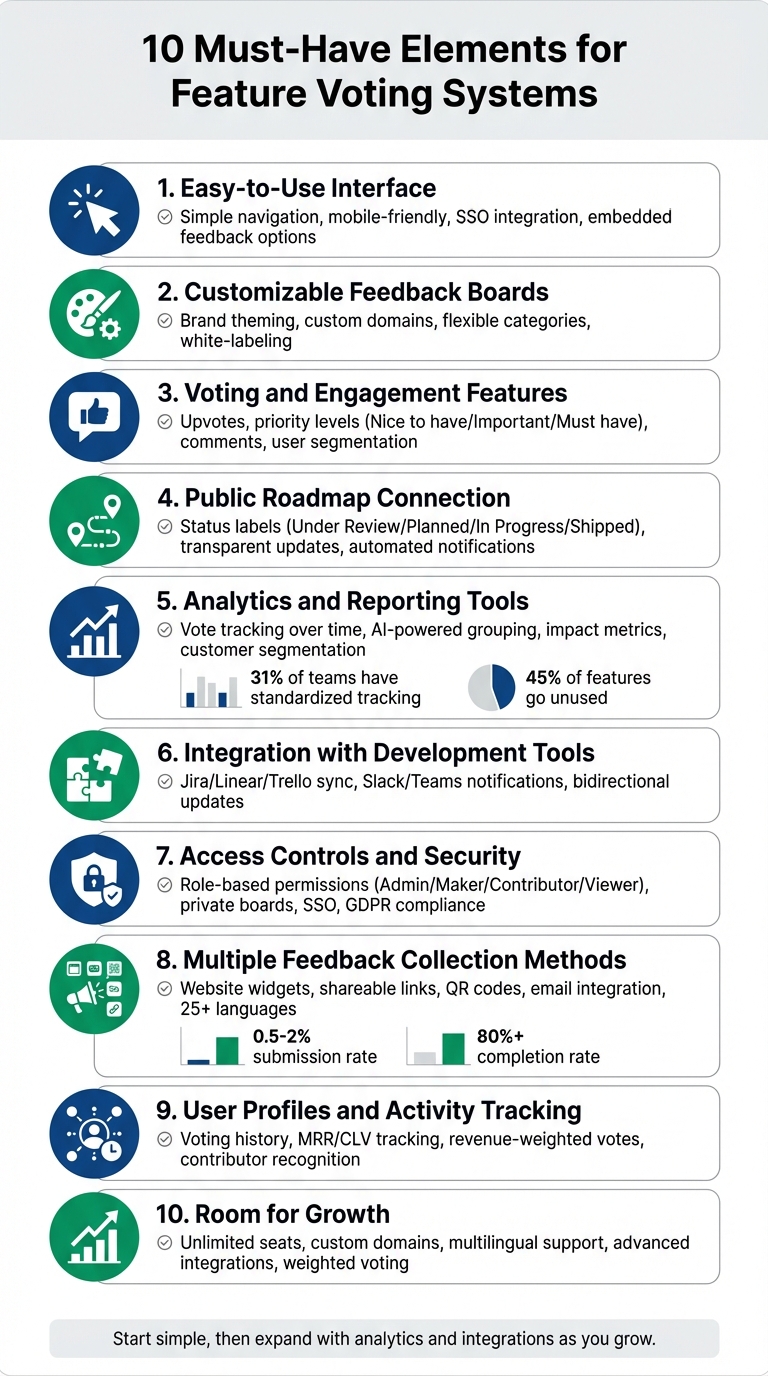
Feature voting systems help you gather user feedback, prioritize features, and align development with customer needs. But not all systems are effective. To avoid turning your feedback tool into an ignored suggestion box, you need the right setup. Here's a quick summary of the 10 must-have elements for a successful feature voting system:
- Easy-to-Use Interface: Simple navigation, mobile-friendly design, and embedded feedback options ensure users can participate effortlessly.
- Customizable Feedback Boards: Tailor boards to your brand and goals, with options like categories, custom fields, and private boards.
- Voting and Engagement Features: Include upvotes, priority levels, and comments for balanced feedback and deeper insights.
- Public Roadmap Connection: Show users how their input influences development with clear status updates and accessible roadmaps.
- Analytics and Reporting Tools: Use vote tracking, segmentation, and AI-powered grouping to identify trends and prioritize effectively.
- Integration with Development Tools: Sync feedback with platforms like Jira or Slack to streamline workflows and ensure nothing gets missed.
- Access Controls and Security: Role-based permissions, private boards, and secure authentication protect sensitive data.
- Multiple Feedback Collection Methods: Use widgets, links, and QR codes to gather input across channels without disrupting user experience.
- User Profiles and Activity Tracking: Connect votes to user data like revenue or account type for smarter prioritization.
- Room for Growth: Ensure your system scales with features like custom domains, multilingual support, and advanced integrations.
These elements transform feedback into actionable insights, helping you focus on features that matter most to your users and business. Start with a simple system, then expand with analytics, integrations, and scalability as your needs grow.
1. Easy-to-Use Interface
For a feature voting system to succeed, it must be simple enough for users to engage with. Overly complicated dashboards or confusing navigation can discourage participation from both users and administrators. One way to increase engagement is to allow voting or commenting without requiring account creation [5]. Incorporating Single Sign-On (SSO) can streamline the process even further - users are automatically authenticated using their existing product credentials [2][4]. This eliminates the frustration of managing yet another password.
Another smart move? Embed the voting board directly into user touchpoints like your app, help docs, or support chat. This makes it easier for users to provide feedback right where they encounter friction. As the team at fdback.io explains:
"The closer the board is to where users experience friction, the better the feedback you'll collect." [3]
Simple Navigation
A user-friendly interface starts with clear menus and labels. These help users quickly find where to submit their ideas or explore existing suggestions. A prominent search bar is a must - it allows users to check for similar requests before posting, cutting down on duplicate submissions [5]. To keep things manageable, organize feedback into 3–6 clear categories. Use straightforward language, like "Connect with other tools" instead of jargon like "API Enhancements", to make the process more intuitive [3].
For administrators, simplicity is just as important. Dashboards should offer one-click status updates, tools to merge duplicates, and options to split suggestions as needed. Kanban-style boards with clear status columns like "Under Consideration", "Planned", "Building", and "Launched" provide instant clarity and make tracking progress easier [1][4][5].
Mobile Responsiveness
With so many users relying on their phones or tablets, a voting platform needs to work seamlessly on mobile devices. A mobile-responsive design not only captures real-time feedback but also broadens your reach by including mobile-first users [3][7].
Key mobile features include lightweight sign-in options like magic links or Google SSO, which are far more convenient on smaller screens than traditional passwords [3]. Navigation must also be tested for mobile usability - menus, labels, and voting buttons should be large enough to tap easily. Adding responsive feedback tabs or "Got an idea?" buttons within your mobile interface encourages users to share their thoughts naturally while using your product [1][3].
This intuitive interface lays the groundwork for the customization options we’ll discuss next.
2. Customizable Feedback Boards
A one-size-fits-all feedback board can confuse users and lower engagement. Customizing your board not only aligns it with your brand but also makes the feedback process smoother. As Feature Upvote puts it:
"People can be confused when they are redirected to third-party sites, so customising the appearance of your page should make the process more seamless for customers."
Customization goes beyond just looks. Flexible setup options let you design boards that fit specific goals - like one for feature requests, another for bug reports, and a third for internal team discussions. This targeted approach ensures you gather the right insights from the right audience. Let’s dive into how design and setup options can make your board more effective.
Theme and Design Options
Start with the essentials: upload your company logo (a height of 40px works well) and add a favicon to match your website’s browser tab. Use your brand’s exact HTML HEX color codes for the navigation bar and text to maintain a consistent look across platforms. You can also customize the page title, suggestion list title, and footer text to reflect your brand’s tone.
For teams needing full control, custom CSS allows you to fine-tune every detail of your board’s appearance. Advanced features, like white-labeling to remove vendor branding or hosting the board on a custom domain (e.g., feedback.yourcompany.com), help create a polished, seamless experience. These design tools set the stage for collecting feedback in a way that feels professional and on-brand.
Flexible Module Setup
Organize your board to align with specific feedback goals by clearly categorizing requests. Use simple, user-friendly labels - like "Connect with other tools" instead of overly technical terms - to make navigation easier for everyone.
For more advanced needs, add custom explanation fields or segment feedback by user plan or company size to get more precise insights. You can also enable priority levels such as "Nice to have", "Important", or "Must have" to help users communicate the urgency of their requests. Access controls allow you to decide whether boards are public for all users or restricted for internal teams - perfect for beta tests or sensitive discussions. This adaptability ensures your feedback board works with your processes, not the other way around.
3. Voting and Engagement Features
A voting system works best when it encourages broad participation. Allowing simple, one-click voting without requiring account creation can significantly increase engagement, often doubling the usual 5–10% participation rate [8]. But while votes are helpful, they don't tell the whole story. To truly understand user needs, you need tools that reveal both what users want and why they want it.
Striking a balance between simplicity and depth is key. Let’s dive into how detailed voting mechanisms can achieve this.
Upvoting and Downvoting
Start with basic upvotes and add layers of priority such as "Nice to have", "Important", or "Must have." This approach helps you separate casual interest from critical needs [1]. For example, while users may upvote many features, these priority levels help uncover which ones are essential for their daily tasks.
However, beware of "herd behavior", where users simply follow the crowd and upvote popular suggestions. To counteract this, some teams hide vote counts initially to reduce bias [1]. Another effective strategy is to segment votes by user type. For instance, feedback from paying customers or high-revenue accounts can be weighted more heavily than input from free users. This ensures that your most strategic accounts aren't overshadowed by sheer volume [1].
A real-world example comes from GiveButter in 2022. Jesse Sandala, their Director of Product, tackled this when the "Auctions" feature received over 600 votes. By combining these votes with internal effort scores and strategic priorities, they launched a feature that boosted user engagement while aligning with business objectives [1].
Comments on Suggestions
Votes show interest, but comments provide the context you need to take action. Without comments, you're left guessing at the reasoning behind each vote. As one expert puts it: "Votes show interest. Comments show context" [1].
To capture this context, design your voting board to prompt users for details when they vote. Ask them to describe their workflow, explain the problem they're facing, or clarify vague requests. This qualitative input ensures you’re solving the right problem with the right solution. Comments also foster user interaction - often, users will highlight duplicate requests or answer each other's questions, reducing the moderation burden on your team [5].
Transparency is equally important. When marking a feature as "Not Planned", use the comment section to explain your decision. Users appreciate openness, and providing an explanation helps prevent frustration or confusion [3].
4. Public Roadmap Connection
Tying user input to actual development progress is where a public roadmap shines. It goes beyond just collecting votes; it shows users the impact of their feedback. Without this transparency, users might lose interest in participating. A public roadmap bridges the gap by revealing how votes influence development. When users see features move from "Planned" to "In Progress" to "Shipped", they feel valued and develop trust in the process.
As Mathilde Collin, Executive Chair & Co-founder at Front, puts it:
"When you let people in on a secret, they feel so involved that they want it to succeed beyond their personal interest. That is what is so powerful about transparency." [9]
Front's first public roadmap, launched on Trello in just two minutes, quickly revealed that a native iPhone app was requested four times more than an Android app. This insight immediately influenced their next product cycle [9]. Being transparent not only builds trust but also helps focus development on what matters most to users.
Status Labels for Features
Clear status labels are essential for keeping users informed. Instead of using technical jargon, stick to straightforward categories like "Under Review", "Planned", "In Progress", and "Shipped." Each label has a distinct role: "Under Review" means you're gathering feedback, "Planned" confirms the feature is on the roadmap, "In Progress" shows active work, and "Shipped" closes the loop by delivering the feature [11].
It's equally important to explain status changes, especially when marking something as "Not Planned." As Sarah Hum, Co-founder of Canny, explains:
"Marking something as closed also removes the post from your main list so people are unlikely to add their vote... your customers will appreciate the transparency." [11]
At Mercury, Senior Product Designer Ida Ström used status updates to highlight how specific requests were supported by data from 20 to 30 users. This not only justified priorities to stakeholders but also reinforced user confidence in the process [1]. Clear communication through status updates fosters trust and encourages continued user engagement.
Open Roadmap Access
Giving users access to your roadmap can deepen their engagement. Buffer demonstrated this in August 2023 with "Buffer Suggestions", powered by featureOS. The tool allowed their community of over 190,000 creators to view all submitted requests and receive automated updates as features progressed [10]. Product Marketing Manager Mike Eckstein emphasized:
"In the spirit of transparency, it's important to us that we let folks know when their requests are being worked on, whether their idea is technically possible, or if there are other things we need to prioritize." [10]
Using broad timelines like "Q2 2026" instead of exact dates helps manage expectations and avoids trust issues if deadlines slip [12]. Integrating your roadmap with the voting system ensures that status changes trigger automatic notifications, keeping users informed without adding extra work for your team [1][10]. This approach keeps the feedback loop alive and strengthens user involvement.
5. Analytics and Reporting Tools
Once you’ve got a user-friendly board and a transparent roadmap in place, the final piece of the puzzle is analytics. This is where feedback turns into actionable strategies.
Votes are just the starting point. Analytics take those votes and uncover the bigger picture. Without them, it’s easy to miss trends, overlook key customer groups, or struggle to justify roadmap decisions. A good reporting system transforms raw data into insights that guide your priorities.
Here’s the reality: only 31% of product teams have a standardized process for tracking feature requests [13]. Even more surprising, about 45% of product features go unused [13]. These gaps can lead to missed opportunities and misaligned priorities. Analytics tools help bridge this gap by providing context and clarity behind each request.
Vote Tracking Over Time
Tracking votes over time can highlight shifting priorities. For example, if a feature request jumps from 10 to 100 votes in two weeks, it’s clear demand is growing. On the other hand, a request stuck at 50 votes for months might not be as urgent. Visualizing trends weekly or monthly can help you spot these patterns [13].
Take Mercury, for instance. Senior Product Designer Ida Ström used vote tracking to bring objectivity to her team’s decisions. By showing that specific issues were affecting 20 to 30 users, she helped steer roadmap discussions away from guesswork [1].
But vote counts alone don’t tell the whole story. Analytics should also segment data by customer type. For instance, 200 votes from free users might not carry the same weight as 15 votes from enterprise customers, where each vote represents higher strategic importance. Teams that use multiple impact metrics to evaluate feature requests make roadmap decisions 28% more accurately than those relying solely on vote counts [13]. Metrics like revenue impact, retention scores, and strategic alignment ensure you’re building for the right audience.
AI-Powered Feedback Grouping
When you’re dealing with hundreds - or even thousands - of feedback submissions, manually sorting through them is overwhelming. Users often describe the same need in different ways, like "Dark Mode", "Night Theme", or similar phrases. AI-powered clustering tools can group these similar suggestions automatically, consolidating scattered votes into a stronger signal [3].
This automation doesn’t just save time - it’s a game changer. Standardized tagging can cut the time spent analyzing feature requests by up to 62% [13]. AI tools group duplicates and surface recurring themes, making it easier to see what matters most. For example, Aha!’s "Elle" assistant can identify common topics that might otherwise go unnoticed, giving product teams a clearer picture of customer needs [15].
The real magic happens when automated grouping is paired with impact modeling. Advanced tools can cross-reference feature requests with actual user behavior to predict which ones will influence metrics like activation or retention [14]. This approach shifts the focus from simply counting votes to understanding which features will deliver the most value. By combining analytics with predictive insights, you can not only address current demands but also shape a roadmap that drives meaningful results.
6. Integration with Development Tools
Once you've gathered actionable feedback, the next big step is integrating it into your development workflow. Collecting feedback is one thing; turning those insights into actual features is where the real work happens. Without proper integration, teams often find themselves manually transferring requests between tools, which can lead to lost context and missed customer details.
This is where the right integrations can make all the difference. When your feature voting system connects directly to your development tools, feedback flows smoothly from submission to implementation. No more manual data entry or misplaced requests - plus, your engineering team stays in sync with the most popular suggestions.
Project Management Connections
Chances are, your development team is already using tools like Jira, Linear, or Trello. Instead of asking them to check yet another platform, why not bring the feedback to where they’re already working? Direct integrations allow upvoted suggestions to be turned into tasks, complete with context, vote counts, and use cases.
Take GiveButter’s successful "Auctions" feature launch as an example. By integrating feedback with internal effort scores and strategic priorities, they built a roadmap that resonated with their users and boosted engagement [1].
Bidirectional syncing takes this a step further. When a developer marks a task as "Completed" in Jira, the feedback board updates automatically, and everyone who voted on the feature gets notified. Mercury’s Senior Product Designer Ida Ström highlighted the value of this approach:
"This is something that's not just the support agent experiencing this, but we've seen it across 20 or 30 people. So the voting has been super helpful too." [1]
But project management tools aren’t the only place where integration matters. Connecting with team communication tools can streamline the feedback process even more.
Team Communication Links
Integrating with tools like Slack or Microsoft Teams keeps everyone in the loop without requiring constant app-switching. For example, when someone submits a high-priority feature request, your product team can get an instant notification in their Slack channel. And when a feature is finally shipped, updates can be shared in real time with sales, support, marketing, and other teams that need to stay informed.
These integrations go beyond just notifications. Slash commands let team members submit, search, or upvote feedback directly from Slack. This means sales reps can log requests right after a customer call, and support agents can capture feedback during live interactions. Dedicated channels, like #feature-requests, help ensure feedback doesn’t get buried in general chat. Some teams even use emoji triggers to automatically convert Slack messages into formal feedback posts, complete with original context and timestamps.
7. Access Controls and Security
When feedback flows freely and tools integrate seamlessly, it's crucial to control who can see and do what. Only the right team members should have access to specific boards and feedback. Without proper safeguards, you risk exposing sensitive details - like customer data, internal strategies, or revenue projections - that are meant to stay private. A secure feedback system goes hand in hand with the integrations discussed earlier.
Role-based permissions typically revolve around three or four key roles: Admins, who handle everything from billing to security settings; Makers, who create and manage boards and feedback; Contributors, who submit ideas and vote; and Viewers, who have read-only access. This setup minimizes risks like accidental deletions and ensures sensitive operations are restricted to those who need them.
Board visibility settings also play a critical role. Open boards are ideal for gathering general customer feedback - anyone with the link can participate. Closed boards are visible but require permissions for interaction, making them perfect for beta testing. Private boards, on the other hand, are completely hidden from non-members, making them ideal for internal discussions or confidential projects.
Role-Based Access
Assigning specific permissions to each role is key to maintaining order. For instance, your support team might need to submit customer feedback but shouldn’t have the ability to delete boards or alter billing information. Sales reps might view feature requests tied to paying customers but not access internal effort scores. Proxy voting allows teams to vote on behalf of users while tracking the origin of those votes. Some companies even prioritize feedback by tagging voters based on customer value - like whether they’re on a paid plan or free tier - so product managers can weigh high-revenue accounts more heavily.
Moderators also play an important role by merging duplicate requests. Without this step, votes can get split across similar suggestions, making it harder to prioritize effectively.
Data Protection and Privacy
Security doesn’t stop at access controls. Authentication methods like Single Sign-On (SSO) using SAML 2.0 let team members access feedback boards without juggling another set of login credentials. For customer-facing boards, email-based access lists - where each approved email gets a unique sign-in token - or simple password protection can work well for specific stakeholder groups.
The importance of strong access controls can’t be overstated. According to OWASP's 2021 Top 10, Broken Access Control is the most concerning web security vulnerability [16]. Enterprise-grade systems address this by enforcing authorization checks on every request, avoiding client-side logic that can be bypassed. They also steer clear of exposing internal database identifiers in URLs, which could give unauthorized users access to restricted feedback.
Beyond assigning roles, protecting feedback data involves robust authentication and strict governance. For example, you might allow someone to view a feature request but hide fields like internal effort scores, revenue projections, or strategic importance ratings. Modern platforms also log every admin action, export, and change - essential for spotting suspicious activity and complying with standards like GDPR and SOC 2.
For boards that allow voting without requiring a login, automatic systems can weed out duplicate votes from the same IP address. This keeps the feedback signal accurate while maintaining accessibility for legitimate users.
Strong access controls and privacy measures don’t just protect your data - they also build trust and encourage user participation.
8. Multiple Feedback Collection Methods
Expanding on secure access and integrations, using various methods to collect feedback ensures you capture insights from every corner.
Offering multiple channels for feedback collection makes it easier for users to share their thoughts. Some may prefer submitting ideas directly within your app, while others might respond better to an email link or scanning a QR code at a physical location. Tools like in-app widgets, embedded modals, and shareable links (via email, SMS, or WhatsApp) allow you to gather feedback at key touchpoints without disrupting the user experience [17][19][1][18].
Website Embed Options
Embedding feedback tools directly into your website or app simplifies the process for users. For example, placing a widget in the bottom-right corner - where users naturally expect it - can automatically collect technical details like browser type, current URL, and any console errors [21]. These widgets can integrate with SSO, so logged-in users are recognized without needing to create new accounts [20][4].
To maximize submission rates, keep initial forms short - two fields at most. Adding more fields can reduce completion rates by 10% to 20% per field [21]. A well-optimized feedback widget generally sees submission rates between 0.5% and 2% of total users, with well-designed forms achieving completion rates of over 80% [21]. This streamlined approach aligns with the broader goal of making feedback collection effortless and effective.
Shareable Links
Shareable links provide flexibility, allowing you to gather input through email campaigns, social media posts, or even printed QR codes at physical locations like front desks or restaurant tables [19]. Using custom domains (e.g., feedback.yourcompany.com) reinforces your brand and builds trust, making the feedback process feel like a natural extension of your product [2][5]. Many platforms also support over 25 languages, ensuring non–English-speaking users can participate seamlessly [5][22].
These links aren’t just for customers. Internal teams can use them to log feedback during support calls or sales discussions. By centralizing input from scattered sources - like Slack messages, tickets, or emails - into a single portal, you can track and prioritize requests more efficiently [6][5]. Linking feedback to customer data, such as monthly recurring revenue (MRR) or account type, helps product managers weigh input from high-value customers appropriately [2][6][4]. This multi-channel approach ensures no feedback slips through the cracks, giving you a complete picture of user needs.
9. User Profiles and Activity Tracking
Tracking individual user participation takes raw vote counts and turns them into actionable insights. Knowing who is voting and what they care about gives context to the numbers, making them far more useful.
User profiles connect anonymous votes to specific accounts, helping you uncover patterns across different customer groups - like free versus paid users, startups versus enterprise clients, or various pricing tiers. This level of detail transforms votes into data you can act on.
Adding revenue data to user profiles takes prioritization to the next level. Metrics like Monthly Recurring Revenue (MRR), customer lifetime value (CLV), and open sales opportunities allow you to identify which requests come from high-value customers versus those with less impact. Eric Hoppe, a marketer at Canny, explains:
"A post with 100 votes might seem important until you realize they're all from free users. Without knowing who voted, how valuable they are, or why they want it, the signal is weak." [1]
Weighting votes by revenue ensures that high-impact features rise to the top. This kind of enriched profile data also lays the groundwork for tracking individual voting behavior.
Voting History Records
Keeping a detailed log of each user's votes, submissions, and comments creates a clear picture of their evolving needs. This history makes it easier to analyze feedback patterns and figure out which features matter most to different customer segments.
Using tools like Single Sign-On (SSO) or magic links to tie votes to verified user identities helps prevent ballot stuffing and ensures the feedback you gather reflects real demand. A great example of this approach comes from GiveButter. When they launched their "Auctions" feature in 2022, Director of Product Jesse Sandala analyzed over 600 user votes, combining them with internal effort scores and strategic priorities [1]. The result? A successful feature launch that aligned perfectly with user demand.
Not all votes should carry the same weight. By linking votes to the financial value of each user, you can prioritize features that will deliver the biggest returns. Additionally, enabling sales and support teams to log votes on behalf of customers ensures no valuable feedback slips through the cracks. Recognizing active contributors further enhances the benefits of detailed user profiles.
Contributor Recognition
Recognizing your most active users builds engagement and helps streamline feedback management. Power users can act as moderators, identifying duplicate requests and keeping your feedback board organized. Their deep knowledge of your product makes their input especially valuable. Offering perks like exclusive beta tests or early access programs is a great way to reward their contributions.
Closing the feedback loop is critical. Automatically notifying users when a feature’s status changes keeps them engaged and shows that their input matters. Additionally, merging duplicate identities - when the same idea is submitted through multiple channels like support tickets, voting boards, or email - ensures you maintain a clean, accurate record of user activity. This level of organization and recognition strengthens your connection with your user base.
10. Room for Growth
Beyond seamless integration and strong security, your system needs to be ready to grow with you. A feature voting platform that works for a small team with a limited number of requests won't cut it when you're handling a much higher volume across multiple product lines. The key is having a platform that scales without requiring a complete overhaul.
Team Expansion Support
Bringing new team members on board should be simple. Look for platforms that allow unlimited admin seats or offer flat pricing models - this keeps costs predictable as your product and customer success teams grow. On the other hand, tools with per-user pricing can quickly become a financial burden as you add stakeholders from sales, support, and engineering.
As your team expands, features like robust Role-Based Access Control (RBAC) and automated user provisioning (via SSO and SCIM) ensure feedback management stays secure and efficient. Different roles require different levels of access. For instance, customer success teams might only need to submit and view requests, while product managers should have the authority to change feature statuses or merge duplicates. Granular permissions and audit logs are essential for keeping feedback organized and tracking who made changes and when.
Take Mercury, for example. When they moved from tracking feedback in Notion and Linear to a dedicated voting platform, Senior Product Designer Ida Ström highlighted how the system helped them uncover patterns across 20 to 30 internal stakeholders. What was once scattered anecdotal evidence became clear, actionable trends for their product team [1].
As your internal team grows, your feedback portal should also evolve to reflect your brand and adapt to advanced user needs.
Custom Domains and Advanced Features
A growing brand needs a feedback portal that reflects its identity. Custom domains (like feedback.yourcompany.com) not only maintain brand consistency but also build trust with users. Some tools even offer custom CSS options, letting you align the portal’s design with your main website.
At scale, advanced features become critical. Weighted voting allows you to prioritize requests based on metrics like Annual Recurring Revenue (ARR) or customer tier, ensuring that high-value requests aren’t buried under votes from free users. Private boards create a secure space for managing feedback from strategic accounts or conducting internal brainstorming sessions without exposing sensitive information. If your business is expanding globally, multilingual support is also a must - this enables customers in regions like EMEA and APAC to provide input in their native languages.
Integration is another area where depth matters. Two-way syncs with tools like Jira, Salesforce, and Azure DevOps ensure your tech stack stays aligned without requiring manual updates. Features like automated routing of submissions to specific product groups and duplicate detection workflows help keep your feedback backlog manageable, even as the volume grows.
Conclusion
The 10 elements outlined above provide a solid framework for creating a feature voting system that transforms scattered feedback into actionable insights. From user-friendly interfaces and customizable boards to weighted voting and scalable infrastructure, these components work together to help you focus on what truly matters to your users and your business.
It's important to remember that votes are just one piece of the puzzle. As Feature Upvote wisely states:
"Votes are only supposed to be one input into your decision-making system. Remember, you don't have to have a perfect system, you just have to have a system" [5].
To avoid turning your roadmap into a simple popularity contest, combine vote counts with other critical factors like revenue potential, development effort, and strategic goals. This approach ensures that user input is balanced with broader business priorities, resulting in meaningful outcomes.
If you're considering a platform like Modu, start by centralizing feedback collection, using public roadmaps, and applying clear status labels to build trust with your users. Once these basics are in place, you can expand with analytics, integrations, and access controls. Consolidating inputs from sources like Slack, email, and support tickets keeps your process focused on the ultimate goal: aligning development with real user needs.
A strong system not only gathers feedback but also closes the loop. Automatically notifying users when their requested features are implemented turns passive voters into enthusiastic advocates and deepens engagement. Ida Ström, Senior Product Designer at Mercury, shared how her team benefited from moving feedback out of scattered Notion threads into a dedicated voting platform. This shift revealed patterns across 20 to 30 internal stakeholders that had previously gone unnoticed [1].
Use this checklist as a guide to establish or refine your feature voting process. The aim isn’t to achieve perfection right away but to build a foundation that scales with your product and ensures feedback drives meaningful progress. With a well-structured system, every piece of user input contributes to the continuous evolution of your product.
FAQs
How do I stop feature voting from becoming a popularity contest?
To prevent feature voting from turning into a popularity contest, establish clear submission and voting guidelines. This helps ensure that votes represent real user needs rather than fleeting trends. Balance the insights from voting data with your business goals, focusing on features that deliver meaningful impact rather than just popularity.
Regular moderation is key - merge similar requests to minimize clutter and keep the process organized. Be transparent about how votes influence decisions, giving users a clear understanding of their role in shaping outcomes. Finally, combine voting data with qualitative feedback to align priorities with what users truly need and your long-term objectives.
What’s the best way to connect votes to our roadmap and updates?
To tie votes to your roadmap effectively, establish a clear and structured approach for turning user feedback into actionable plans. Start by setting specific criteria, such as a minimum number of votes, to help prioritize ideas. Regularly review feedback to merge duplicate requests, which keeps your backlog organized and manageable. Use status labels like "Planned" or "Launched" to communicate progress transparently. Keeping voters updated not only builds trust but also ensures your roadmap stays aligned with what your customers truly need.
How can we prevent spam or duplicate votes without requiring logins?
Preventing spam or duplicate votes without requiring logins involves a mix of techniques to balance security with ease of participation.
One common approach is using cookies to track and limit votes to one per session. However, this method has a weakness - users can clear their cookies to vote again. A more secure option is incorporating unique, single-use tokens in voting forms. These tokens ensure that each vote is legitimate and help block automated submissions.
Another effective method is throttling votes by IP address. By setting limits on how frequently votes can come from the same IP, you can reduce the risk of spam. Additionally, monitoring for suspicious patterns, like bursts of rapid voting, can help identify and stop manipulation attempts.
By combining these strategies, you can maintain a secure voting process while keeping it simple for users to participate.