
How AI Analyzes Feedback for Product Insights
How AI Analyzes Feedback for Product Insights
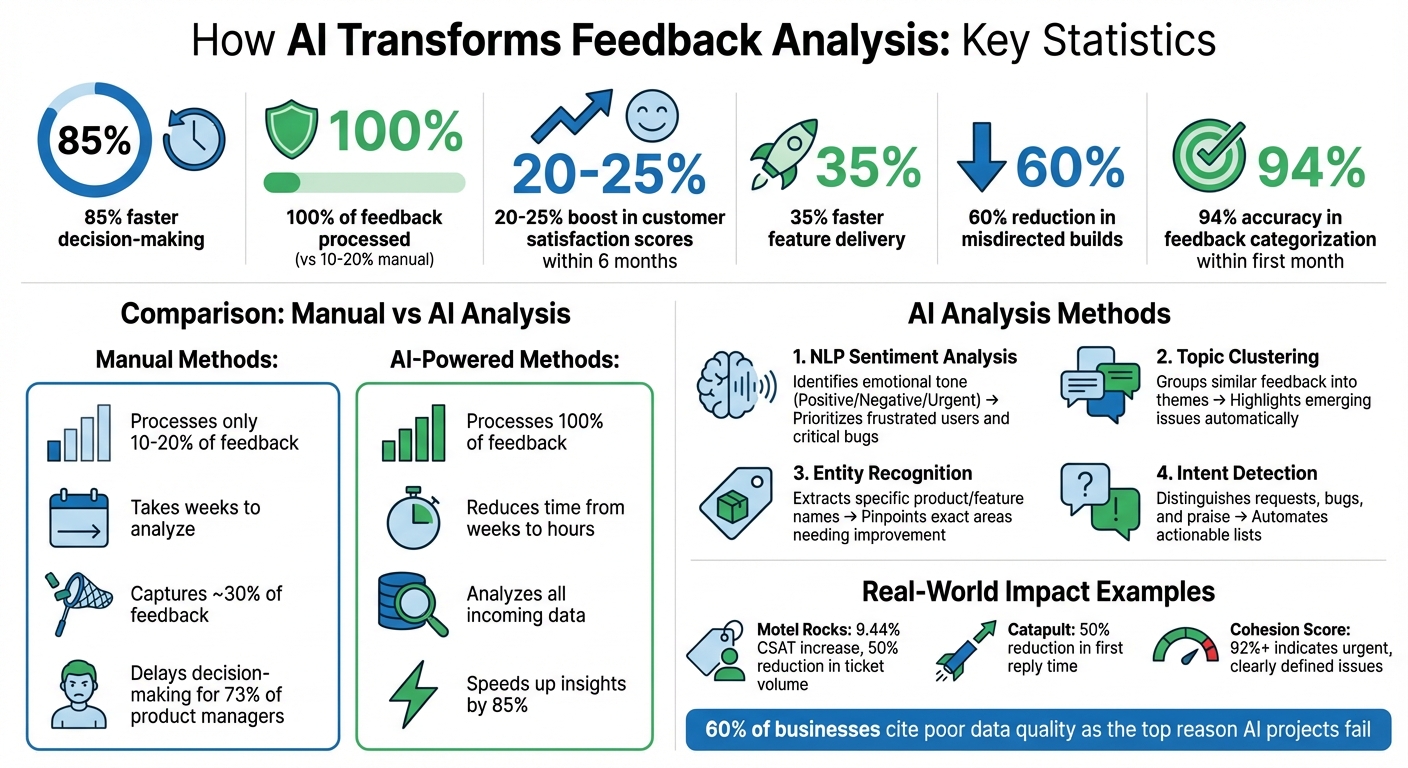
AI tools are transforming how businesses process customer feedback. Instead of relying on time-consuming manual methods, AI uses techniques like Natural Language Processing (NLP) and clustering to organize, analyze, and prioritize feedback from multiple sources such as support tickets, app reviews, and social media mentions. This approach speeds up decision-making by 85%, helps detect trends, and ensures no feedback is overlooked.
Key highlights:
- Faster insights: AI reduces the time needed to analyze feedback from weeks to hours.
- Comprehensive analysis: Processes 100% of feedback, unlike manual methods that handle only 10–20%.
- Smarter decisions: AI ranks feedback by frequency, sentiment, and business impact, ensuring critical issues are addressed first.
- Improved customer satisfaction: Companies using AI tools report a 20–25% boost in satisfaction scores within six months.
Build This Product Feedback AI Analyst In Just 10 Minutes | FULL TUTORIAL
Gathering Feedback from Multiple Sources
To get a full picture, AI needs input from a variety of data sources. Relying on just one channel can distort results. For example, support tickets might overemphasize bugs, while surveys only reflect the opinions of those motivated enough to respond. By combining structured data (like polls or ratings) with unstructured data (such as support tickets or social media), AI can separate isolated issues from larger patterns across different user groups.
When AI connects feedback to user behavior, it reveals the real impact of customer sentiment. For instance, if text feedback highlights "confusing onboarding" and churn rates are high in the same segment, AI can pinpoint how this specific issue is driving users away. This blend of diverse inputs creates a strong base for meaningful AI analysis.
Using Modu Modules to Collect Feedback

Modu offers six different module types to gather and organize data for AI analysis:
- Single and Multiple Choice polls: Quick and easy for users, these provide high response rates and help gauge preferences.
- Rating modules: Use a 1–5 scale to track satisfaction trends over time.
- Suggestions boards: Allow users to propose ideas and vote on them, prioritizing community-driven insights.
- Text forms: Gather detailed, private feedback, such as bug reports or feature requests.
- Roadmaps: Display features that are planned, in progress, or already released, keeping users informed and engaged.
- Changelogs: Share updates with visuals like cover images or YouTube embeds to highlight progress.
Each module generates a unique type of data - whether it's numerical scores, detailed narratives, or voting trends - giving AI a well-rounded dataset to analyze.
Making Feedback Collection Easy for Users
Modu makes it simple for users to share their thoughts by offering multiple ways to collect feedback. You can use website embeds, popup widgets, or shared links to meet users wherever they are. For example:
- Inline embeds: Perfect for placing at the end of help articles.
- Popup widgets: Trigger these after key actions, like completing a purchase, to capture immediate reactions.
- Shared links: Send via email to collect feedback while the experience is still fresh.
Timing and placement are key. Exit-intent popups on pricing pages or passive feedback tabs in dashboards can encourage responses from a broader range of users - not just the most vocal ones. This streamlined process ensures AI gets diverse, high-quality input, leading to sharper insights and faster product improvements.
Preparing Feedback Data for AI
Raw feedback is often messy and far from ready for AI processing. Unlike humans, who can overlook typos or inconsistencies, AI lacks that contextual flexibility. A single error in the data can skew model training, leading to inaccurate predictions and flawed insights [4][7]. In fact, 60% of businesses cite poor data quality as the top reason their AI projects fail [5].
AI has a tendency to deliver results with high confidence, even when the underlying data is flawed. This can lead to misleading conclusions that steer decision-makers astray [7]. As Pardhasaradhi aptly puts it:
"The old adage 'garbage in, garbage out' still holds true. Data cleaning ensures that the raw material fed into these powerful tools is accurate, consistent, and usable" [7].
The sections below outline key techniques for cleaning text-based feedback and preparing poll and rating data for AI analysis.
Cleaning Text and Suggestion Responses
Text-based feedback, like open-ended responses or suggestion boards, demands thorough preparation. Start by consolidating duplicate entries. For instance, phrases like "App is slow" and "Performance issues" should be merged to avoid splitting votes or misrepresenting feedback trends. Without this, machine learning models may misinterpret variations in product names (e.g., "Blue Shirt" vs. "Blue Shrt") as entirely different entities, which undermines pattern recognition [7].
Natural Language Processing (NLP) tools can help normalize text and eliminate inconsistencies. For example, standardizing "USA" and "United States" into a single format ensures accurate mention counts [5]. A consistent tagging system also helps categorize feedback effectively. Tags should include:
- Type: Whether the feedback is about a bug, feature, or something else.
- Theme: The specific product area or category.
- Code: A concise summary.
Keeping the number of categories below 20 avoids confusion and minimizes data silos.
Enhance feedback items by adding metadata like browser type, account size, or revenue. This additional context allows AI to prioritize insights based on business impact, not just feedback volume. It also makes it easier to identify trends among high-value users.
Organizing Poll and Rating Data
Polls and ratings provide structured data, but they still require standardization for effective AI analysis. Use balanced rating scales - typically 5-point or 7-point - with clear labels ranging from "Very Unsatisfied" to "Very Satisfied." This ensures that numeric data is easy to compare across surveys. You can further standardize ratings using techniques like min-max scaling or percentage conversion [4][6].
For poll data, make sure options are mutually exclusive and keep the number of choices between 4 and 6 to reduce noise. Standardize formats for dates, phone numbers, and currency to maintain consistency. For example, without standardization, AI might treat "3/4/2026" and "March 4, 2026" as entirely different entries, which can disrupt trend analysis and frequency counts [4][6].
How AI Analyzes Feedback
When feedback is clean and standardized, AI can uncover patterns and turn thousands of comments into actionable insights. Two main tools - Natural Language Processing (NLP) and clustering - work together to analyze feedback from Suggestions, Text modules, and ratings, helping teams make informed product decisions.
Using Natural Language Processing (NLP)
NLP gives AI the ability to process text-based feedback at scale. It automatically organizes feedback into themes like "Onboarding", "Pricing", "Performance", or "Feature Requests", eliminating the need for manual tagging. Impressively, AI can achieve up to 94% accuracy in categorizing feedback within the first month [1].
NLP also performs sentiment analysis, identifying emotional tones such as positive, negative, neutral, or urgent. It can even detect sarcasm, ensuring that comments like "Great job crashing again" aren’t mistakenly labeled as positive. Beyond sentiment, entity recognition pinpoints specific features, pages, or workflows mentioned in feedback. For instance, comments like "The checkout page freezes" or "Payment doesn’t work" allow NLP to focus on "checkout" as the problem area.
To streamline analysis, NLP consolidates similar phrases - merging "App is slow" with "Takes forever to load", for example - ensuring accurate vote counts and avoiding duplicates. Amol Jain, Head of Product Engineering at Replit, summed up the efficiency of AI-powered feedback analysis:
"The fact that AI Feedback just did it by clicking buttons? That was fairly magical" [2].
When paired with clustering, NLP becomes part of a powerful system for understanding feedback.
Finding Patterns with Clustering
Clustering complements NLP by grouping related feedback into meaningful themes. It identifies recurring issues based on the semantic meaning of text. For example, comments like "slow performance", "lag issues", and "app freezes" would all be grouped under a single cluster focused on performance problems.
Each cluster is assigned a cohesion score, which measures how closely related the items within that group are. A score of 92% or higher signals a clearly defined, urgent issue that requires immediate attention. Thanks to AI, teams can analyze feedback and gain insights 85% faster, cutting down the time from weeks to just hours [1].
Table: Key AI Methods and Their Benefits
| AI Method | Function | Benefit |
|---|---|---|
| NLP Sentiment Analysis | Identifies emotional tone (Positive/Negative/Urgent) | Helps prioritize frustrated users and critical bugs |
| Topic Clustering | Groups similar feedback into themes | Highlights emerging issues without manual effort |
| Entity Recognition | Extracts specific product/feature names | Pinpoints exact areas of the product needing improvement |
| Intent Detection | Distinguishes between requests, bugs, and praise | Automates actionable feature and bug lists |
Converting Feedback into Product Decisions
AI's ability to analyze feedback is impressive, but turning those insights into actionable product decisions is where the real work begins. The challenge lies in identifying actions that create the most impact. Teams leveraging AI tools have reported delivering features 35% faster and reducing misdirected builds by 60% [1].
Ranking Feedback by Priority
AI helps rank feedback based on multiple factors, making it easier for teams to decide what to tackle first. Frequency and volume are key indicators - issues that show up repeatedly often point to widespread problems [2][1]. Meanwhile, sentiment and urgency analysis highlights critical bugs or pain points that frustrate users, distinguishing them from neutral or less pressing suggestions [1][3]. Feedback that’s both frequent and tied to negative sentiment should rise to the top of your priority list.
To add further validation, behavioral correlation links qualitative feedback to quantitative data. For example, if users complain about a "broken checkout" and your analytics reveal a 15% drop in conversion rates, you’ve confirmed both the problem and its business impact [2]. This prevents teams from overreacting to vocal minorities while ignoring silent majority issues.
Take Motel Rocks, an online fashion retailer, as an example. In January 2026, they used Zendesk Copilot to analyze customer sentiment and recurring frustrations. By addressing these early, they boosted their Customer Satisfaction Score (CSAT) by 9.44% and cut total ticket volume in half.
Once feedback is ranked and validated, the next step is integrating it into your workflow.
Adding Insights to Your Product Workflow
After prioritizing feedback, it’s time to weave those insights into your product development process. Tools like Modu's Roadmap module make this step seamless. High-priority feedback can be converted into roadmap items, organized by status: Backlog, Planned, In Progress, or Shipped. This gives users a clear view of what’s being worked on and when.
Modu also integrates with platforms like Jira, Linear, Trello, and ClickUp, allowing teams to turn feedback into development tickets with a single click. For example, in August 2025, Catapult, a company specializing in athletic performance, used automated triage tools to prioritize support tickets by urgency and sentiment. This integration reduced their first reply time by 50%.
Teams can also set up Slack alerts to flag spikes in negative sentiment or keywords like "broken" or "error", helping them catch bugs early [8][1].
Once features are shipped, Modu's Changelog module helps close the feedback loop. You can post updates with titles, detailed descriptions, cover images, and even YouTube embeds. This transparency shows users their input matters, fostering trust and encouraging them to stay engaged with your feedback channels.
Key Takeaways
AI transforms the traditionally slow and subjective process of feedback analysis into a fast, data-driven system. Research highlights that AI-powered tools can reduce time-to-insight by 85%, speed up feature delivery by 35%, and cut down misdirected development by 60%[1]. Unlike manual methods, which typically capture only about 30% of feedback, AI can process 100% of incoming data from sources like support tickets, app reviews, and social media. By using quantified impact scores - factoring in frequency, sentiment, and user behavior - AI eliminates the bias of vocal minorities, turning raw feedback into actionable insights.
For example, Modu streamlines feedback collection and analysis into a single workflow. Its AI-powered clustering groups similar suggestions, while integrations with tools like Jira, Linear, and Slack help transform insights into actionable tasks. Additionally, its Roadmap and Changelog features keep users updated and showcase visible progress.
Manual feedback analysis often delays decision-making for 73% of product managers[1]. AI not only speeds up this process but also reshapes how teams understand their users, prioritize projects, and deliver features that resonate. These takeaways underline how AI-driven insights enable product teams to make smarter, data-backed decisions.
FAQs
What feedback sources should I include for accurate AI insights?
To gather accurate insights from AI, it's crucial to pull feedback from a variety of sources. Here are some key ones to consider:
- Support tickets and customer interactions: These often highlight specific pain points or recurring issues users face.
- Surveys and in-app feedback widgets: These provide structured, targeted responses that are easy to analyze.
- User reviews on external platforms: These offer a broader view of customer sentiment and perceptions.
- Community suggestion boards: These help identify and prioritize features users are actively requesting.
- Product roadmaps and changelogs: These can reveal trends in feedback over time and align insights with past updates.
By combining these sources, AI can generate insights that lead to actionable improvements for your product.
How clean does my feedback data need to be before using AI?
For AI to deliver precise analysis, feedback data needs to be carefully prepared and structured. This means eliminating duplicates, fixing any formatting inconsistencies, and tagging or categorizing the feedback appropriately. While there isn’t a specific standard for how clean the data must be, well-organized input helps the AI identify patterns, sentiments, and trends more effectively. This also minimizes the risk of errors or biases. By ensuring the data is properly refined, you can gain more dependable insights and make better use of automated analysis tools.
How do I turn AI feedback clusters into a prioritized roadmap?
To build a focused roadmap using AI feedback clusters, start by reviewing user feedback that has been grouped into themes through AI clustering. Pinpoint the clusters that appear most often or highlight pressing issues, as these usually indicate high user demand or critical concerns. Then, assess the sentiment and potential impact of each cluster, ranking them by urgency and their value to your business goals. Use this ranking to shape your roadmap, ensuring it addresses user priorities effectively.