
Product Changelog Best Practices: Q&A with Experts
Product Changelog Best Practices: Q&A with Experts
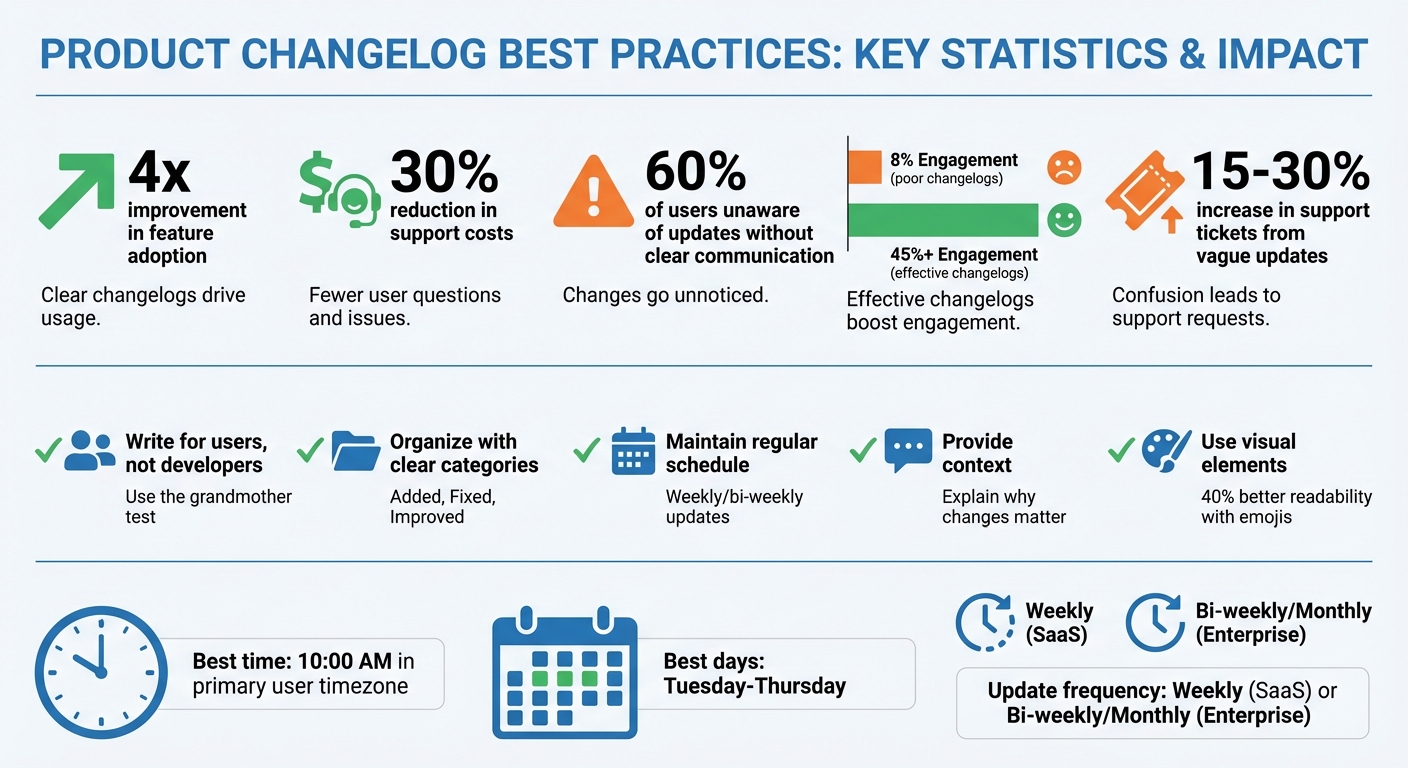
A product changelog is more than a list of updates - it’s a tool to keep users informed and engaged. Done right, it can improve feature adoption by up to 4x, reduce support costs by 30%, and build trust with your audience.
Here’s how to craft effective changelogs:
- Focus on users: Write updates in simple, clear language that highlights user benefits. Avoid technical jargon.
- Organize clearly: Use categories like "Added", "Fixed", and "Improved" to make updates easy to scan.
- Be consistent: Stick to a regular update schedule, like weekly or bi-weekly, and publish at optimal times (e.g., midweek mornings).
- Provide context: Explain why changes matter, and connect updates to user needs or feedback.
- Engage visually: Use emojis, bold text, or short videos to make updates stand out.
Tools like Modu can simplify changelog management by automating drafts, linking updates to roadmaps, and tracking user engagement. A well-maintained changelog isn’t just informative - it’s a bridge to stronger user relationships.
5 SaaS Changelog Best Practices to Boost Feature Adoption & User Engagement
Expert Best Practices for Creating Effective Changelogs
Crafting a great changelog requires putting users front and center. The best product teams treat their changelogs as an extension of their product. As the team at Tallyfy says, "Your changelog is a product. Treat your changelog with the same care as your product" [5]. This means focusing on what users need to know, rather than diving into internal technical details.
Write for Users, Not Developers
Changelogs shouldn’t read like engineering notes packed with jargon. Instead, make them accessible by focusing on how updates benefit the user. A good rule of thumb? Use the "grandmother test" - if a nontechnical person can understand the update, you’re on the right track. Every entry should answer, "What’s in it for me?" For example, instead of vague statements like "Improved performance", say, "Sign-in is now twice as fast" or "Dashboard loads 30% quicker." Clear, outcome-focused language helps users immediately see the value of changes.
Organize Updates into Clear Categories
A well-structured changelog is easier to navigate. Start with any breaking changes at the top, flagged with clear symbols like ⚠️, and provide step-by-step guidance for users to adapt. Use a visual hierarchy - bold key points and keep descriptions short - to make updates scannable. Some teams even incorporate emojis, such as 🚀 for new features or 🐞 for bug fixes, which can improve readability by up to 40% [7]. Once you establish a format, stick with it so users know what to expect. Consistency in structure makes updates more approachable and keeps users engaged.
Maintain a Regular Update Schedule
Consistency in timing builds trust. Whether you release updates weekly, bi-weekly, or monthly, choose a schedule and stick to it. For SaaS products, weekly updates often work best, while enterprise software may benefit from longer cycles - bi-weekly or monthly - to allow for more thorough testing.
Timing is also key. Publishing updates between Tuesday and Thursday, ideally around 10:00 AM in your customers’ primary time zone, ensures they’re more likely to notice. An "Unreleased" section can help track upcoming changes internally, and bundling minor updates together prevents overwhelming users with constant notifications. Regular, predictable updates help maintain user trust and keep them engaged with your product.
Using Modu to Improve Your Changelog Process

Managing changelogs manually can quickly become chaotic, especially when juggling multiple updates, notifying users, and connecting changes to your roadmap. Modu's Changelog module simplifies this by centralizing everything. Instead of digging through scattered posts or emails, you get one organized hub for all your updates, streamlining communication and keeping users informed [6].
What Modu's Changelog Module Offers
Modu makes updates easier to read with Markdown support, allowing you to use bullets, bold text, and headers. This keeps your content clear and prevents users from feeling overwhelmed [3]. You can also use tags like "Added", "Fixed", or "Improved" to categorize updates, include cover images to make announcements stand out, and embed YouTube videos to guide users through new features [10][8][11]. Plus, emoji reactions let users give instant feedback, so you can see how updates are received.
Another standout feature? AI-generated changelog drafts. Modu can pull from roadmap descriptions, feature requests, or commit logs to create drafts automatically [9][11]. This saves your team time and lets them focus on delivering updates instead of writing about them.
Connecting Changelogs to Roadmaps and Feedback
Modu doesn’t just organize your changelogs - it connects them directly to your roadmap and feedback process. When a roadmap item is marked as "Shipped", Modu automatically notifies everyone who requested or voted for that feature [4][11]. This closes the feedback loop in a seamless way: users suggest ideas, you track them on your roadmap, and when the feature is live, they’re notified right through the changelog [9][10].
You can also link changelog entries to specific roadmap items, allowing users to follow a feature's progress from "Planned" to "In Progress" to release [9][4]. To top it off, Modu's engagement analytics track views, clicks, and reactions, giving you insight into which updates resonate most with your audience [9][11]. This turns your changelog into more than a simple update - it becomes an interactive tool for ongoing conversations with your users.
Common Changelog Mistakes to Avoid
Even with the best intentions, teams can stumble into common pitfalls that undermine the effectiveness of their changelogs. A well-crafted changelog does more than just inform - it keeps users engaged and ensures updates are clear and relevant. Missteps, however, can lead to confusion, higher support costs, and wasted effort on features that users might not even notice. By understanding these common mistakes, you can keep your changelog user-friendly and impactful.
Don't Overwhelm Users with Too Much Information
One of the worst things you can do is overload users with unnecessary details. Experts often refer to this as "The Novel" - long-winded explanations for minor fixes that no one has the time (or patience) to read [5]. On the other end of the spectrum is "The Git Dump," where raw commit logs filled with internal jargon and ticket numbers are dumped directly into the changelog [5][2]. Both approaches miss the mark because they treat changelogs like internal documentation, not user-focused communication.
Here’s the reality: most changelogs only manage engagement rates of around 8%. But concise, user-friendly updates can boost that number to 45% or more [7]. Instead of saying something like "Refactored authz subsystem", focus on the user-facing benefit: "Sign-in is now twice as fast" [5][3].
Another common mistake is "clumping" - releasing a massive batch of updates all at once [12]. When users are forced to sift through an overwhelming list of changes, they’re more likely to miss the updates that matter to them. A better approach? Release smaller, more frequent updates and organize them with clear categories like Added, Fixed, and Improved [2][5]. Keep individual entries short (under 20 words when possible), highlight key points with bold text, and remember that 70% of users want to hear about updates but find most release notes "boring" or "confusing" [7].
Always Provide Context for Updates
Another major misstep is "vague-noting" - entries like "Various bug fixes and improvements" that offer no meaningful information [5][12][1]. Without context, users are left guessing how updates affect them, which often leads to frustration and increased support tickets (by as much as 15%–30%) [7].
"Your customers don't care about your database optimizations - they care about their experience." - Tallyfy [5]
Providing context doesn’t mean writing a novel. It means focusing on how updates benefit the user. For example, instead of saying "Added CSV export", explain the value: "Export your data to Excel for custom reporting" [5][3]. Specifics matter - "Dashboard loads 3x faster" is far more engaging than "Improved performance" [5][2]. And when updates are based on user feedback, make that clear: "You asked for dark mode - here it is!" [13][6]. Acknowledging user input not only builds trust but also encourages engagement. Teams that include this kind of context see up to four times higher adoption rates for new features [3].
Conclusion: Key Takeaways for Better Changelogs
Think of your changelog as more than just a list of updates - it's a way to build trust, engage users, and encourage loyalty. When done effectively, it can turn unnoticed feature launches into active engagement opportunities, cut down support inquiries by 15% to 30% [7], and ensure users are aware of new features. Without clear communication, 60% of users may remain unaware of updates [3]. The difference between an 8% engagement rate and one exceeding 45% often comes down to applying a few simple, consistent practices [7]. These strategies emphasize the importance of user-centered communication, reinforcing the themes discussed earlier.
Steps to Improve Your Changelog Strategy
Make your changelog easy to understand by writing in plain language - something even a grandparent could grasp [5]. For instance, swap out technical jargon like "refactored auth" for something more relatable, such as "Login is now 2x faster" [5]. Organize updates clearly by grouping them into sections like "Added", "Improved", "Fixed", and "Security", so users can quickly find what matters to them [5]. Highlight breaking changes prominently at the top with clear warnings [2].
Use visual elements like screenshots, GIFs, or short videos to make your updates more engaging - this can boost user interaction by 3 to 5 times [13]. Acknowledge user feedback directly to strengthen engagement [14]. Be consistent with your update schedule, whether weekly, bi-weekly, or monthly, and aim to publish between Tuesday and Thursday at around 10:00 AM in your users' primary timezone [5]. Finally, wrap up every update with a clear call-to-action, like "Try it now" or "Read the guide", to encourage immediate adoption [7].
How Modu Can Help with Your Changelogs
Modu simplifies the process of creating effective changelogs. Its tools link updates directly to user feedback and roadmaps, automatically notifying users when a feature they supported becomes available [13]. Modu transforms complex commit logs into user-friendly, benefit-driven updates that anyone can understand. It also automates distribution across multiple channels, including in-app widgets, email digests, and public pages. By centralizing your changelog strategy, Modu ensures every update aligns with user needs and long-term product goals, helping you craft a more cohesive product experience.