Product Iteration: Aligning Teams with Feedback
Product Iteration: Aligning Teams with Feedback
Building great products starts with team alignment. Misaligned teams waste time, miss opportunities, and fail to deliver what users actually need. The solution? User feedback. But gathering feedback isn’t enough - it’s about making it actionable and accessible to everyone.
Here’s how teams can stay aligned and make better decisions:
- Shared Feedback Dashboards: Centralize all user feedback in one place, ensuring everyone works from the same information.
- Cross-Functional Feedback Reviews: Bring teams together to evaluate and prioritize feedback collectively.
- Integrated Feedback Workflows: Embed feedback directly into tools like Slack or Jira for seamless execution.
Each method has its strengths. Dashboards improve visibility, reviews break silos, and integrated workflows speed up execution. Combining all three ensures feedback drives smarter, faster product development.
Building Alignment with Cross-Functional Product Stakeholders | Excellent Product Leadership
1. Shared Feedback Dashboards
A shared feedback dashboard consolidates all user input into one accessible hub for the entire team. Instead of sifting through scattered email threads, support tickets, or Slack channels, everything is stored in one centralized system. This setup ensures product managers, engineers, designers, and customer success teams can access the same information at any time, making feedback visibility the cornerstone of team alignment.
Alignment Strength
The real strength of a shared dashboard is its ability to create a single source of truth. When support teams see the same feature requests as engineering, and marketing can track what users are asking for, everyone works from the same playbook. It bridges gaps between departments by turning fragmented monitoring into cohesive listening. As one expert puts it, "Monitoring reveals what people are saying to you, while listening reveals what they're saying about you" [4]. A shared dashboard ensures every department hears the same story.
The challenge? Ensuring the dashboard becomes part of daily routines. While product roadmaps might get reviewed weekly or monthly, feedback dashboards need to be checked regularly to stay effective. If it’s just another tab that no one opens, its potential is wasted.
Feedback Utilization
Transforming raw feedback into actionable insights is where these dashboards shine. Prioritization frameworks help teams make sense of the flood of requests. For example, combining an Impact vs. Feasibility matrix with key business metrics like Monthly Recurring Revenue (MRR) or churned revenue helps teams decide what’s doable and what drives results [1][2]. This approach balances user demand with business goals.
Modern dashboards go a step further by pairing user comments with behavioral data. Tools like heatmaps and session recordings can confirm whether usage patterns align with specific feature requests [3]. This structured process not only clarifies priorities but also prepares teams to handle growth efficiently as both user and team demands increase.
Scalability
Shared dashboards are built to handle growth. As user input increases, these systems automatically organize feedback - aggregating vote counts and request volumes to highlight trends without manual effort. Platforms like Modu streamline this with suggestion modules, allowing users to submit ideas and vote on them. The system ranks requests by vote score, ensuring feedback remains manageable even as submissions multiply.
However, team growth adds another layer of complexity. More departments mean more people accessing the dashboard, more perspectives to account for, and a higher risk of the tool becoming cluttered. To prevent this, clear ownership is essential. Someone must curate the data, ensuring the dashboard stays focused and doesn’t devolve into a chaotic repository of unorganized feedback.
2. Cross-Functional Feedback Reviews
Cross-functional feedback reviews bring together product managers, engineers, designers, QA teams, and marketing to evaluate user feedback as a cohesive unit. Instead of working in isolation, these teams collaborate to set priorities, turning feedback into a shared responsibility rather than leaving it solely to product managers.
Strength in Alignment
The real advantage of cross-functional reviews is their ability to break down silos. As Koko Product highlights:
Cross-functional workshops... provide a platform for diverse perspectives, breaking down silos and enhancing collective problem-solving [6].
When engineers see the same feature requests as customer support, or designers hear firsthand about usability issues from QA, the entire team gains a shared understanding. This unified perspective helps avoid conflicting priorities and fosters alignment.
The process also ensures a deeper, more comprehensive evaluation. By involving design, development, QA, and marketing, teams can assess both the feasibility and the potential impact of decisions [1][7]. For example, a feature request that seems straightforward might reveal unexpected technical challenges or uncover marketing opportunities when viewed through multiple lenses. Thoughtworks explains:
Involving the team in co-creation helps drive buy-in, build empathy for the user and foster collective problem-solving [7].
This collective approach not only eliminates silos but also lays the groundwork for turning feedback into actionable plans.
Making Feedback Actionable
These reviews transform raw feedback into clear, actionable steps. Teams often use tools like Impact vs. Feasibility matrices [5] to collaboratively map out feedback, ensuring everyone understands not just what will be developed, but also why. This shared discussion and debate create alignment across the board.
Incorporating these reviews into agile rituals - like sprint planning, daily standups, and sprint reviews - keeps customer insights front and center [4]. Tim Jordan, Senior Manager of Customer Support at Cars.com, emphasizes this point:
Numbers tell you what's happening. Comments tell you why [4].
By embedding feedback into the team's daily workflow, it becomes an integral part of the development process rather than an afterthought.
Faster Iteration
Structured reviews also speed up the development cycle. Prioritization based on actionable feedback reduces errors and accelerates time-to-market. The idea that "quality powers speed" underscores how involving QA and other teams early in the process leads to quicker, more efficient development [7]. Continuous feedback loops - through feature walkthroughs, story kickoffs, and bug bashes - further streamline the process [7]. As Koko Product puts it:
Alignment enables swift adjustments, allowing product managers to iterate rapidly based on market feedback and changing business priorities [6].
3. Integrated Feedback Workflows
Integrated workflows take user feedback directly into the tools teams already use - like project management systems, communication platforms, and development trackers. This approach eliminates the need for separate dashboards or extra meetings by embedding feedback into daily operations, making it part of the natural flow of product development.
Alignment Strength
By integrating feedback into tools like Slack, Jira, or Linear, teams eliminate the usual friction that slows alignment. For instance, engineers can see user requests alongside technical requirements in their issue trackers, while designers can view satisfaction ratings right next to feature specs. This setup ensures that everyone has access to the same information without needing to jump between platforms or attend extra discussions.
Tools like Modu make this process even smoother by connecting user feedback directly to development workflows. For example, a popular suggestion on a public board can trigger Slack notifications or automatically create tasks in Jira, Trello, ClickUp, or Linear. This automation ensures that critical feedback gets to the right teams instantly.
Feedback Utilization
Integrated workflows turn feedback into actionable insights. Instead of relying on secondhand summaries, product managers can use live data exports, like those available through Google Sheets integrations, to monitor trends and voting patterns. This ensures stakeholders have direct access to the most current insights.
For developers, seeing a Jira issue with the original user's words provides clarity on both what to build and why it’s important. This level of context preserves the nuances that often get lost during traditional handoffs. As a result, teams can prioritize features that address real user needs during sprint planning, rather than making decisions based on assumptions. This direct connection between feedback and action shortens the iteration cycle while maintaining focus on what matters most.
Iteration Speed
Automation speeds up the entire process. Real-time feedback eliminates the need to wait for scheduled reviews. For example, a bug report submitted through a Text module can immediately notify the appropriate team via Slack. Similarly, a highly-voted feature suggestion can automatically move to "Planned" status on a public roadmap, keeping users informed without requiring manual updates.
This faster feedback loop doesn’t compromise quality - it actually improves it. Continuous feedback allows teams to make adjustments mid-sprint instead of discovering problems during retrospectives. By automating the distribution of feedback, teams stay aligned without disrupting their workflows. The result? Faster delivery of updates that truly resonate with users.
Scalability
Integrated workflows are designed to grow with your team. Whether you’re a three-person startup or a large enterprise, the same Slack-to-Jira pipeline works seamlessly. Automation ensures feedback reaches the right people, regardless of team size or complexity. For larger organizations, features like password-protected boards and SSO options maintain security while still enabling broad feedback collection.
This approach also scales to handle growing feedback volumes. Automated AI clustering groups similar suggestions, preventing teams from getting overwhelmed by duplicate requests as the user base expands. What might start as a simple integration for a small team can evolve into a robust feedback infrastructure without requiring a complete overhaul.
Comparing the Three Approaches
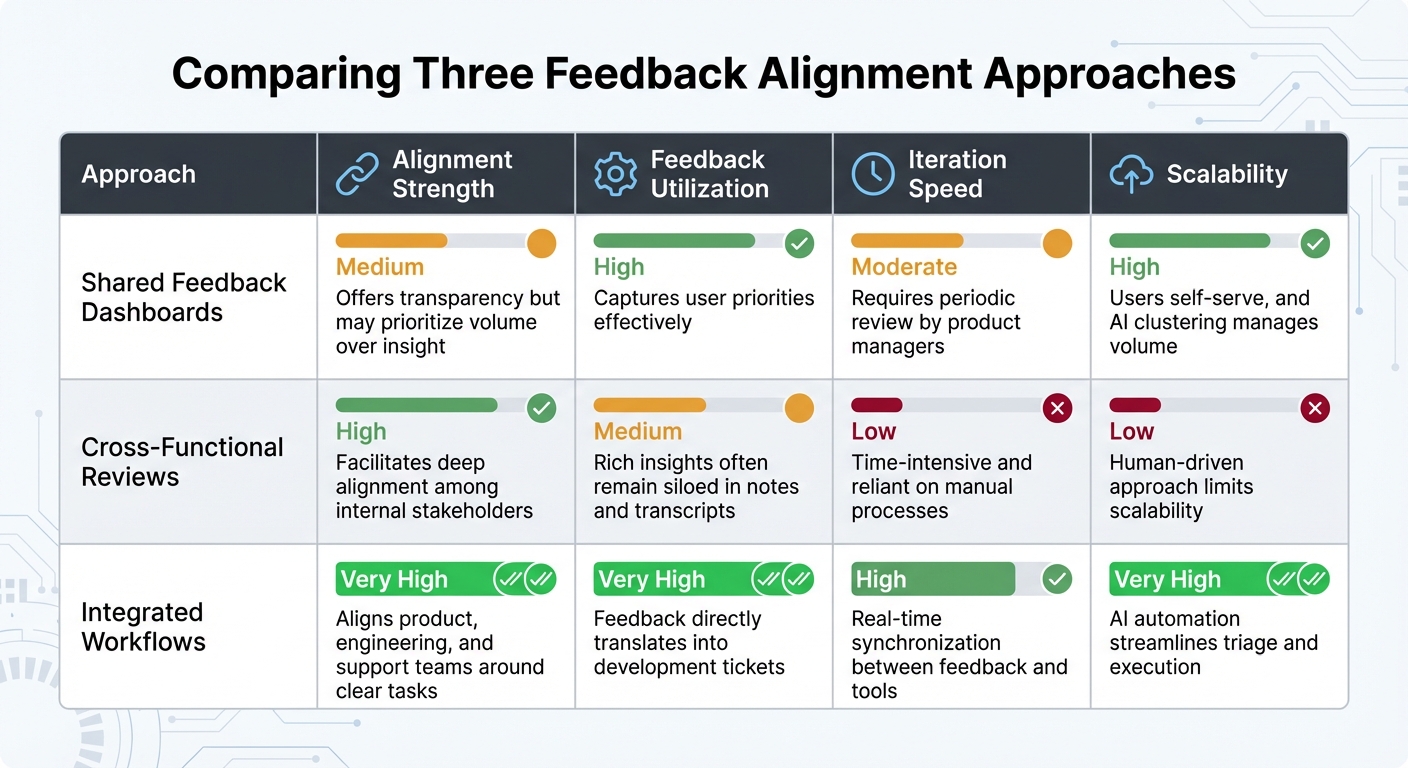
Let’s take a closer look at how these different methods stack up when it comes to aligning teams with feedback. Each approach offers its own strengths and challenges, making them suitable for different scenarios.
Shared Feedback Dashboards shine when it comes to transparency and engaging the community. They allow users to vote on suggestions and see what others care about most. However, they can sometimes amplify the voices of the most vocal users, which might overshadow more meaningful insights. On the other hand, Cross-Functional Feedback Reviews bring sales, support, and product teams together, fostering a deep understanding of user behavior. While this method is great for strategic alignment, it’s time-intensive and harder to scale as teams grow. Lastly, Integrated Feedback Workflows take a more seamless approach by embedding feedback directly into development tools, turning user requests into actionable tasks almost instantly.
Here’s how these approaches compare across key dimensions:
| Approach | Alignment Strength | Feedback Utilization | Iteration Speed | Scalability |
|---|---|---|---|---|
| Shared Feedback Dashboards | Medium - offers transparency but may prioritize volume over insight | High - captures user priorities effectively | Moderate - requires periodic review by product managers | High - users self-serve, and AI clustering manages volume |
| Cross-Functional Reviews | High - facilitates deep alignment among internal stakeholders | Medium - rich insights often remain siloed in notes and transcripts | Low - time-intensive and reliant on manual processes | Low - human-driven approach limits scalability |
| Integrated Workflows | Very High - aligns product, engineering, and support teams around clear tasks | Very High - feedback directly translates into development tickets | High - real-time synchronization between feedback and tools | Very High - AI automation streamlines triage and execution |
Modu takes Shared Feedback Dashboards to the next level by incorporating AI clustering. This groups similar ideas with over 92% cohesion, preventing duplicate requests from distorting priorities. Additionally, real-time analytics track sentiment trends across user segments, ensuring feedback from high-value enterprise customers carries the weight it deserves compared to free-trial users. This segmentation helps align roadmap decisions with revenue impact rather than sheer submission volume.
Ultimately, the best teams don’t rely on just one method - they combine all three. Dashboards are used for gathering broad community input, cross-functional reviews for strategic alignment on major decisions, and integrated workflows for day-to-day execution. By notifying users when features they voted for move from “Planned” to “Shipped,” teams build trust and encourage ongoing, meaningful feedback. This balanced approach ensures both community engagement and operational efficiency.
Conclusion
Choose your feedback alignment method based on your team’s size, workflow pace, and strategic objectives. For small teams, shared feedback dashboards are ideal - they promote transparency and let users vote on priorities through public suggestion boards. Mid-sized teams with more complex product structures should focus on cross-functional reviews to balance user needs with business goals across engineering, marketing, and sales. For teams that move quickly, integrated workflows ensure feedback is turned into actionable tasks within hours.
Recent examples show that implementing these methods has cut response times by 50% and clarified feedback trends, leading to smarter strategic decisions. These results highlight the benefits of an integrated approach, which Modu conveniently offers.
With Modu, you can access all three approaches in one platform. Use the Suggestions module for centralized dashboards, the Roadmap module for cross-functional reviews, and integrations with tools like Jira, Linear, and Slack for automated workflows. Plus, AI clustering ensures 100% of feedback is processed, eliminating duplicate requests and keeping priorities clear.
The best product teams combine these methods to turn scattered feedback into decisive action. Dashboards capture broad community insights, cross-functional reviews shape key decisions, and integrated workflows handle daily execution - transforming raw feedback into actionable strategies.
FAQs
How do we stop the loudest users from skewing feedback priorities?
To keep the feedback process balanced and prevent the most vocal users from overshadowing others, consider strategies like weighted voting or normalization. These methods help distribute influence more evenly. Platforms such as Modu offer tools like AI-driven insights and trend analysis, which can spotlight a wider range of perspectives.
Additionally, setting limits on the number of votes or suggestions each user can submit ensures no single voice dominates. Pair this with transparent prioritization processes to ensure that all user input is fairly represented, keeping the focus on addressing genuine needs.
Who should own the feedback system to keep it clean and effective?
The feedback system needs a clear owner or team to keep it organized and useful. This responsibility often falls to product managers or customer experience teams since they can tie feedback directly to broader goals. Their job includes managing the collection, sorting, and analysis of feedback, ensuring the system stays clean and effective. By doing so, they can turn user insights into meaningful product updates.
When should we use dashboards vs reviews vs integrations?
Dashboards provide a clear way to monitor key metrics and trends as they happen, making it easier for teams to track progress and stay aligned with their goals. Reviews, on the other hand, dive deeper into evaluating user feedback and suggestions, helping teams prioritize tasks and make informed decisions. Integrations link feedback tools like Modu with platforms such as Jira or Slack, automating data sharing and simplifying workflows. When used together, these tools create a seamless system for managing feedback and keeping teams on the same page during product development.