
Using Feedback to Solve Channel Pain Points
Using Feedback to Solve Channel Pain Points
Friction in customer interactions can cost your brand more than you think. Research shows that 70% of shoppers lose trust in a brand after just two bad experiences. When customers face obstacles - like a confusing checkout process or unresponsive chatbots - they’re more likely to leave than stay.
Here’s the good news: feedback is your fix. By asking customers for their input at key moments, you can identify pain points across your website, mobile app, email, or social media. Addressing these issues not only improves satisfaction but also boosts retention and revenue - companies focused on customer experience grow 41% faster.
Key takeaways:
- Common pain points: Repeating issues across channels, slow service, or broken processes.
- Feedback tools: Use surveys, ratings, and suggestion boards to pinpoint problems.
- Action steps: Organize feedback, prioritize fixes, and update customers on progress.
Feedback isn’t just about listening - it’s about acting. Fixing these issues can transform your customer experience, reduce churn, and build loyalty.
How To Identify Customer Pain Points (Detailed Breakdown)
What Are Channel Pain Points?
Channel pain points are the obstacles customers encounter when interacting with your brand across various communication methods - like your website, email, live chat, social media, or mobile app [4]. These aren’t just small inconveniences; they’re barriers that make it harder for customers to meet their needs, often leading to frustration.
One major issue is the need for customers to repeat themselves when switching between channels. For example, imagine explaining your problem to a live chat agent, only to start over again when you move to email. This kind of experience is a dealbreaker for many. In fact, 32% of customers stop engaging with a brand after just one bad encounter [5]. Meanwhile, 79% expect brands to respond to social media complaints within 24 hours.
Each channel comes with its own set of challenges. Websites may have confusing layouts or complicated checkout processes that lead to abandoned carts. Email responses can feel slow or impersonal, leaving customers feeling overlooked. Chatbots, while helpful in theory, can become frustrating if they trap users in endless loops without offering access to a human agent. And on social media, unanswered complaints can quickly tarnish your brand’s image.
"Numbers tell you what's happening. Comments tell you why." - Tim Jordan, Senior Manager of Customer Support, Cars.com
These problems don’t just hurt customer satisfaction - they also impact your bottom line. Addressing these issues can significantly improve retention. For instance, active social listening has been shown to boost customer retention by 2.4×. Ignoring pain points, on the other hand, drives customers away. Take Corewell Health as an example: during a major rebrand in 2025, they monitored feedback across 21 hospitals in real time. By adjusting their messaging based on customer sentiment, they reduced negative feedback by 50% and generated 3 million impressions.
The key to tackling channel pain points is to see them as interconnected rather than isolated issues. By systematically addressing these challenges, brands can improve customer satisfaction, increase retention, and drive revenue growth. Up next, we’ll explore how feedback tools can help pinpoint these pain points with precision.
How to Use Feedback to Find Channel Pain Points
Customer feedback acts like a magnifying glass for spotting issues in your channels. Instead of guessing where users are running into trouble - whether it’s on your website, email system, or mobile app - you can ask them directly. The trick is gathering feedback that’s both actionable and flexible enough to capture the unique challenges of each channel. With targeted feedback, you can pinpoint exact trouble spots and dive deeper into analysis.
This is where Modu steps in. Modu is a feedback management platform that offers specialized tools to collect insights tailored to specific pain points. Each tool, or "module", serves a unique purpose, so you can align your feedback collection method with the type of problem you're addressing. For instance, a Rating module can help you measure satisfaction during the checkout process, while a Text module allows users to privately report bugs in your mobile app without making issues public.
Choosing the right module is key. For example:
- Suggestions modules are ideal for public idea boards where customers can propose features and vote on priorities - great for identifying missing features.
- Single Choice or Multiple Choice polls let users quickly categorize issues, such as whether a problem relates to "Navigation", "Speed", or "Content."
- Rating modules provide clear, quantifiable data on satisfaction levels, helping you identify underperforming areas.
Using Modu's Modules to Collect Feedback

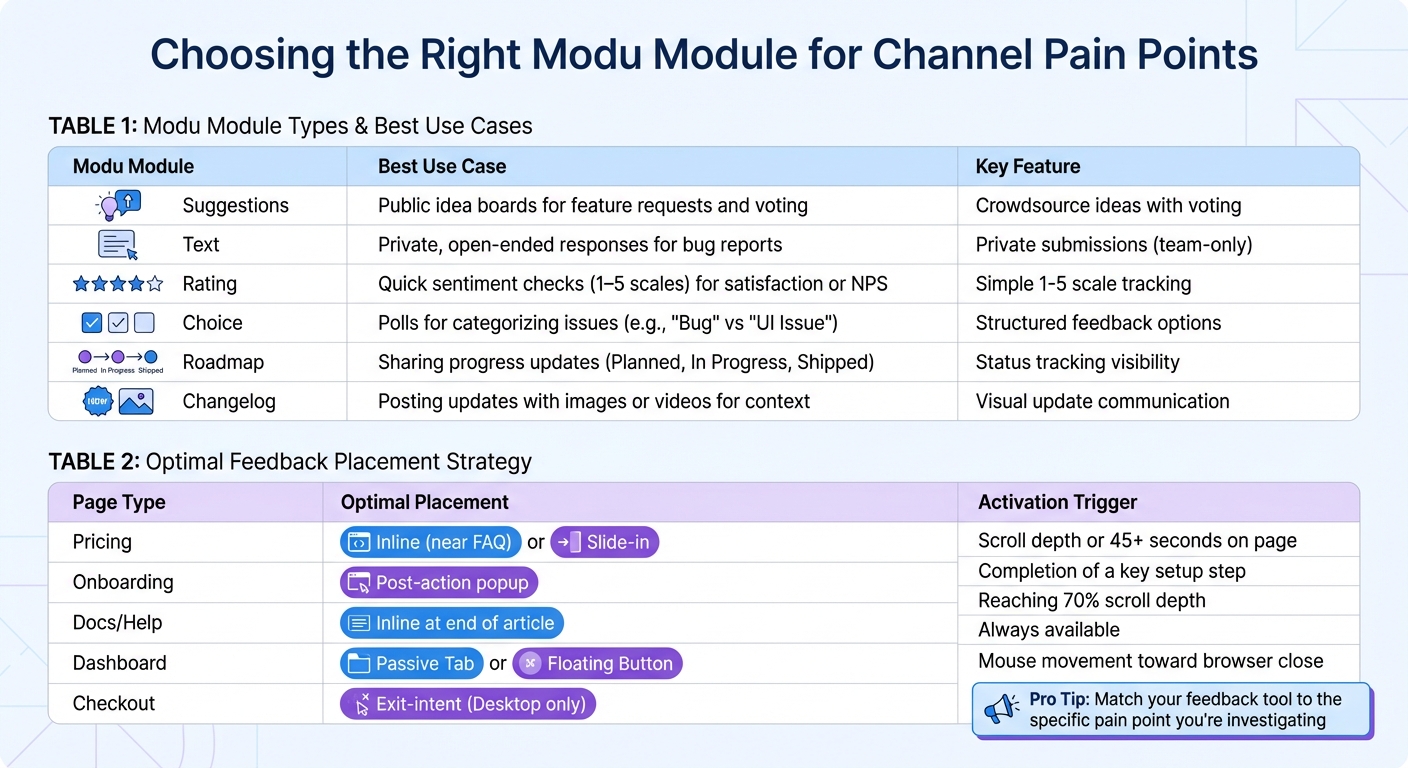
Each type of Modu module is designed to tackle specific challenges. Here’s a quick overview of how they work:
| Modu Module | Best Use Case |
|---|---|
| Suggestions | Public idea boards for feature requests and voting |
| Text | Private, open-ended responses for bug reports |
| Rating | Quick sentiment checks (1–5 scales) for satisfaction or NPS |
| Choice | Polls for categorizing issues (e.g., "Bug" vs "UI Issue") |
| Roadmap | Sharing progress updates (Planned, In Progress, Shipped) |
| Changelog | Posting updates with images or videos for context |
Suggestions modules shine when you want to crowdsource ideas. Users can submit suggestions, vote on others’ ideas, and reveal which pain points matter most to your audience. This is especially helpful for product teams deciding which updates will deliver the most impact.
Text modules are perfect for situations requiring privacy, like bug reports, billing issues, or sensitive feedback. These submissions stay visible only to your team, making them ideal for support forms or internal surveys.
Rating modules simplify satisfaction tracking with an easy 1-5 scale. Whether measuring email response times, website navigation, or chatbot effectiveness, these modules provide clear data on where users are happy - or not. For instance, if most users rate your mobile app a 1 or 2, that’s a red flag.
Single and Multiple Choice modules help you categorize feedback quickly. For example, you could ask users to specify which part of the checkout process caused problems, offering options like "Payment processing", "Shipping options", or "Promo code application." This structured approach saves time compared to sifting through open-ended responses.
Embedding Feedback Tools to Increase Participation
Feedback tools are only effective if users notice them. Placement matters. Modu offers three distribution options: embedded widgets on your site, popup widgets triggered by user behavior, and direct links shared via email or social media. Choosing the right placement ensures you’re gathering feedback at the right moment.
Here’s a breakdown of optimal placements based on page type:
| Page Type | Optimal Placement | Activation Trigger |
|---|---|---|
| Pricing | Inline (near FAQ) or Slide-in | Scroll depth or 45+ seconds on page |
| Onboarding | Post-action popup | Completion of a key setup step |
| Docs/Help | Inline at end of article | Reaching 70% scroll depth |
| Dashboard | Passive Tab or Floating Button | Always available |
| Checkout | Exit-intent (Desktop only) | Mouse movement toward browser close |
Inline embeds are great for collecting contextual feedback. For example, placing a Text module at the end of a help article allows users to answer, “Was this article helpful? What’s missing?” right when they encounter an issue.
Popup widgets are more intrusive but work well for high-priority feedback. Use them sparingly and trigger them strategically, such as after a user spends 45+ seconds on your pricing page (indicating confusion) or completes a key onboarding step (when first impressions are fresh). Exit-intent popups on checkout pages can capture insights from users about to abandon their carts.
Direct links are versatile for collecting feedback across platforms you don’t control. Share a Modu board link in emails, social media posts, or customer support tickets. This is especially useful for channels like email or social media where embedding widgets isn’t possible.
The goal is to make feedback collection easy and immediate. Users should be able to report problems as they happen, without jumping through hoops. This immediacy not only increases participation but also ensures the feedback is accurate and detailed. Once collected, these insights can be analyzed and mapped across your channels for deeper understanding.
Analyzing and Mapping Channel Pain Points
Once feedback starts rolling in, the real work begins: turning raw data into actionable insights. This involves sifting through submissions, identifying patterns, and linking problems to specific channels. Without proper organization, feedback can quickly feel overwhelming. The goal is to sort responses by their source - whether they come from your in-app widget, support tickets, email surveys, or social media - so you can uncover recurring issues tied to specific customer touchpoints. By segmenting feedback by channel, you gain a clearer picture of precise problem areas.
Organizing Feedback by Channel
The first step is to categorize feedback based on its source. Tools like Modu's analytics dashboard make this process smoother by allowing you to filter submissions by board, module type, and source. For example, if API errors are only flagged in support tickets, it’s a sign that technical issues might be frustrating your power users.
Set aside 30 minutes each week to review and consolidate duplicate entries while tagging submissions by channel and issue type [2]. This keeps feedback from piling up into an unmanageable backlog. Use tags like "Navigation", "Performance", "Billing", or "Feature Request" to quickly sort issues. Over time, patterns will emerge, showing which channels consistently highlight particular pain points. This insight helps pinpoint where the customer experience is breaking down.
Visualizing Pain Point Trends
To make feedback actionable, assign measurable metrics like vote count, average rating, and frequency across channels [2]. Modu’s analytics tools calculate these metrics, providing a clear snapshot of urgent issues. For instance, if the in-app widget shows 142 votes for "UI Navigation confusion" with an average rating of 2.4 out of 5, that’s a clear signal that this problem needs immediate attention.
Comparing performance across channels is easier when you use a simple table format. Here’s an example:
| Channel | Common Issues | Vote Count | Average Rating |
|---|---|---|---|
| In-App Widget | UI Navigation confusion | 142 | 2.4 / 5 |
| Support Tickets | Integration errors (API) | 89 | 1.8 / 5 |
| Public Board | Feature request: Dark Mode | 310 | 4.2 / 5 |
| Social Media | Slow checkout response | 56 | 2.1 / 5 |
| Email Surveys | Pricing clarity | 74 | 3.5 / 5 |
This table highlights where to focus your efforts. For example, support tickets point to technical issues (API errors with a low 1.8 rating), while the public board emphasizes a strong demand for new features (Dark Mode with 310 votes). Social media feedback about slow checkout speed may have fewer votes, but its low rating suggests it’s a pressing issue for a smaller customer group.
Modu’s Google Sheets integration (available on the Growth plan) allows you to export this data, create custom charts, and share insights with your team [3]. By organizing and visualizing feedback, you can prioritize channel-specific pain points and focus your resources where they’ll have the greatest impact. The ultimate goal is to turn scattered data into a clear, actionable roadmap for improvement.
Prioritizing and Fixing Channel Pain Points
Once you’ve gathered and visualized feedback, the next step is deciding what to address first. Not all issues have the same level of urgency - some may affect thousands of users, while others impact only a small group. To stay objective, prioritization frameworks like RICE (Reach × Impact × Confidence / Effort) and ICE (Impact + Confidence + Ease / 3) are invaluable. These tools help you rank issues based on their scope, significance, and the effort needed to resolve them, ensuring your team focuses on fixes that benefit both your users and your business the most.
Set aside 30 minutes each week to triage feedback. Use this time to review new submissions, merge duplicates, and assign clear statuses like New, Under Review, Planned, In Progress, or Shipped. This process keeps your backlog manageable and ensures critical issues are addressed rather than buried. By maintaining this regular rhythm, you can swiftly move top-priority items into the development pipeline.
Syncing Feedback to Roadmaps and Integrations
Once you’ve identified the issues that matter most to users, it’s time to integrate them into your roadmap. Modu’s Roadmap tool, for instance, organizes items into four status categories: Backlog (under consideration), Planned (approved for future work), In Progress (currently being developed), and Shipped (completed and released). This structure makes it easy for users to see what’s being worked on and when they can expect solutions. Feedback can either be added manually to the roadmap or synced directly from approved suggestions, saving time and cutting down on repetitive data entry.
To streamline the process further, sync prioritized feedback with tools like Jira or Linear. For example, if a pain point like “API integration errors” is moved to Planned, it can automatically create a corresponding task in your project management tool. You can also set up Slack notifications to alert your team when there’s a surge in votes or when critical bug reports are flagged. If you’re using tools like Trello or ClickUp, feedback-driven tasks can appear alongside your existing boards, making it easier to balance ongoing projects with new fixes.
Fixing High-Impact Issues
Addressing pain points isn’t just about writing code - it’s also about keeping users informed. Research shows that companies that actively act on feedback experience 41% faster revenue growth [1], proving that closing the feedback loop delivers measurable results. Start by acknowledging feedback within 48 hours. Even a quick “We’re looking into this” message shows users that their concerns are being taken seriously and helps build trust.
As your team works on solutions, keep users updated at every stage. When a task moves from Planned to In Progress, notify those who voted for it or submitted feedback. Once the fix is live, update the status to Shipped and share the news in your Changelog module. This transparency not only closes the loop but also reinforces that user input drives real action. Considering that 79% of customers expect a response to complaints on social media within 24 hours [3], timely updates are especially important for issues raised on public platforms.
Tracking Resolutions and Continuous Improvement
Once you've identified and addressed pain points, the journey isn’t over. The final step is to confirm that the solution works and commit to ongoing improvement. Fixing issues without closing the loop by informing users and verifying effectiveness leaves the job half-done. This feedback cycle completion is what sets apart businesses that merely collect feedback from those that earn customer trust. Without it, users may feel ignored and stop sharing their insights altogether [1][2]. In fact, research shows that companies focused on customer feedback experience 41% faster revenue growth and better retention rates [1]. Clearly, follow-through matters just as much as the fix.
"The real value is not in asking for feedback. It is in turning that feedback into action that customers can see and feel."
- Chaviva Gordon-Bennett, Content Strategist at monday.com [1]
To truly resolve issues, actions must be visible and outcomes measurable. When users see their feedback driving change, they’re more likely to keep contributing valuable insights.
Sharing Updates with Users
Being transparent builds trust, and a Changelog is a simple yet powerful way to communicate resolutions. When you fix a pain point, post an update that explains the change and its impact. Modu’s Changelog module makes this easy with Markdown formatting, cover images, and YouTube embed options, so you can visually show users what’s been improved. For instance, if you’ve fixed API integration errors, include a short video walkthrough or a screenshot of the updated interface to make the resolution tangible.
Keep a public record of these updates so users can track the history of improvements. This ongoing transparency reassures your audience that their feedback drives meaningful action and that your team is committed to making things better [2]. You can also organize changelog entries by channel (like “Mobile App,” “Email,” or “Support Portal”), helping users quickly find updates relevant to them. Acknowledging resolutions promptly shows that customer input directly shapes your product’s evolution.
But informing users is only half the equation. The next step is to ensure the solution actually works.
Measuring Improvements through Feedback
Once a fix goes live, it’s time to measure its success. Use Modu’s Rating module to collect quick feedback on whether the update resolved the issue. A simple 1–5 star question like, “Did this update improve your experience?” can provide immediate insight into how effective the solution is. If the average rating falls below 3, it’s a clear sign that further refinement is needed [1][3].
Modu’s analytics dashboard helps you track long-term trends and engagement metrics, giving you a clear picture of whether the pain points are truly resolved - or if new issues are cropping up. For example, if feedback volume drops significantly after a fix, it’s a good sign that the solution worked. On the other hand, if feedback remains steady or increases, it may signal unresolved gaps. This continuous cycle of implementing, measuring, and refining ensures you’re not just addressing problems but also evolving your product in line with user needs.
| Modu Module | Primary Function in Resolution Tracking | Key Feature |
|---|---|---|
| Changelog | Communicating final resolutions | Image/Video embeds for visual proof |
| Roadmap | Showing progress of fixes | Status labels (Planned, In Progress, Shipped) |
| Rating | Measuring solution effectiveness | 1–5 star scales for quick sentiment checks |
| Suggestions | Identifying and voting on pain points | AI clustering to group similar issues |
| Analytics | Tracking long-term improvement | Trend visualization and engagement metrics |
Conclusion
Addressing channel pain points isn't something you tackle once and forget - it’s an ongoing process that reshapes how your business functions and how customers view your brand. The approach is simple: gather feedback from every channel, centralize it, identify recurring issues through analysis, tackle the most pressing problems, and, most importantly, close the loop by sharing resolutions with your users. When this becomes part of your routine, you’re not just solving problems - you’re creating a system that prevents them from spiraling into bigger issues like customer churn [3][6].
This feedback cycle fits naturally into your existing workflows. A weekly triage process ensures every piece of feedback gets reviewed promptly and added to your roadmap for improvement. Keep an eye on performance with clear goals: aim to centralize over 80% of incoming feedback, triage new submissions within seven days, and notify over 90% of users when their feedback status changes [2].
Transparency is key to building trust. A visible changelog and roadmap signal to users that their input directly influences your product’s evolution. When customers see their suggestions leading to real improvements, they’re more likely to continue providing valuable insights.
"The point is to allow for the customer feedback process to turn into a virtuous cycle where each piece of knowledge will inform your steps, goals, and strategies." - Adam Garcia, Owner of The Stock Dork [3]
This self-sustaining system sets apart businesses that merely collect feedback from those that build lasting customer loyalty. Taking action on feedback today helps you avoid tomorrow’s roadblocks [3][6].
Start small, stay consistent, and let user feedback guide your progress. Your customers are already showing you where improvements are needed - now it’s time to act, demonstrate that their voices matter, and let their insights shape your next steps.
FAQs
Which channel pain points should I fix first?
To improve customer experience and drive product adoption, it’s crucial to tackle pain points highlighted by recurring or critical feedback. Start by focusing on high-volume or high-impact channels - such as support tickets, in-app feedback, and social media. These platforms often reveal the most pressing issues faced by users.
Centralizing feedback from these sources allows you to spot patterns and prioritize problems that affect the largest segments of your audience. By addressing these key areas first, you can boost retention, enhance satisfaction, and steer product development in a direction that aligns with user needs.
Where should I place feedback widgets to get more responses?
Feedback widgets work best when placed where users are actively engaging with your product or site. Think about moments of interaction, key pages, or areas where users might encounter challenges. For example, placing them on product pages, within checkout flows, or alongside specific app features can be highly effective. These locations make it easy for users to share their thoughts in real time, while their experience is still fresh. This approach not only boosts response rates but also ensures the feedback is more accurate and actionable.
How can I tell if a fix solved the problem?
To ensure your fix worked, keep an eye on feedback and data after rolling it out. Dive into customer feedback, support tickets, or usage data to see if the issue still lingers. Establish continuous feedback systems, like suggestion boards or in-app surveys, to monitor progress. Looking at trends or sentiment analysis can also help you gauge whether user satisfaction has improved, signaling that the problem has been addressed successfully.