
10 Tips for Better Stakeholder Feedback on Prototypes
10 Tips for Better Stakeholder Feedback on Prototypes
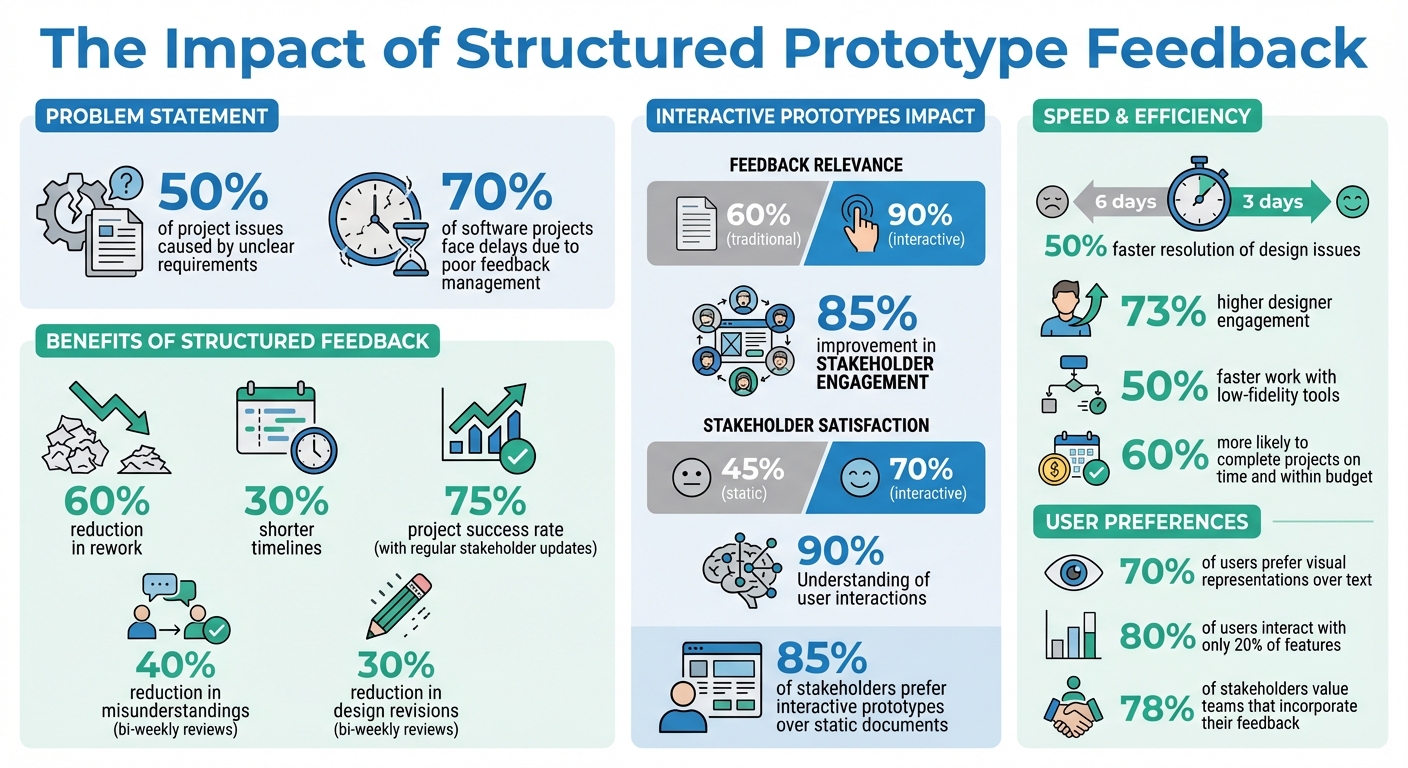
Getting useful feedback on prototypes can save time, reduce costs, and improve outcomes. Here's why it matters: unclear requirements cause 50% of project issues, while teams that prioritize feedback reduce rework by 60% and shorten timelines by 30%. Interactive prototypes, like clickable wireframes, boost feedback relevance from 60% to 90% and improve stakeholder engagement by 85%. Skipping this process risks delays and wasted resources.
To make feedback sessions more effective, focus on these 10 key strategies:
- Set clear goals for every feedback session to gather actionable insights.
- Schedule regular reviews to keep projects aligned and minimize confusion.
- Start with simple prototypes to focus on functionality, not aesthetics.
- Use realistic data to make feedback more relevant and practical.
- Encourage open discussion to gather honest, diverse perspectives.
- Leverage tools with direct commenting to clarify and track feedback.
- Test prototypes in real-world scenarios to uncover practical challenges.
- Document all feedback and decisions to avoid losing critical input.
- Align prototypes with business goals to maintain focus and direction.
- Use short feedback cycles to address issues promptly and maintain momentum.
Prototypes thrive on structured feedback. By following these tips, you can turn stakeholder input into meaningful improvements that drive project success.
Managing Stakeholder Feedback For Figma Prototypes: Best Way? - Video And Design Saas Solutions
1. Set Clear Goals for Each Feedback Session
Walking into a feedback session without clear goals is like trying to critique a painting without knowing what you're supposed to evaluate. Specific objectives turn vague opinions into actionable insights that help refine your prototype.
Before each session, figure out exactly what you want to validate. Are you testing the checkout process, navigation clarity, or alignment with business needs? Research shows that 90% of product managers found structured feedback sessions with defined goals reduced the need for revisions later in the development process [2]. This means less wasted time and fewer resources down the drain.
"The client didn't know what kind of feedback I wanted, because I had forgotten a related-but-less-glamorous predecessor of prototyping - planning and framing the prototype." – UXPin [4]
Another key part of goal-setting is telling stakeholders what not to focus on. For instance, if you're testing navigation flow, make it clear they should ignore placeholder colors, fonts, or copy. This prevents them from getting sidetracked by aesthetics instead of functionality. When participants lose focus, retention rates can drop by as much as 60% [2]. Keeping the session focused ensures stakeholders stay engaged and productive.
Structure the session around a single user journey or task. Provide a concise, real-world scenario to give context to the prototype. This helps stakeholders see how the functionality works in practice rather than as an abstract idea. Visual aids like wireframes can improve understanding by up to 75% [2], and feedback gathered this way is 90% relevant, compared to only 60% with less structured methods [2].
2. Schedule Regular Stakeholder Reviews
Once clear objectives are set, regular reviews are the glue that keeps a project moving in the right direction. Without consistent feedback, teams often face confusion and misalignment, which can lead to costly mistakes. A steady review schedule ensures everyone stays informed and helps catch potential issues before they spiral out of control. In fact, projects with regular stakeholder updates have a 75% success rate compared to much lower rates when communication is sporadic [2].
A bi-weekly review schedule - every 14 days - strikes the perfect balance. It keeps the project on track without overwhelming participants, while reducing misunderstandings by 40%, design revisions by 30%, and expensive rework by 60% [2].
But timing matters just as much as frequency. Aligning reviews with key project milestones makes them more effective. For example, in the early stages, reviews might focus on low-fidelity sketches, gradually advancing to high-fidelity interactive models as the project progresses. This step-by-step approach ensures stakeholders have something tangible to review at every stage, making their feedback more actionable.
Keeping stakeholders engaged is another critical piece of the puzzle. Interactive prototypes are a game-changer here - 85% of stakeholders prefer them over static documents [2], and they help achieve up to 90% understanding of user interactions [2]. To maintain this engagement, always close the feedback loop. Share a quick summary after each review, using a feedback and voting platform to highlight which suggestions will be implemented and why. This simple step can prevent disengagement, which otherwise could climb as high as 70% [3]. When stakeholders see their input being valued and acted upon, it builds trust and ensures they stay invested in the project.
3. Start with Simple Prototypes for Early Feedback
Kick things off with low-fidelity prototypes like sketches, wireframes, or basic mockups. These simpler designs keep the focus on layout, functionality, and core ideas, rather than getting sidetracked by details like colors or fonts. When prototypes look too polished, stakeholders often get distracted, making it harder to evaluate whether the solution actually addresses the right problem [4].
Getting clarity on requirements early can save a lot of headaches down the road [2]. In fact, 70% of users prefer visual representations over long text descriptions [2]. Even rough sketches can communicate ideas more effectively than pages of documentation.
The unfinished look of these prototypes also signals flexibility. UXPin explains that this roughness helps stakeholders "see the forest for the trees" [4]. This approach encourages more focused, actionable feedback and can boost stakeholder engagement by 30% [2], as it invites direct input on the core ideas rather than polished details.
To make feedback sessions productive, be clear about what you want reviewed. Before presenting, explain that you're testing layout and flow - not visual design. If feedback drifts into areas like aesthetics, acknowledge it but guide the conversation back to functionality and structure [6]. Tools like Balsamiq, designed for low-fidelity prototyping, can help teams work 50% faster compared to starting with high-fidelity designs [5]. This shows how simplicity can speed up the process while keeping things clear.
"The more detailed and polished something is, the more detailed the feedback will be." [4]
4. Use Realistic Data in Your Prototypes
Once you've laid the groundwork with simple prototypes, incorporating realistic data takes things to the next level. Replacing placeholder text like "lorem ipsum" with actual data helps stakeholders better grasp how the interface will function. Showing real product names, customer details, or transaction amounts allows them to envision the system in action. In fact, 85% of stakeholders respond more favorably to prototypes with tangible elements compared to abstract explanations [2].
It’s essential to be thoughtful about the type of data you include. Building on low-fidelity prototypes with realistic data creates scenarios that mimic actual use cases. Using live data - such as the user's own content - can be especially engaging, as it immerses stakeholders in authentic scenarios [8]. When live data isn’t an option, using domain-specific real data (e.g., actual flight numbers or product codes) is a strong alternative. Peter, a strategist at In The Pocket, explains:
"Working with real data requires a fundamental mindset shift alongside improved tools" [7].
Don’t limit your prototypes to idealized examples. Incorporate edge cases, such as extra-long names ("Guarulhos - Governador André Franco Montoro International"), missing values, or similar-looking identifiers. These stress-test your design and reveal potential layout issues, ensuring the interface performs well in real-world conditions. High-fidelity prototypes with realistic data can even cut development misunderstandings in half [2].
Focus on the features that matter most. Research shows that 80% of users typically interact with only 20% of a product’s features, so prioritize realistic data for those key areas [2]. For specialized applications, consider pulling data from APIs like TMDB for movie apps or Google Maps for location-based features. This approach makes prototypes feel more authentic and helps gather targeted feedback on core functionality.
| Data Type | Definition | Stakeholder Impact |
|---|---|---|
| Live Data | The user's own actual data and content [8] | Highest engagement; allows full immersion [8] |
| Real Data | Actual data from the domain, not user-specific [8] | High credibility; effective for testing functionality [7] |
| Realistic Data | Fake data designed to look real (e.g., "John Doe") [8] | May obscure issues that arise with real-world complexity [7] |
| Lorem Ipsum | Random Latin filler text [7] | Fails to help stakeholders visualize the final product [7] |
5. Encourage Open Discussion and Ideas
Getting stakeholders to share their thoughts takes more than just asking for input. It’s about creating an environment where people feel comfortable offering critical feedback or unconventional ideas. Building trust and keeping everyone informed regularly helps lay the groundwork for open, honest conversations.
A great way to start is by using low-fidelity prototypes, such as sketches or wireframes. These simple, unfinished designs make it clear that nothing is set in stone, encouraging stakeholders to focus on the core functionality rather than getting distracted by visual details. This approach makes it easier for them to offer constructive criticism.
For those who may hesitate to speak up in group settings, consider using anonymous feedback channels or scheduling one-on-one sessions. These methods help reduce the influence of group dynamics or hierarchy, giving quieter voices a chance to share more honest and thoughtful insights. This feedback can then be used to refine prototypes in a way that’s more aligned with user needs.
Structured feedback activities can also make discussions more productive. For instance, the "Rose, Thorn, Bud" framework encourages stakeholders to identify what’s working (Rose), what’s not (Thorn), and where there’s potential (Bud). This turns feedback into a guided exercise, making it less intimidating than an open-ended discussion. If someone shares a brief comment, try using neutral follow-ups like “Can you expand on that?” to encourage deeper insights without making them feel pressured.
Here’s a quick breakdown of tools and methods that can help quieter stakeholders feel more at ease:
| Method | Benefit for Quieter Stakeholders | Tool/Technique Example |
|---|---|---|
| Private Mode | Reduces fear of judgment or hierarchy | Mural Private Mode |
| Direct Commenting | Encourages thoughtful, asynchronous input | Figma / InVision |
| Rose, Thorn, Bud | Provides a structured, safe way to share feedback | Structured Workshop |
| One-on-One | Creates a space free from group pressure | Individual Interview |
6. Use Tools with Direct Commenting Features
When feedback comes through emails or meetings, important details can easily get lost or misinterpreted. A vague comment like "the navigation feels off" doesn’t clarify which part of the design needs attention or why it’s an issue. That’s where tools with direct commenting features come in handy. They allow stakeholders to attach their feedback directly to specific UI elements, screens, or interactions. This eliminates the guesswork and ensures everyone is on the same page.
Research backs this up: teams using comment-enabled prototypes resolve design issues 50% faster, cutting resolution time from six days to three. Additionally, 73% of designers report higher engagement levels, with satisfaction improving by 70% and feedback relevance jumping from 60% to 90% [2].
Platforms like Figma, InVision, and Adobe XD offer on-canvas commenting features, along with clear revision histories. These features let stakeholders see how their feedback has influenced the design, fostering a sense of trust and collaboration. As Ana Crudu from MoldStud highlights:
"Stakeholders who can visualize how feedback has influenced design iterations feel more invested" [2].
Beyond improving design clarity, these tools can integrate with broader feedback systems. For example, Modu’s Suggestions module allows stakeholders to submit ideas and vote on feedback, creating a transparent record of priorities. Approved suggestions can then sync directly to your roadmap, clearly showing how stakeholder input translates into actionable plans. Combining direct commenting with broader feedback tools ensures stakeholder involvement throughout every phase of the project.
7. Test Prototypes in Actual Use Scenarios
Testing prototypes in real-world settings uncovers challenges that lab environments simply can't replicate. While controlled tests provide valuable insights, they often miss the distractions, physical constraints, and interruptions that users face in their everyday environments [5].
One effective method is contextual inquiry. Instead of bringing users into a controlled space, observe them interacting with the prototype in their natural environments - whether at work or home. Pay attention to how factors like noise, lighting, or limited workspace impact their experience [5]. For a deeper understanding over time, try diary studies. These involve users documenting their thoughts and feelings over one or two weeks of use. This method highlights emotional responses and frustrations that only surface after extended, real-world exposure [5]. Combined, these approaches offer a clearer picture of how the prototype performs in authentic settings.
To further validate your prototype, consider remote, unmoderated testing. This method captures genuine behaviors without the influence of an observer, making it easier to see how the design fits into users' existing workflows. It also helps identify needs that abstract models might miss [5].
Be mindful of social desirability bias, where users may hesitate to share negative feedback [6]. To encourage honesty, present multiple versions of the prototype for comparison. Tools like the "I Like, I Wish, What If" framework can also help participants share critiques in a constructive way [6].
Finally, testing with extreme users - like a busy parent juggling shopping or a tech-savvy remote worker - can reveal pain points that average users might not notice. By selecting diverse contexts, you can ensure the prototype is prepared to handle a wide range of real-world conditions [6].
8. Keep Records of All Feedback and Decisions
Documenting feedback is more than just a formality - it’s a way to ensure that insights are actionable and decisions don’t get lost after a meeting ends. Without proper records, critical stakeholder input can slip through the cracks. In fact, 70% of software projects face delays due to feedback being ignored or poorly managed [2].
One effective approach is to maintain a decision log. This log should capture not only the feedback but also the reasoning behind every design choice. It’s a tool that helps reduce uncertainty for your development team while serving as a reference point for future decisions [2]. To take it a step further, a feature matrix can be used to directly connect stakeholder input to specific prototype features, expected outcomes, and priorities [2].
But don’t just focus on written notes. During live feedback sessions, pay attention to non-verbal cues - like expressions of frustration or moments of excitement - that can reveal valuable context beyond the words being spoken [5]. Highlight reels from recorded sessions are another way to document these reactions, giving your team a deeper understanding of user behavior [9]. These kinds of records make the handoff to development much smoother.
Using the right tools can make a big difference in how feedback is managed. Clear and organized documentation not only helps your team but also builds trust with stakeholders - 78% of stakeholders value teams that visibly incorporate their feedback into the process [2].
Finally, consolidate all the feedback, user stories, and design guidelines into a single, comprehensive transition document. This ensures that the development team has all the context they need to move forward without confusion [2]. Platforms like Modu can simplify this process by automatically organizing insights and decisions, saving time and effort.
9. Connect Prototypes to Business Goals
When prototypes stray from business objectives, the feedback they generate often veers into personal preferences rather than actionable insights. Keeping prototypes aligned with business goals is crucial to ensuring discussions remain focused on the project's core objectives [1]. Think of it as a way to anchor design decisions to measurable outcomes, much like setting clear goals and conducting regular reviews.
By tying prototypes directly to business goals, you can sharpen their strategic value. Show how each design element addresses specific business needs - whether it’s lowering churn, boosting revenue, or streamlining operations. This approach helps cut through vague feedback and surfaces clear, actionable input that drives the project forward [1]. When prototypes clearly reflect business priorities, teams reduce the risk of miscommunication or delays caused by unclear requirements.
"The purpose of collecting feedback is to make sure your project, organization, or processes are aligned with needs or expectations of your stakeholders." - Mural [1]
To better integrate stakeholder feedback with strategic objectives, structure the process around measurable business outcomes. Categorize feedback using business-focused tags like "user retention", "revenue growth", or "churn reduction." This not only helps product managers justify roadmap decisions but also enables the creation of detailed reports that highlight areas for improvement [11]. When stakeholders see their input tied to tangible results, trust grows - and 78% of project leaders who used data-driven metrics reported greater confidence in their design choices [2].
Start each feedback session by identifying the business goal each prototype element supports. Use tools like a feature matrix to map components to specific outcomes and prioritize them accordingly. Platforms such as Modu can streamline this process by tagging and organizing feedback based on its business impact, making it easier to focus on what truly matters.
10. Use Short Feedback Cycles and Prioritize Input
Long delays in feedback can derail progress and lead to unnecessary rework. Teams that hold bi-weekly prototype reviews cut misunderstandings by 40% and reduce design revisions by 30% during later development stages [2]. When feedback is postponed for too long, even minor issues can escalate into significant obstacles - 70% of software projects face delays because feedback isn't addressed promptly [2].
Projects that adopt iterative feedback loops experience a 60% drop in costly rework [2]. Scheduling structured two-week milestones ensures stakeholders remain actively engaged, rather than stepping in only when it's too late to make meaningful changes. These shorter cycles naturally encourage actionable feedback and help maintain momentum.
To prioritize feedback effectively, use a matrix that evaluates user impact, technical feasibility, and business goals. Focus on the 20% of features that deliver 80% of user engagement [2]. Tools like Modu can streamline this process by allowing teams to tag, vote on, and organize feedback efficiently. This approach ties in well with earlier advice about keeping stakeholders aligned and involved.
Each feedback session should target a single user journey or core feature, with no more than three follow-up questions to avoid overwhelming participants [10]. Document all decisions in a central location, building on the record-keeping practices discussed earlier. By combining short, focused feedback cycles with smart prioritization, teams are 60% more likely to complete projects on time and within budget [2].
Conclusion
Getting useful feedback on prototypes isn’t about gathering more opinions - it’s about setting up a structured process that turns stakeholder input into real, actionable changes. By focusing on clear goals, holding regular review sessions, and documenting decisions consistently, teams can avoid distractions and zero in on what truly moves the project forward. The numbers speak for themselves: projects that use iterative feedback loops experience a 60% drop in costly rework, and teams with regular stakeholder updates achieve a 75% success rate[2].
Switching from static documents to interactive prototypes also makes a noticeable impact. Stakeholder satisfaction jumps from 45% with traditional methods to 70% with interactive models, while the relevance of feedback improves from 60% to 90%[2]. Clickable prototypes give stakeholders a hands-on experience, turning abstract ideas into something tangible. This shift transforms passive observers into engaged participants who provide precise, meaningful feedback.
Modern feedback platforms simplify this entire process by centralizing how teams collect, prioritize, and analyze input. Tools like Modu offer various ways to gather feedback, including Rating modules for quick sentiment checks, Text modules for in-depth insights, and Suggestions modules for prioritizing future features. Teams can seamlessly integrate these tools into their workflows, organize feedback efficiently, and keep communication transparent throughout the prototyping phase.
The secret lies in treating feedback as an ongoing conversation rather than a one-time event. Short, focused review cycles help catch small issues before they snowball into bigger problems, ensuring feedback stays relevant and actionable. By combining structured processes with the right tools, teams create a collaborative environment where stakeholders feel valued, alignment is maintained, and prototypes improve based on real-world needs - not assumptions.
Take the first step: choose one tip from this approach and apply it to your next prototype review. Whether it’s setting clearer goals for feedback sessions, using realistic data, or adopting a centralized feedback tool, even a small change can make collaboration smoother and more effective for everyone involved.
FAQs
Who should be in prototype feedback sessions?
Feedback sessions for prototypes should bring together a mix of participants. Include internal team members such as designers, developers, product managers, and project leads, along with external stakeholders like clients, end-users, or partners. This blend ensures a variety of viewpoints on usability, technical functionality, and alignment with stakeholder goals. Involving everyone early and often encourages better communication, identifies potential challenges, and helps fine-tune the prototype to align with expectations.
How do I prioritize conflicting stakeholder feedback?
To handle conflicting stakeholder feedback, begin by setting clear goals for the feedback process. Ensure everyone understands the criteria for prioritization. Gather input from various channels to pinpoint recurring themes and pressing concerns. Employ a transparent framework - such as voting or ranking systems - to align the feedback with your project’s objectives. Lastly, explain the reasoning behind your decisions to foster trust and show stakeholders that their input matters.
What’s the best way to track feedback and decisions?
The best way to keep track of feedback and decisions is by using a centralized feedback management platform. This approach gathers all input in one easy-to-access space, making it simpler to organize requests, set priorities, and share updates with everyone involved.
Features like suggestion boards, roadmaps, and changelogs - combined with AI-driven analysis - can highlight trends, streamline prioritization, and provide clarity. This setup helps stakeholders clearly see how their feedback influences decisions.