
10 Ways to Use Feedback for Personalized Communities
10 Ways to Use Feedback for Personalized Communities
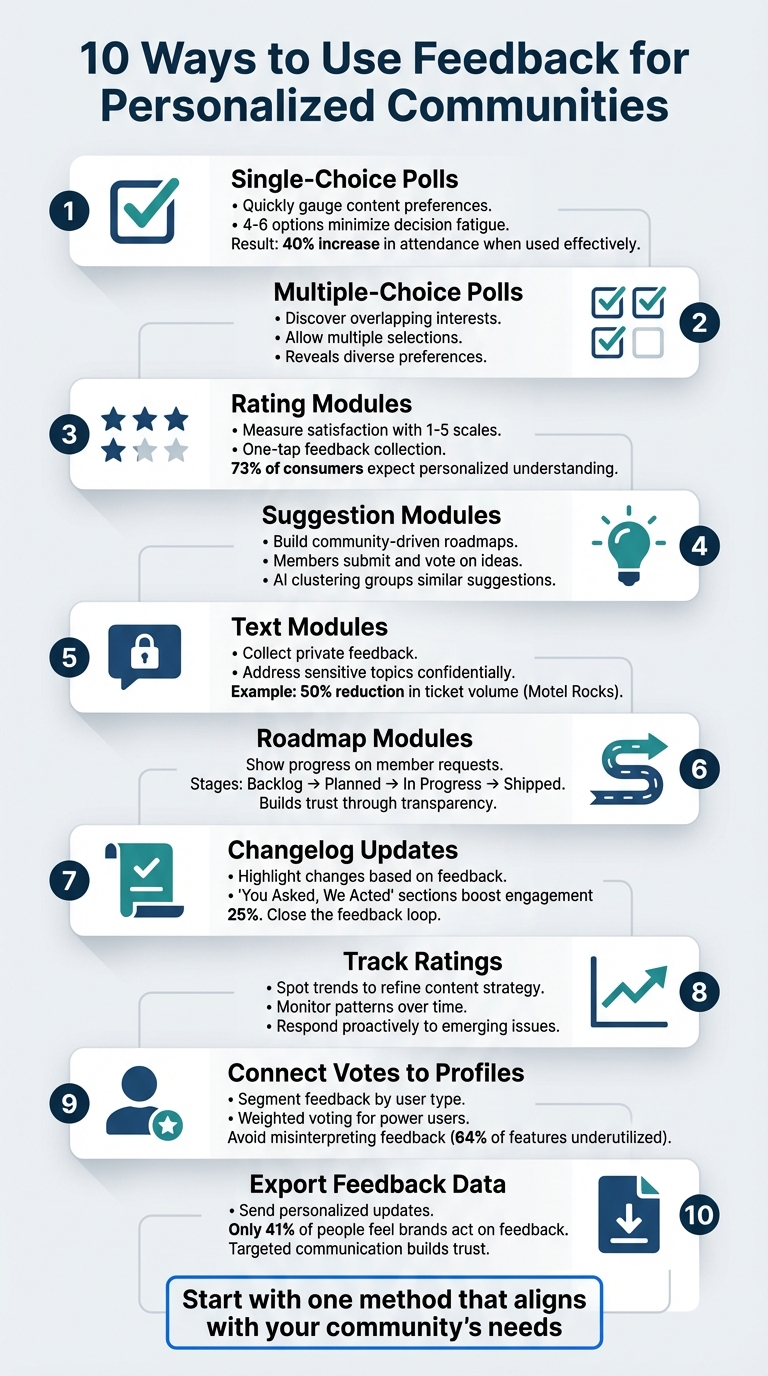
Feedback transforms online communities by turning passive members into active participants. Here are 10 practical ways to collect and act on feedback to create stronger connections and improve engagement:
- Single-Choice Polls: Quickly gauge content preferences with simple polls.
- Multiple-Choice Polls: Discover overlapping interests by allowing multiple selections.
- Rating Modules: Measure satisfaction with easy 1-5 scales.
- Suggestion Modules: Collect ideas and prioritize them with votes.
- Text Modules: Gather private feedback for sensitive topics.
- Roadmap Modules: Show progress on member-requested features.
- Changelog Updates: Highlight changes made based on feedback.
- Track Ratings: Spot trends to refine content strategy.
- Connect Votes to Profiles: Segment feedback by user type for better insights.
- Export Feedback Data: Send personalized updates based on input.
Key Takeaway: Acting on feedback builds trust and keeps members engaged. Tools like polls, suggestion boards, and roadmaps make it easier to listen and respond effectively. Start by choosing a method that aligns with your community’s needs.
Mastering Feedback: How to Respond and Learn from Customer Insights
1. Use Single Choice Polls to Learn Content Preferences
Single choice polls are a quick and effective way to turn passive readers into active participants. With just one click, members can share their preferences, making it easy for them to engage without much effort or time commitment [1].
Collecting Feedback Made Simple
Single choice polls are straightforward by design. Asking members to pick from 4–6 options - like "Tutorial Videos", "Case Studies", "Expert Interviews", or "Quick Tips" - minimizes decision fatigue and encourages participation. For example, one learning community increased attendance by 40% after using a targeted poll to identify member interests [3]. To get the best results, trigger these polls after users have interacted with your page, ensuring their feedback is informed. This simplicity not only drives participation but also provides clear, actionable data.
Gaining Actionable Data
These polls provide clear percentages that highlight what content resonates most with your audience. Instead of guessing, you can make data-driven decisions. Including an "Other" option with a comment box is a smart move - if more than 10% select it, you've identified a gap in your content offerings.
Strengthening Community Engagement
When you act on poll results, you strengthen the connection with your community. A "You asked, we acted" approach shows members that their input directly shapes the content you create, fostering a sense of ownership. This creates a positive feedback loop, encouraging even more participation [3]. Adding follow-up prompts like "Why did you choose this?" can deepen the conversation and further engage your audience.
Using tools like Modu can simplify the process of creating and managing polls, ensuring that the insights you gather lead to a more tailored and engaging community experience.
2. Use Multiple Choice Polls to Identify Member Interests
Multiple choice polls are a great way to uncover the full range of what members care about because they allow participants to pick all the options that apply to them. Unlike single-choice polls, which limit responses to just one answer, this format highlights overlapping preferences and diverse interests that might otherwise go unnoticed.
Easy Way to Gather Feedback
This type of poll is simple and quick for members to complete, making it easier to gather input. By allowing multiple selections, you’re lowering the barrier to participation, turning passive observers into active contributors. For instance, a learning community using Kannect saw a 40% increase in attendance for their weekly sessions after running a poll to let members vote on the topics they wanted to explore. This shows how asking for specific input can directly boost engagement [3].
"When members feel like their voice directly shapes the experience, engagement skyrockets." - Kannect [3]
Gaining Useful Insights
The structured data from multiple choice polls makes it easier to spot trends. To keep things manageable, limit polls to 4–6 options - this avoids overwhelming participants while still catering to different interests. Don’t forget to include an "Other" option with a comment field. If more than 10% of respondents choose it, you might have missed a key interest area [3].
Making It Personal
Randomizing the order of poll options can help minimize selection bias. Timing is also important - launch polls right after users engage with your platform to ensure the questions are relevant to their current activity. Tools like Modu make this even easier by letting you create multiple choice modules that track votes for each option. This clear data can then be used to personalize experiences further with tools like rating modules, giving you a better understanding of what truly resonates with your community.
3. Use Rating Modules to Measure Satisfaction Levels
Rating modules turn member sentiment into a clear, easy-to-interpret satisfaction score. A straightforward 1-5 scale provides concrete numbers that reveal whether your community is thriving or facing challenges. This structured feedback allows you to catch potential problems early and confirm what’s working - without asking members to spend time writing long responses.
Ease of Feedback Collection
Rating modules make it simple for members to share their thoughts. With just one tap on a star or emoji, they can provide feedback effortlessly. Considering that 73% of consumers globally expect companies to understand their unique needs and expectations [4], this low-friction approach is ideal. To maximize relevance, trigger a rating request immediately after a meaningful interaction, like completing a course module or attending a community event. Capturing feedback while the experience is fresh ensures it’s both genuine and actionable.
"Maintain a simple, consistent 1-5 stars scale with no more than five questions and conclude with an open-ended inquiry such as 'Any additional feedback?'" - Ehab Abushmais, Principal Growth Advisor at Customer Success Optimization, LLC [4]
This quick and straightforward method not only encourages participation but also provides insights that drive meaningful improvements.
Actionable Insights
Ratings do more than just measure satisfaction - they highlight areas that need attention. By examining both high and low scores, you can refine your strategy and focus on what matters most. For instance, low scores on specific features pinpoint where immediate adjustments are necessary, while consistently high ratings confirm that your efforts align with member expectations.
"A CSAT score... was the beacon to identify if there was a concern with a group or a particular representative. Suppose a group or individual score is low. In that case, that tells us that we need to get into speech analysis to see where the agent specifically could do better." - Amber Fogle, former Director of Operational Training at Vroom [4]
Tools like Modu’s rating modules streamline this process. You can embed 1-5 scales throughout your community, monitor average ratings, and identify patterns that need further exploration. The data integrates seamlessly with other tools, giving you a comprehensive view of member satisfaction - all without relying on lengthy surveys.
4. Use Suggestion Modules to Build Community-Driven Roadmaps
Suggestion modules go beyond simple polls, offering a way to gather actionable input from your community. They let members submit ideas, vote on priorities, and watch their contributions shape real features. This transforms passive users into active collaborators, strengthening trust and ensuring your priorities align with what your audience truly values.
Community Engagement
The voting system in suggestion modules makes it easy for members to influence decisions. With just one click, they can upvote ideas that matter to them. Considering that only 41% of respondents believe brands act on feedback [2], showing members their votes lead to tangible results - like features marked as "Planned" or "In Progress" - helps eliminate skepticism.
Status labels, such as "Backlog", "Planned", or "Shipped", encourage members to check back and track the progress of their supported ideas. This transparency not only keeps members engaged but also shows that their voices are heard. By regularly updating the status of suggestions, you demonstrate accountability and close the feedback loop, proving that every contribution counts.
Actionable Insights
Unlike basic polls, suggestion modules use AI clustering to group similar ideas automatically. This ensures dominant themes emerge while avoiding the frustration of duplicate ideas being overlooked. Members can see their suggestions are part of a larger, ongoing conversation.
With tools like Modu's suggestion modules, approved ideas can be synced directly to your roadmap, streamlining the journey from feedback to implementation. Public comments add valuable context, explaining why certain ideas resonate with the community. By combining vote data with these insights, you can build a roadmap that’s both informed by data and deeply connected to your community’s needs.
5. Use Text Modules to Collect Private Member Preferences
Text modules provide a private way for members to share their preferences directly with admins, offering insights that help create more personalized community experiences. Unlike public feedback tools, these modules encourage members to discuss sensitive topics - like accessibility needs, content concerns, or personal challenges - without hesitation. This private channel complements public feedback by addressing issues that members might not feel comfortable sharing openly.
Customization Potential
The way you frame your questions can make all the difference. For example, instead of asking something broad like, "How do you feel about the community?", try a more specific question such as, "Which specific community features do you find easy or difficult to navigate?" [2]. This approach leads to more actionable insights. Caitlin from Steadfast Collective explains:
"Vague comments like 'the platform is confusing'... don't provide enough information for community managers to make meaningful changes" [2].
To make the most of text modules, you can include features like inline validation, character limits, and AI clustering. These tools help group similar responses, turning unstructured feedback into organized, actionable data.
These customizations make it easier to identify and act on specific areas for improvement.
Actionable Insights
Private feedback often highlights issues that public polls miss. For instance, in January 2026, the online fashion retailer Motel Rocks analyzed text-based feedback and spotted recurring frustrations early on. By addressing these concerns, they boosted their CSAT score by 9.44% and reduced ticket volume by 50% [1]. Similarly, in August 2025, Catapult, a company focused on athletic performance, used automated tools to analyze sentiment and urgency in text submissions. This reduced their first reply time by 50% [1].
To build trust and encourage further engagement, it’s important to follow up on private feedback. Share updates that show how member insights have led to meaningful changes - this not only closes the feedback loop but also fosters a stronger sense of community.
6. Share Roadmap Modules to Show Progress on Member Requests
Roadmap modules transform feedback into tangible action by giving members a clear view of what’s happening behind the scenes. When members see their requests move through stages like Backlog, Planned, In Progress, and Shipped, it creates a trust-building feedback loop. It’s a way to demonstrate that their voices are heard and are actively shaping the community’s growth.
Community Engagement
Public roadmaps are a powerful tool for fostering a sense of ownership and ongoing involvement. When members notice their ideas shaping the roadmap, it strengthens their connection to the community. For example, in 2022, TinyMCE’s Product Manager, Fredrik Danielsson, introduced a public roadmap that emphasized capabilities and use cases over strict deadlines. This flexible approach allowed the team to collect over 300 user insights while staying realistic about their commitments.
One standout moment came during the development of their Merge Tags plugin. By sharing mockups in the "In Progress" section, they received valuable feedback that directly influenced the final design. As Thrico aptly put it:
"Transparent feedback loops - 'you said X, we built Y' - build credibility that marketing alone can't buy" [1].
This transparency not only strengthens trust but also leads to actionable improvements.
Actionable Insights
Roadmap modules also help teams balance what users want with what’s feasible. By evaluating member demand alongside capacity, teams can prioritize effectively and deliver features that resonate. For instance, this approach helped TinyMCE achieve a successful launch with engagement levels that aligned with their data-driven expectations.
Tools like Modu make this process even smoother by allowing roadmap items to sync directly from approved suggestions. Adding optional ETA labels, such as "Q2 2026" or "Coming Soon", further manages expectations while keeping members excited about what’s on the horizon.
7. Publish Changelog Updates Based on Member Feedback
Changelog modules close the feedback loop by showing members that their suggestions lead to real, tangible changes. When updates directly reference member requests, announcements become more than just information - they become a tool for building trust and increasing engagement. This kind of transparency strengthens credibility like nothing else.
Community Engagement
Tying updates to member feedback has a direct, measurable impact. For example, adding a "You Asked, We Acted" section to community updates has been shown to boost engagement by 25% within just 10 days [3]. When members see their ideas put into action, they feel more connected to the community. They evolve from passive participants to active contributors, with a genuine emotional investment in its growth.
A great example of this comes from mid-2022, when TinyMCE’s Product Manager Fredrik Danielsson and Head of Product Roman Khudonogov introduced a public changelog strategy. By sharing updates on completed tasks and even mockups during development, they collected over 300 user insights that directly shaped the final version of their Merge Tags plugin. This approach turned contributors into loyal advocates who felt a deep sense of ownership over the product’s evolution.
Customization Potential
Changelog modules in Modu offer plenty of ways to make updates more engaging. You can include rich media like cover images, screenshots, and even YouTube embeds to make entries more visually appealing. Categorizing updates with tags like "New Features", "Bug Fixes", or "Performance Improvements" helps members quickly find what’s relevant to them. Adding emoji reactions is another simple yet effective way to encourage interaction and keep the conversation going.
You can also link changelog entries back to their original roadmap items, showing the full journey from "Planned" to "Shipped." This reinforces the idea that member feedback doesn’t just vanish - it’s part of a clear, transparent process with visible outcomes. As Buffer’s Head of Product Tom Redman puts it:
"If we don't have a compelling reason for something to be private, it'll be shared transparently."
8. Track Rating Patterns to Adjust Content Strategy
Paying attention to rating patterns can reveal what your audience loves and what might need a revamp. While a single low rating might just be an anomaly, consistent drops in ratings usually point to underlying problems. By analyzing trends over time, you can transform raw data into powerful insights that refine your content strategy.
Ease of Feedback Collection
Timing is everything when it comes to gathering accurate feedback. Asking for ratings right after critical moments - like finishing a tutorial or attending an event - ensures that responses reflect fresh impressions. This approach captures genuine reactions before details fade from memory.
Actionable Insights
Catching trends early can help you address potential issues before they escalate. As Go Icon highlights:
"Regular surveys... help gauge ongoing satisfaction. This allows you to monitor trends over time and respond proactively to emerging issues" [5].
For instance, if ratings steadily drop over a few weeks, it might indicate problems with your content's format, subject matter, or even how it's being delivered. Breaking down ratings by user type can also sharpen your analysis. A drop in satisfaction from a dedicated power user, for example, could signal a bigger issue than a one-time visitor's feedback. You can also cross-check qualitative feedback - like complaints about a confusing interface - with rating data to differentiate widespread issues from isolated remarks.
Community Engagement
Transparency can go a long way in building trust. Sharing rating trends with your team and community not only fosters accountability but also aligns everyone on member sentiment [6]. When you adjust your strategy based on feedback, set clear goals - such as boosting average ratings by a specific percentage - and let your community know when changes are made. Closing the loop like this shows members that their feedback is valued and directly influences improvements.
9. Connect Suggestion Votes to User Profiles
Tying votes directly to user profiles transforms raw feedback into actionable insights. By segmenting users - like distinguishing power users from trial users - you can avoid misinterpreting feedback, a mistake that contributes to 64% of shipped features being underutilized [2].
Customization Potential
User profiles take feedback analysis to the next level. They allow for weighted voting systems that give more influence to users who matter most. For instance, feedback from users with badges like "Beta Cohort" or "Top Contributor" can carry extra weight. Similarly, votes might be prioritized based on account size or revenue, ensuring that requests from high-value customers get the attention they deserve [1]. You can also use profile completeness meters to encourage users to share more about their interests. This helps you recommend suggestion boards or polls that align with their preferences [1].
Actionable Insights
A centralized voting system can uncover hidden patterns in feedback. In 2022, Mercury's Senior Product Designer, Ida Ström, shared how this approach revealed that a seemingly isolated support ticket actually impacted 20 to 30 users:
"This is something that's not just the support agent experiencing this, but we've seen it across 20 or 30 people. So the voting has been helpful too." - Ida Ström, Senior Product Designer, Mercury
This insight led to roadmap changes that might have been overlooked otherwise. Similarly, GiveButter's Director of Product, Jesse Sandala, used over 600 votes for an "Auctions" feature to align the launch with strategic goals. The result? Engagement levels that matched predictions based on the voting data. These examples show how data-driven decisions can help community managers deliver experiences tailored to specific user segments.
Community Engagement
Voting fosters a sense of belonging, turning users into active members of your community [1]. This connection drives loyalty - 66% of customers who feel part of a brand community say they are loyal to that brand [7]. Automated notifications like "Your idea was shipped" close the feedback loop and transform engaged users into enthusiastic brand advocates. Plus, 77% of consumers have a more positive view of brands that actively seek and act on customer feedback [8].
10. Export Feedback Data to Send Personalized Updates
Exporting feedback data can turn insights into meaningful, targeted communication. With only 41% of respondents feeling heard [2], showing your audience that their input matters can set you apart. By using this data to craft updates that align with your members' interests, you demonstrate that you're not just listening - you’re acting on what they care about.
Actionable Insights
When you export feedback data, you uncover patterns that help you move beyond generic updates. For example, by analyzing polls, ratings, or suggestions, you can segment your audience and send tailored messages. Imagine sending a "You asked, we acted" email to users who voted for a feature once it launches [3]. This kind of personalized follow-up reinforces that their voice has a real impact. It’s a simple but effective way to build trust and engagement.
Simplifying Feedback Collection
Integrations like Google Sheets and the IMPORTDATA function make it easy to pull live CSV exports for quick filtering and analysis. This automation not only saves time but also ensures your updates are based on the most current data.
Use this segmented data to create newsletter sections that speak directly to different groups. For instance, users who participated in polls about content preferences could receive updates on the exact topics they voted for. This level of precision transforms your communication from a broad message into something that feels personal and relevant to each recipient.
Conclusion
The ten feedback methods discussed here all share one powerful goal: turning passive visitors into active participants. Whether you're using single-choice polls to steer content decisions, multiple-choice surveys to uncover interests, or suggestion boards to gather ideas for your roadmap, you're doing more than collecting data - you’re building a system where contributions lead to deeper engagement [1].
Here’s the catch: only 41% of people believe brands actually act on customer feedback [2]. That means how you respond is just as important as how you collect input. When you close the loop - showing users how their feedback shaped your content strategy, sharing roadmap updates based on their requests, or sending personalized messages to those whose suggestions were implemented - you demonstrate that their voice truly matters.
Simple tools like emoji reactions and single-click polls make it easy for readers to engage with minimal effort [1]. Once someone takes that first step - whether it’s voting in a poll or rating an experience - they’ve invested in your community’s direction. Each small interaction paves the way for future contributions.
These techniques create the backbone of a strong feedback system. The principles that support effective feedback - Relevance, Reliability, Responsiveness, Reviewability, and Respect [3] - offer a practical framework to ensure your tools are impactful and considerate of your audience’s time. Using platforms like Modu to integrate these tools removes technical hurdles and equips community managers to act on valuable insights.
Start with the feedback method that aligns with your current priorities: maybe a single-choice poll to explore content preferences or a rating module to measure satisfaction. Each tool adds another layer to the conversation, building a continuous and meaningful connection with your community.
FAQs
Which feedback method should I start with?
A solid way to start gathering feedback is by using targeted surveys or polls. These approaches are straightforward, adaptable to various group sizes, and offer structured insights that can steer your decisions effectively. Tools like Modu’s suggestion modules or polls make it easier to collect meaningful feedback from your community, setting the stage for stronger connections and ongoing growth.
How often should I run polls or ratings?
The ideal frequency for running polls hinges on your goals and the needs of your community or product. Regular engagement - such as after product updates or on a quarterly basis - can help you gather consistent feedback without overwhelming your audience. Timing your polls around key milestones, like product launches or marketing campaigns, can ensure the questions feel relevant and timely. The trick is finding the right balance: engage often enough to stay connected and responsive, but not so frequently that users feel inundated or the quality of responses drops.
How can I close the feedback loop without overpromising?
To effectively close the feedback loop without making promises you can't keep, focus on being specific, transparent, and actionable. Start by asking focused questions to gather feedback that truly matters. Once you have that input, communicate clearly about what steps you’ll take and set expectations that are realistic.
Keep users in the loop by sharing updates, like roadmaps or changelogs, to highlight progress. If certain suggestions can't be implemented, explain why with honesty, including any constraints you’re facing. This approach not only builds trust but also ensures users feel valued while allowing you to deliver meaningful improvements without overcommitting.