
How User Feedback Shapes MVP Iteration
How User Feedback Shapes MVP Iteration
Want to build a product people love? Start with your MVP, and let user feedback guide you.
Creating a Minimum Viable Product (MVP) is about launching a simplified version of your product with core features. But the real magic happens when you listen to users and iterate. Skipping feedback can lead to wasted resources and missed opportunities.
Here’s what matters most:
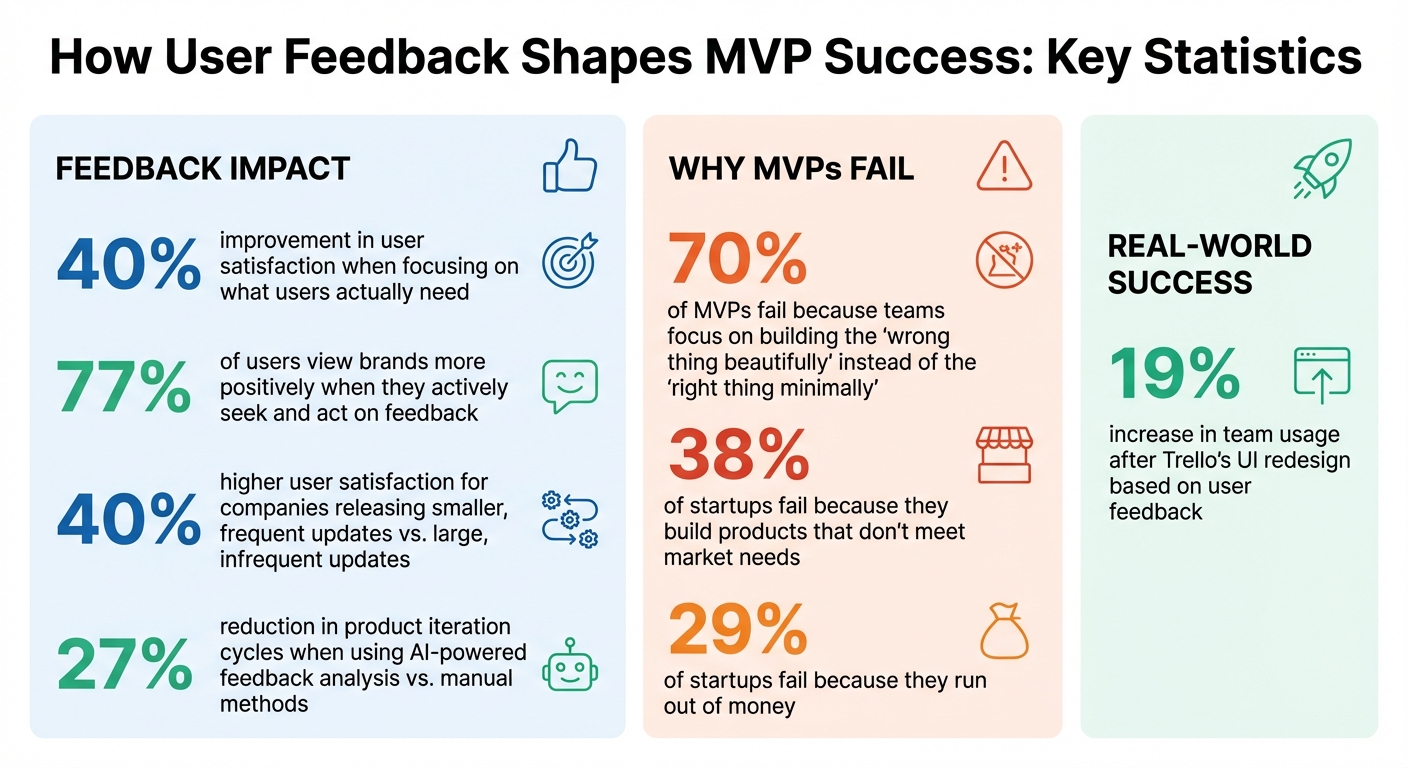
- Why feedback is key: It helps you focus on what users actually need, avoiding unnecessary features and improving satisfaction by 40%.
- Common pitfalls: Teams often build features no one wants, ignore usability issues, or mismanage resources.
- How to collect feedback: Use tools like surveys, ratings, and suggestions right after user actions to capture fresh insights.
- Acting on feedback: Prioritize recurring issues, validate problems, and focus on small, impactful updates.
- Keep users in the loop: Share progress with changelogs and updates to build trust and loyalty.
A feedback-driven process ensures your product evolves to meet market demands while saving time and money. Tools like Modu can help you collect, organize, and act on feedback efficiently, turning user insights into actionable improvements.
Hypothesis to Iteration: The MVP Development System That Works
Common Problems in MVP Iteration
MVP development can easily veer off course. Teams often encounter three major challenges that hinder their ability to create products users truly want: building unnecessary features, delivering poor user experiences, and overextending limited resources. Let’s break these down and explore how targeted feedback can help steer things in the right direction.
Building Features Users Don't Need
One of the costliest mistakes in MVP development is investing time and money into features no one actually wants. This happens when teams rely on untested assumptions rather than validated user needs.
Take feature creep, for example. Instagram’s early days as "Burbn" illustrate this perfectly. Initially, it was an overly complex app with social check-ins, gaming elements, and more. But after listening to users, the founders realized people only cared about photo sharing. By stripping everything else away, they created the streamlined app that became a global success [4].
Another common issue is overreacting to niche user feedback. Slack faced this when a vocal minority requested redundant ways to organize channels. Instead of building every feature they asked for, Slack identified the core need - better content organization - and introduced solutions like "pinned messages" and "channel sections" to address the issue for everyone [1].
"Your most unhappy customers are your greatest source of learning." - Antonio Chagoury, Technologist and Entrepreneur [3]
It’s important to dig deeper into user requests to uncover the real problem. For example, if users ask for "more buttons", the real issue might be poor navigation. Simply building what users ask for, without understanding the underlying need, wastes resources and time. Feedback is key to avoiding this trap.
Poor Usability and User Experience
A confusing or clunky MVP can leave a lasting negative impression. If users have a bad experience early on, they may never give your product a second chance, no matter how much you improve it later [6].
Rushed MVPs often result in UX debt, similar to technical debt. Ignoring usability in the beginning means you’ll spend more time and money fixing basic issues later, leaving little room for innovation [6].
Look for red flags like high dropout rates, users abandoning the product shortly after signing up, or core features being ignored. If your support team is overwhelmed with "how do I..." questions about basic functionality, it’s a sign something’s wrong. Trello experienced this firsthand. By analyzing click maps and user feedback, they discovered users struggled to find collaboration tools. A UI redesign to highlight sharing features led to a 19% increase in team usage in just one quarter [1].
The costs of poor usability add up quickly. Confused users mean higher customer support expenses, pulling funds away from product development [6].
Working with Limited Resources
Time, budget, and manpower are always limited, making prioritization critical. Yet, 70% of MVPs fail because teams focus on building the "wrong thing beautifully" instead of the "right thing minimally" [8].
The 90/90 Rule highlights this issue: the first 90% of features take 90% of the timeline, but the last 10% - polishing for usability - takes another 90%. This can drain resources and leave teams scrambling to finish [8].
Shortcuts, like hard coding or skipping error handling, may seem practical in the moment but create technical debt that becomes costly to address as the product scales. With 29% of startups failing because they run out of money, every dollar and hour must be spent wisely [8].
Misallocating resources compounds the problem. Teams often hire specialists too soon or invest in infrastructure for growth they haven’t achieved yet. Meanwhile, 38% of startups fail because they build products that don’t meet market needs, showing how critical it is to focus on the right features [9].
In larger organizations, rigid roadmaps booked months in advance can prevent teams from acting on user feedback. This lack of flexibility makes it harder to adapt and improve the product [7]. Strategic feedback can help teams prioritize what matters most when resources are tight.
Using User Feedback to Improve Your MVP
User feedback is a goldmine for refining your MVP. The key is to collect, organize, analyze, and act on it effectively to make meaningful improvements.
Collecting Feedback with Modu
To get a well-rounded view, combine both qualitative and quantitative feedback. Modu's module system makes this process seamless by offering tools for different types of insights:
- Suggestions modules: Allow users to propose features and vote on ideas.
- Rating modules: Use 1–5 scales and NPS tracking to measure satisfaction.
- Text modules: Gather detailed, private input like bug reports.
- Single or Multiple Choice modules: Run quick polls for targeted feedback.
Timing is everything - embed these modules or use popups right after users complete key actions. This ensures you capture their thoughts while the experience is still fresh. Fun fact: about 77% of users view brands more positively when they actively seek and act on feedback [10]. Collecting feedback isn’t just about improving your product - it also builds trust.
Deciding Which Feedback to Act On
Not all feedback is created equal. Focus on recurring themes that indicate systemic issues. Tools like the RICE framework (Reach, Impact, Confidence, Effort) or the Impact/Effort Matrix can help prioritize changes. Quick wins, such as fixing unclear button labels or tweaking error messages, often deliver high value with minimal effort.
"Without data, you're just another person with an opinion." - W. Edwards Deming, Economist [10]
When feedback seems to conflict, dig deeper to identify the shared pain point behind it. Modu’s AI clustering can group similar feedback into themes, making it easier to spot patterns and focus on what really matters.
Once you’ve identified key trends, validate them to ensure they’re actionable.
Finding Patterns in User Feedback
Categorize feedback into areas like onboarding, usability, pricing, bugs, and feature requests. Add metadata tags like urgency, issue type, or user persona to prioritize effectively. For example, if your most active users are struggling with a specific workflow, that’s a clear sign it needs immediate attention.
It’s also important to cross-check user feedback with behavioral data. If users say a feature is confusing, analytics or heatmaps can reveal where they’re getting stuck. This triangulation helps you focus on real problems rather than the loudest complaints.
Here’s a compelling stat: companies that release smaller, frequent updates based on user feedback see 40% higher user satisfaction compared to those sticking with large, infrequent updates [1]. By spotting patterns early and responding quickly, you can iterate faster and keep users engaged.
Once you’ve acted on feedback, let your users know. Update your roadmap, share progress through changelogs, or send out “You Asked, We Built” emails. Acknowledging their input builds loyalty and encourages ongoing participation, transforming feedback into a competitive edge.
Adding Feedback to Your Development Cycle
Feedback isn't just a way to spot challenges in your MVP - it’s a tool for ongoing development. Gathering feedback is step one, but the real value comes from using it to drive continuous improvements. High-performing teams follow a structured approach: Input (collect data), Process (analyze insights), Output (implement changes), and Feedback (apply learnings again) [4]. This cycle ensures feedback becomes a core part of decision-making instead of fading into the background.
One effective strategy is holding regular feedback triage meetings. In these sessions, product managers, designers, and developers come together to review, prioritize, and decide which feedback to act on during the next sprint [1]. This collaborative approach prevents teams from feeling overwhelmed and keeps priorities in check. Instead of massive updates, teams can focus on smaller, more frequent iterations to keep their product evolving.
Connecting Feedback to Your Roadmap
Your product roadmap should reflect what users need - not just what your team wants to build. Modu's Roadmap module helps organize tasks into four clear categories: Backlog (ideas under consideration), Planned (confirmed for future work), In Progress (currently being developed), and Shipped (completed and live). Each task can include a title, description, and even an ETA label like "Q2 2026" or "Soon."
This setup ensures alignment with your business goals. Not every user request should be implemented, especially if it doesn’t fit your long-term vision [1][2]. For example, prioritizing UI updates that directly address user needs can lead to noticeable increases in engagement [1].
You can manually add items to the roadmap or sync them directly from approved suggestions in the Suggestions module. Watching ideas move from "Backlog" to "Shipped" not only builds user trust but also reinforces transparency.
Sharing Updates with Changelogs
Communicating updates is just as important as making them [4]. Modu's Changelog module lets you share product changes in a visually engaging way, with options for cover images and YouTube embeds.
Highlight user-requested updates in changelog entries and share them via in-app notifications, email, or social media. Even small updates - like fixing a button label or improving an error message - deserve recognition. Announcing these "quick wins" shows users that their feedback matters and keeps them engaged.
Using Integrations to Speed Up Development
Manually transferring feedback slows everything down. Modu’s integrations with tools like Jira, Linear, Trello, ClickUp, and Slack eliminate these delays, letting teams implement changes faster and more efficiently.
For instance, if a high-priority suggestion comes in, you can instantly create a Jira issue, Linear task, or Trello card without leaving Modu. Slack integration ensures feedback is shared in real time, cutting out manual data entry and minimizing the risk of lost insights.
Take Slack’s early development as an example. When users requested better channel organization, the team avoided redundant features by identifying the real problem: content discovery. They introduced pinned messages and channel sections, simplifying the experience [1]. Integrations like these help teams go from identifying a problem to delivering a solution quickly.
Using AI tools can also streamline the process. Teams that leverage AI-powered feedback analysis reduce product iteration cycles by 27% compared to manual methods [1]. With Modu’s AI clustering (available on the Growth plan) and workflow integrations, you can turn raw feedback into actionable updates with minimal effort. These tools close the feedback loop, ensuring insights lead to real improvements without unnecessary delays.
Solving Feedback Management Problems with Modu
Managing feedback effectively is crucial for improving your MVP (Minimum Viable Product). While collecting feedback is relatively simple, the real challenge lies in organizing and using it without overwhelming your team. Feedback comes from all directions - support tickets, social media, in-app surveys, and emails. Without a clear system, important insights can slip through the cracks, conflicting requests can create confusion, and teams can waste valuable time debating priorities.
Managing Large Volumes of Feedback
When the amount of feedback becomes too large to handle manually, tools powered by AI can step in to help. Sentiment analysis and topic detection tools, for example, can process thousands of open-ended responses, identifying key sentiments and recurring themes almost instantly [1]. This eliminates the need to comb through every piece of feedback individually.
Modu offers an AI clustering feature (available on the Growth plan) that organizes feedback into clear categories like urgent bugs, feature requests, UX improvements, and performance issues [1][5]. These categories make the feedback easier to manage and ensure critical issues are addressed. You can even filter submissions by sentiment, topic, or user segment to focus on the most pressing or relevant feedback.
Once feedback is categorized, the next hurdle is dealing with conflicting user opinions.
Handling Conflicting User Requests
Feedback often pulls in different directions. One user might ask for a simpler interface, while another wants more customization options. To navigate this, frameworks like RICE can help you prioritize feedback objectively. By focusing on business goals and high-impact changes, you can ensure your roadmap remains on track [1][2][4].
Keeping Your Team Aligned
Feedback loses its value when it’s siloed across different teams. Designers might have access to one set of insights, developers to another, and product managers to yet another. Modu solves this by providing a centralized workspace where all stakeholders can access the same feedback data, reducing miscommunication and preventing duplicate efforts [4].
Regular feedback triage sessions also play a key role. These meetings, where product managers, designers, and developers collaboratively review and categorize feedback, ensure everyone is on the same page. They help teams decide which changes to prioritize for upcoming sprints, turning feedback into actionable steps without unnecessary conflict [1].
Conclusion
Listening to user feedback is like having a roadmap that keeps your MVP aligned with what the market truly wants [1]. Without it, you risk making decisions based on guesswork, which can waste both time and resources. Regular updates informed by feedback can significantly improve user satisfaction [1].
The key to a successful product lies in how effectively teams gather, process, and act on feedback [5]. When handled systematically, feedback transforms into actionable improvements, helping you focus on what users actually need instead of chasing unnecessary features.
This is where Modu steps in to simplify the process. It centralizes feedback collection, uses AI to group and organize large volumes of input, and ties it all directly to your roadmap and changelog. With integrations for tools like Jira, Linear, and Slack, Modu ensures feedback integrates smoothly into your workflow, shortening iteration cycles and keeping your team on the same page.
FAQs
How do I know which user feedback to prioritize?
Focus on gathering feedback that comes in regularly, ties directly to your product's objectives, and tackles key user pain points. Pay special attention to repeated concerns and feature requests that influence user satisfaction and contribute to your product’s growth. Tools like Modu can simplify the process by helping you collect, analyze, and spot patterns in feedback, ensuring you act on insights that truly make a difference. Use this feedback to make meaningful changes that align with your product’s vision and drive progress.
What’s the fastest way to collect feedback inside an MVP?
If you're looking to quickly gather feedback for your Minimum Viable Product (MVP), in-app surveys and microsurveys are your best bet. These tools let you collect focused insights directly from users while they're actively engaging with your product, offering real-time feedback without disrupting their experience.
To dig even deeper, pair these surveys with user interviews and usability tests. This combination helps pinpoint specific pain points, giving you actionable insights to refine and improve your MVP right away.
How often should I ship MVP updates based on feedback?
The timing of MVP updates largely hinges on your development cycle and the specific needs of your product. However, adopting an iterative approach works best. Rolling out updates every few weeks or within a couple of months allows you to integrate user feedback, test changes, and focus on what matters most to your audience. Regular updates not only keep users interested but also encourage continuous input, ensuring each release aligns with user expectations and contributes to achieving product-market fit and long-term growth.