
User Segmentation for Persona Creation
User Segmentation for Persona Creation
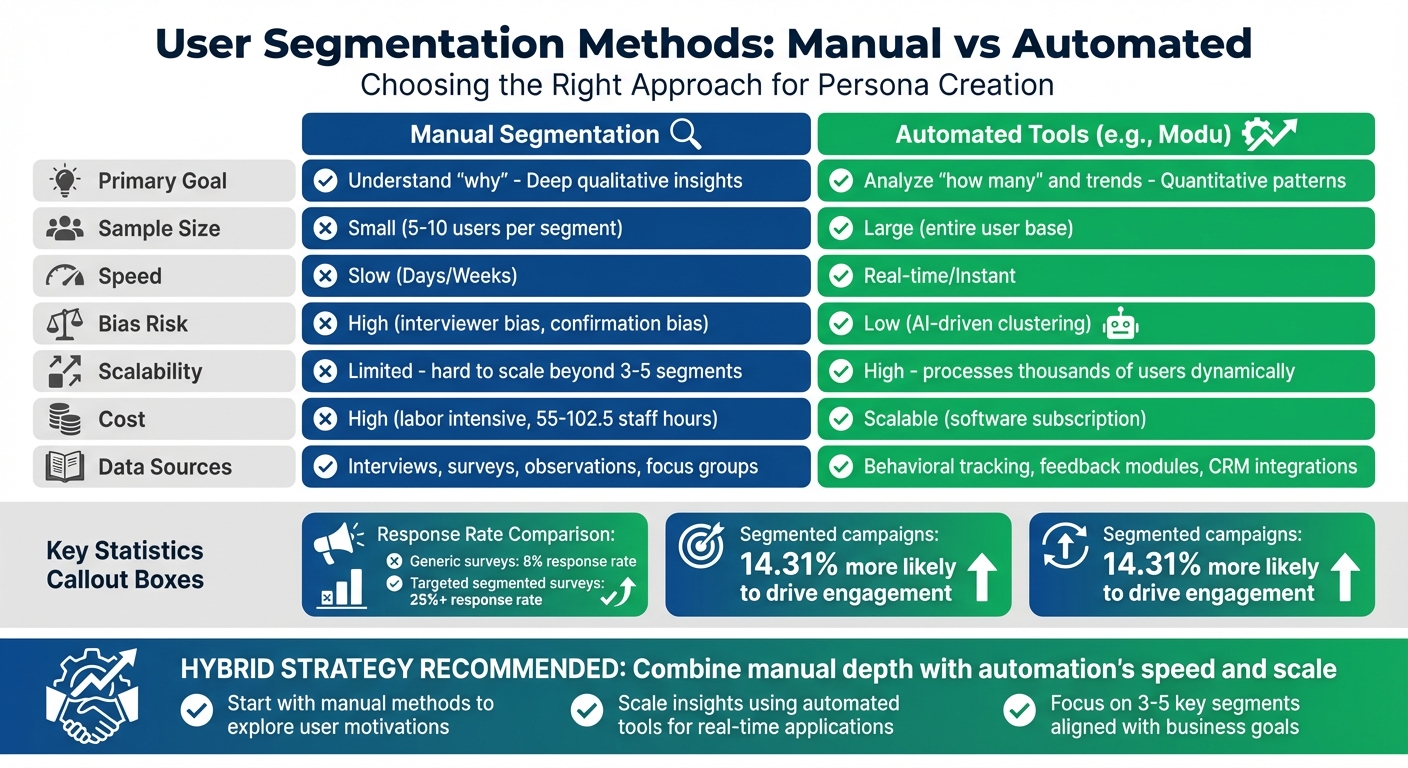
User segmentation refines how businesses understand and target customers by grouping them based on demographics, behaviors, and needs. This process ensures personalized engagement, leading to better response rates and actionable insights. Here's what you need to know:
- Manual Segmentation: Relies on human analysis of user data (e.g., interviews, surveys). It's detailed but time-consuming and hard to scale.
- Automated Tools (e.g., Modu): Use real-time data and AI to dynamically group users. They are faster, scalable, and reduce human error.
- Key Benefits: Higher survey response rates (25%+ for targeted surveys vs. 8% for generic ones), better targeting, and real-time updates.
- Best Approach: A hybrid strategy combines manual depth with automation's speed and scale.
Quick Comparison:
| Feature | Manual Segmentation | Automated Tools (e.g., Modu) |
|---|---|---|
| Goal | Understand "why" | Analyze "how many" and trends |
| Sample Size | Small (5–10 users/segment) | Large (entire user base) |
| Speed | Slow | Real-time |
| Bias Risk | High | Low (AI-driven) |
| Scalability | Limited | High |
For the best results, start with manual methods to explore user motivations, then scale insights using automated tools for broader, real-time applications.
Persona Development for Market Segmentation Segments
1. Manual Segmentation Methods
Manual segmentation involves grouping users based on shared traits, behaviors, and needs through human analysis. This process relies on data collection, observation, and user interviews to create personas. Instead of focusing solely on user actions, this method digs deeper into why users behave the way they do.
Data Sources
This method combines both quantitative and qualitative data:
- Quantitative data includes demographics (age, gender, income, education), firmographics (industry, company size, revenue), and behavioral metrics such as session duration or feature usage [5][3][2].
- Qualitative data adds depth through user interviews, focus groups, and observational studies, where researchers observe users interacting with products in real-world settings [5].
- Psychographic data - covering values, interests, lifestyle choices, and pain points - provides insights into user motivations that numbers alone can’t reveal [5][4].
Before gathering new data, it’s wise to review what’s already available. CRM systems often contain valuable details like plan types, account age, and support ticket history, which can inform segmentation efforts right away [2]. Leveraging existing data can save time and avoid redundant research.
Accuracy
While manual segmentation provides rich insights, it’s not immune to human error. Biases such as confirmation bias, stereotyping, and anchoring can creep into the process [6]. To minimize this, teams can conduct "blind" data analysis sessions, where members independently review data before discussing their findings [6]. Cross-checking manual observations with quantitative analytics or usability testing further ensures that personas reflect actual user behaviors [5][6].
Scalability
Manual segmentation offers depth but struggles when scaling. Interviewing 5–7 users per segment can yield valuable insights, but expanding this approach to dozens of segments quickly becomes impractical [2]. For this reason, focusing on 3–5 key segments tied to specific business goals - like reducing churn or improving user activation - is more effective [2]. Over-segmenting can dilute insights, creating noise rather than actionable data. This limitation makes manual segmentation ideal for smaller, high-priority projects.
Practical Applications
Manual segmentation is particularly effective for crafting personalized user experiences. Examples include:
- Designing onboarding flows tailored to welcome survey responses.
- Offering simplified interfaces for beginners while showcasing advanced features to experienced users.
- Selecting targeted participants for beta testing.
- Identifying disengaged users for re-engagement campaigns [4][3][1].
| Segment Type | Practical Application | Feedback Tool/Method |
|---|---|---|
| Trial Users | Identify conversion blockers | Day 3-4 "First Friction" Survey [2] |
| Power Users | Deep product insights/Beta testing | Feature-specific feedback surveys [2] |
| Inactive Users | Churn prevention/Re-engagement | "Win-back" email surveys [2] |
| New Users | Activation/Onboarding improvement | Post-milestone CSAT surveys [2] |
| Promoters | Word-of-mouth marketing | Referral or review requests [4] |
While manual segmentation excels at delivering detailed insights, its scalability challenges set it apart from automated methods, which are better suited for real-time, large-scale applications.
2. Automated Segmentation Tools (e.g., Modu)

Automated segmentation tools are game-changers when it comes to managing large-scale data. These platforms can analyze data in real time, automatically updating user segments as new information comes in. Unlike manual methods that depend on interviews or observations, tools like Modu use behavioral patterns, user feedback, and interaction data to group users dynamically. Modu, for example, collects feedback through modules such as ratings, polls, suggestions, and open-ended responses, helping you identify patterns across different user segments. This approach lays the foundation for discussing their data sources, accuracy, scalability, and practical uses.
Data Sources
Automated tools pull data from a variety of sources to build detailed user profiles. For instance, technographic data - like device type or operating system - can help pinpoint the best engagement channels, such as in-app surveys for mobile users or email outreach for desktop users. These tools also integrate seamlessly with platforms like Salesforce, HubSpot, Zendesk, and Intercom, enriching user profiles with CRM, helpdesk, and transactional data. Modu specifically connects with tools like Slack, Jira, Trello, Linear, and ClickUp, allowing feedback data to sync with ongoing workflows. This means user segments are updated automatically based on factors like support tickets, project progress, or payment history.
Accuracy
One of the biggest advantages of automated segmentation is its ability to eliminate human bias. Using AI-driven clustering, these tools can analyze patterns across an entire user base, providing a more objective view than manual methods, which often rely on small sample sizes and are prone to confirmation bias. By focusing on actual user behavior, automated targeting becomes more precise, leading to better response rates and more reliable insights [2].
Scalability
Growth is no problem for automated tools - they are built to scale. These platforms can update user segments dynamically as data grows, automatically shifting users between groups based on real-time behavior. For example, users might move from a "Trial" group to a "Power User" group as their engagement increases. Features like auto-capture track all user events without requiring manual tagging, creating a comprehensive history of interactions. This scalability directly impacts marketing success, as segmented campaigns are 14.31% more likely to drive engagement compared to non-segmented efforts [7].
Practical Applications
Automated segmentation has practical uses that can transform user experiences. For example, it enables personalized onboarding by triggering flows tailored to specific user personas identified during sign-up. Teams can refine semi-fictional personas by updating them with real-world data, such as purchasing habits or feature preferences gathered through feedback modules. Modu’s AI clustering feature (available with their Growth plan) groups similar feedback responses automatically, helping teams uncover persona-specific pain points and priorities without manual effort. Additionally, dynamic triggers can send surveys at key moments - like after onboarding or at usage milestones - ensuring feedback is collected when it’s most relevant [2].
| Feature | Manual Segmentation | Automated Tools (e.g., Modu) |
|---|---|---|
| Primary Goal | Deep qualitative "Why" | Quantitative "How many" & Trends |
| Sample Size | Small (5–10 per segment) | Large (Entire user base) |
| Speed | Slow (Days/Weeks) | Instant/Real-time |
| Bias Risk | High (Interviewer bias) | Low (AI-driven clustering) |
| Cost | High (Labor intensive) | Scalable (Software subscription) |
Advantages and Disadvantages
When it comes to manual versus automated segmentation, the decision isn't about declaring one superior to the other - it’s about recognizing the strengths and weaknesses each brings to the table.
Manual segmentation excels at uncovering deep insights into user motivations. It allows for a nuanced understanding of behaviors through interviews, surveys, and observations. However, this process is time-consuming and prone to human error. It also struggles with scalability, especially as user behaviors shift over time, making the data less relevant as it ages.
On the other hand, automated tools like Modu address many of these challenges. These tools can analyze massive datasets in real time, providing insights into trends and patterns across thousands of interactions. Unlike manual methods, which rely on smaller data samples, automation ensures higher response rates and delivers more comprehensive results. That said, automated tools might lack the rich, qualitative detail that comes from one-on-one conversations.
One standout feature of automation is its ability to eliminate "signal dilution." This occurs when average scores obscure the differences between user groups, leading to unclear conclusions. For example, Modu’s AI clustering feature (part of the $59/month Growth plan) automatically groups similar feedback, revealing patterns unique to specific personas - all without requiring manual input.
For the best results, a hybrid approach is often the way to go. Begin with manual methods to gain deep, foundational insights into user motivations, and then use automated tools to validate and expand on those findings in real time. Automated platforms also shine in capturing timely feedback through dynamic triggers, such as surveys sent immediately after key user actions. This combination ensures a comprehensive and actionable segmentation strategy.
| Dimension | Manual Segmentation | Automated Tools (e.g., Modu) |
|---|---|---|
| Data Sources | Interviews, observations, surveys | Behavioral tracking, feedback modules, CRM integrations |
| Accuracy | Rich qualitative insights | AI-driven patterns; eliminates signal dilution[2] |
| Scalability | Limited; requires significant effort[2] | High; processes thousands of users in real time[2] |
| Practical Applications | Persona discovery, understanding motivations | Dynamic segmentation, triggered surveys, trend analysis |
Conclusion
Manual segmentation works well for small, focused teams looking to dig into the "why" behind user behavior. If your team consists of just 1–5 members and aims to understand user motivations, tools like qualitative interviews and surveys can provide the depth you need. But keep in mind, creating personas manually takes time - anywhere from 55 to 102.5 staff hours - and this approach often results in static profiles that can quickly become outdated[8].
On the other hand, automated segmentation shines when you're dealing with large datasets - like millions of users - or if your team doesn’t have the capacity for time-intensive manual research. Tools like Modu analyze behavioral patterns in real time, keeping personas up-to-date. Plus, automated surveys often perform better, with targeted surveys achieving response rates above 25%, compared to just 8% for generic ones[2]. This difference helps separate meaningful insights from background noise.
A hybrid approach combines the best of both worlds: the rich detail from manual methods and the scalability of automation. Tanya Negi, Content Specialist at Zonka Feedback, captures this perfectly:
"The real value isn't in the grouping. It's in sending the right survey to the right user at the right moment."[2]
To get started, focus on 3–5 segments that align with specific business goals, like reducing churn or improving onboarding. Make sure each segment has at least 100+ responses before drawing any conclusions[2][4].
FAQs
How do I choose my first 3–5 user segments?
To connect effectively, start by pinpointing the key traits of your audience. This includes demographics like age, gender, and location, as well as psychographics such as interests and values. Dive deeper by analyzing behavioral data - look at how users interact with your product or which features they prefer.
Pay close attention to your most engaged users. What sets them apart? Use this insight to refine your audience segments. And don’t let these groups become outdated - regularly update them based on feedback and analytics. Keeping these segments current helps you maintain stronger engagement and improve retention over time.
When should I switch from manual to automated segmentation?
When your user base grows too large or becomes too intricate for manual segmentation, it's time to consider automated methods. Automation leverages analytics and AI to form precise user groups, saving time and improving accuracy. If you're juggling multiple data sources - like surveys, in-app feedback, or social media - automation combines these inputs into clear, actionable insights. This approach not only allows for real-time updates and improved personalization but also frees up your team to focus on more strategic initiatives.
How do I keep personas up to date as users change?
To ensure personas stay relevant, make it a habit to gather and analyze user feedback and behavioral data regularly. Use tools like surveys, interviews, and feedback platforms to keep track of changing user preferences and needs. For example, platforms such as Modu allow you to collect continuous input through features like suggestion boards, polls, and open-ended response options. Revisiting and updating personas periodically helps capture shifts in user motivations, behaviors, and demographics, making them a reliable guide for decision-making and design.